9 pointers to make pop-ups an effective lead generation tool

This is a guest post by Abbey Claire Dela Cruz, Marketing Manager at Poptin.

Pop-ups vary in size and style. While creating them is incredibly easy, how you execute them makes all the difference. If done right, pop-ups can help you achieve great results with your lead generation strategies. They can engage with your target audience and usher them to your funnel until they’re ready to give you their email addresses.

Here are some of the most effective hacks to help you make pop-ups an effective lead generation tool.

1. Personalize your message

Want a surefire way to grab the attention of your visitors? Try personalizing your pop-ups. There are many different advanced targeting options that enable you to show a specific pop-up message to a certain audience, like for first-time visitors, or people from a specific country, traffic source, web page, and more.

2. Offer a lead magnet they can’t say no to

The value of your offer can make or break the effectiveness of your conversion funnel. Most successful businesses rely on lead magnets in exchange for visitors’ contact information. And most premium content that acts as a lead magnet on pop-ups is downloadable ebooks, free shipping, webinar slots, discounts, and coupon codes, among many other enticing offerings that can encourage sign-ups.

3. Make it easy for visitors to exit your pop-up

Without a clear exit method, your bounce rate will continue to spike, and next thing you know, you’re losing potential subscribers left and right.

4. Reduce friction and distractions

When creating your own pop-up, design it in a way that visitors can simply input their contact information with ease. If you include a lot of unnecessary fields, you can end up losing them along the way.

If you think every element of your design is important, run an A/B test to see how you can best optimize it for better performance and results.

5. Timing and location make all the difference

Pop-ups, if implemented correctly, can drive the best user browsing experience. However, if you do it wrong, expect to have a low conversion rate.

To overcome this, study your audience’s behavior and come up with a list of triggers to help you execute your pop-ups at the right time. Side by side with timing is the location. There are messages that you can just put on slide-ins, and then there are those that are most effective on a full-screen overlay.

6. Invest in visual elements

As the saying goes, a picture is worth a thousand words. A high-resolution image that encapsulates what your lead magnet is about will let visitors know in an instant what you want to offer them in return. Visual elements also allow them to perceive your brand’s tone and message without distraction.

Just make sure that your sign-up button is emphasized, and the call to action is as clear as day.

7. Show scarcity

According to the scarcity principle in social psychology, humans tend to value scarce things overabundant things.

With this in mind, emphasizing how limited your slots are can drive better results than just inviting them to a certain event. Moreover, inviting them to sign up to get sneak-peek updates on an upcoming sale can equally work in your favor.

8. Add urgency with a countdown timer

Potential clients don’t want to miss something they know they won’t have access to in the future. With this in mind, adding a sense of urgency through a countdown timer can help achieve faster conversions when you’re trying to gather leads.

9. Include social proof

Social proofs are considered a powerful persuasion technique to gain leads. They’re used to establish your credibility and reputation as a leader in the industry.

They are more prominent on websites and landing pages, but they can be also effective on pop-ups. For example, if you’re promoting an online course, include a nice testimonial from a previous student to encourage potential enrollees to also subscribe.

Start creating pop-ups with Poptin for Zoho CRM and learn to integrate your leads directly into your Zoho CRM account.


Work smarter by adding new capabilities to Zoho CRM with business solutions from Zoho Marketplace.

Explore Zoho Marketplace

The post 9 pointers to make pop-ups an effective lead generation tool appeared first on Zoho Blog.

Net Universe offers all Zoho subscritpions and consultant services with worldwide Delivery Services.
Send us an email to [email protected] for more information or visit https://www.netuniversecorp.com/zoho.

Zoho Subscriptions and Zoho’s Subscriptions

Zoho Subscriptions celebrates 6 years of serving subscription businessesZoho Subscriptions turned 6 recently, but we’ve been offering subscription-based products for much longer than that. So we thought this would be a good time to look back at how Zoho Subscriptions was born and take a moment to thank our customers for sticking with us.

Pioneering the model

Zoho has been offering subscription-based products for the better part of two decades now, starting when we first launched Zoho CRM in 2005.

The idea behind it was simple: offer customers a flexible way to pay for quality products, without making them feel like they’re tied down to a long-term contract.

Zoho Pioneers the Subscription Model

As Zoho branched out and offered more products, the subscription model proved to be a success. We found ourselves one of very few companies offering cloud services with a broad product portfolio and an entirely subscription-based model.

As our volume of customers grew, we came to realize that our existing method of managing customers’ subscriptions couldn’t keep up. We needed a tool that could handle the complexities of recurring billing and subscription management at scale. Something that could cope with the varied pricing models of our multiple products, and something that could play well with our existing systems. 

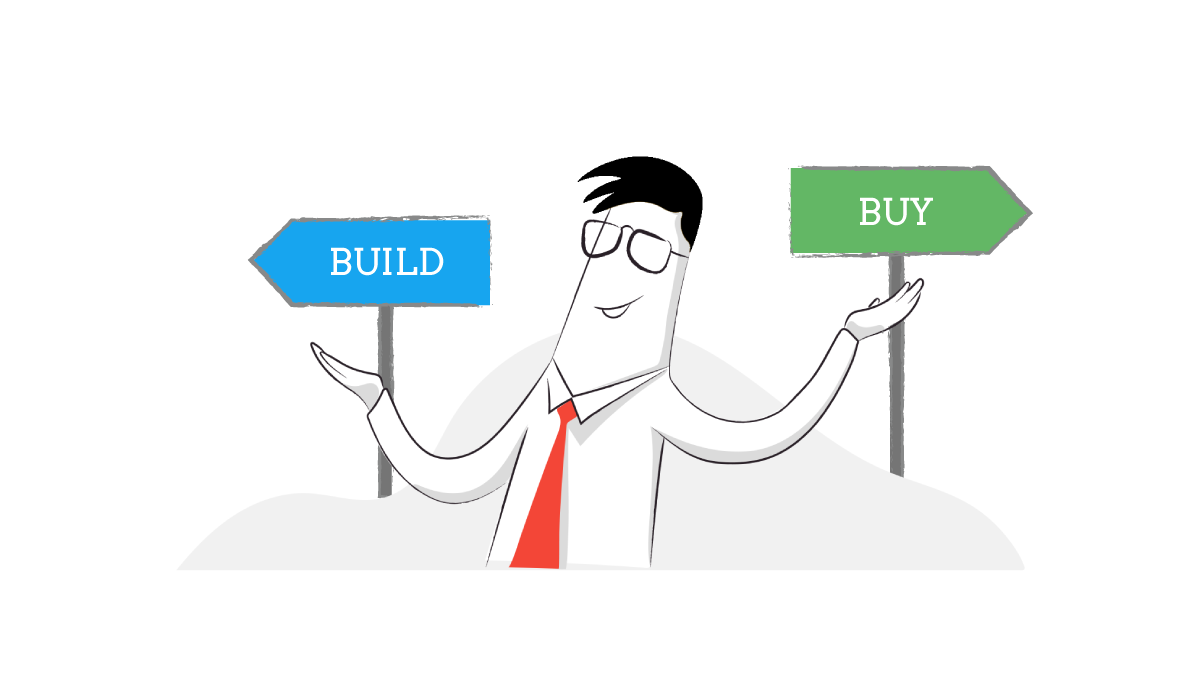
Build vs. buy

It’s a classic question that every organization faces at some point. Do you set aside the resources to build your own solution, including a budget, work hours, and a dedicated team? Or do you skip the hassle and buy a pre-made solution instead?

Zoho Subscriptions solves Build vs Buy There’s not always a simple answer to that question. If you choose to build, you run the risk of spending a lot of resources on a system that couldn’t deliver. If you choose to buy, you pay someone else to do the work of creating your solution…but the burden is on you to pick one that does what you need it to do.

At Zoho, we’re committed to solving this problem for both sides. That’s why we don’t make anything we don’t want to use ourselves. We use our own products, like Zoho Books for our accounting, Zoho People for HR management, and Zoho Cliq for internal communications–just to name a few.

So, following our usual strategy, we decided to build our own subscription management system. It just so happened that we had a decade’s worth of experience in the subscription industry to help us do so.

By 2013, Zoho was offering more than 20 products with a subscription-based pricing model. This gave us real-world experience of what was needed in a subscription management tool. We were all too familiar with pain points like add-on management, tier-based pricing, and consolidated reporting, and we wanted to solve them–for ourselves and for other businesses.

Our (and your) very own recurring billing tool

In 2014, we put that experience to good use and launched Zoho Subscriptions to help other businesses adopt a subscription-based model for themselves. At that time, the subscription industry boom was right around the corner and major players like Adobe were switching to a subscription-based model.

We built Zoho Subscriptions to be scalable, from its set-and-forget simplicity to its open REST APIs. We wanted it to work seamlessly with our existing upstream systems like Zoho CRM and downstream systems like Zoho Books, so this functionality was baked in. We didn’t stop there though, we wanted Zoho Subscriptions to work out of the box for other businesses too, so we made sure it came with prebuilt integrations that make it easy for you to connect with payment gateways and other integrations to communicate with your existing systems.

This means smaller business without dedicated development teams can configure Zoho Subscriptions with a no-code approach and larger business with their own resources can use Zoho Subscriptions’ APIs to integrate tightly with their own applications.

All of this customization came out of our realization that every business needs to make their subscription management software truly their own, whether they build or buy. When you can make your tools work exactly the way you need them to, build vs. buy doesn’t have to be a tough decision. Zoho Subscriptions can help you out.

Our commitment to customers

If you’ve been using Zoho Subscriptions, thank you! We wouldn’t be where we are right now without your support, and we’re committed to continuing to provide you with more great features that scale. Our team is hard at work to bring you the best subscription management experience, so you can look forward to major updates in the coming year.

As your business grows, Zoho Subscriptions will be right there with you.

We’d love to hear from you! Drop a comment below and let us know what you think about recurring billing and Zoho Subscriptions.

Net Universe offers all Zoho subscritpions and consultant services with worldwide Delivery Services.
Send us an email to [email protected] for more information or visit https://www.netuniversecorp.com/zoho.

Introducing Zia, the smart HR assistant

Introducing-Zia-in-Zoho-People


Employees often know when there are easier ways to be performing their routine tasks. Not only does manual work drain morale, but it also distracts employees from their other important activities.

Introducing-Zia-in-Zoho-People

Understanding these concerns, we have introduced Zoho’s AI chatbot, Zia, in Zoho People to help your employees automate their everyday tasks. Here’s how Zia can be useful for your employees:

  • Performs the complete leave application process on behalf of your employees. Your employees just have to input the date, leave type, and reason.

  • Fetches the list of upcoming holidays and leave reports.

  • Provides a complete list of all your pending tasks within Zoho People.

  • Raises requests and inquiries for employees through the case management module.

  • Helps employees “Check-in” and “Check-out” for the day.

Read more about how Zia can be useful to your employees in our HR Knowledge Hive.

Net Universe offers all Zoho subscritpions and consultant services with worldwide Delivery Services.
Send us an email to [email protected] for more information or visit https://www.netuniversecorp.com/zoho.
Think Twice: 5 tips to protect yourself from email spam

James is a shopaholic. Whenever James receives an email with a discount code or a deal, he clicks the links to take advantage of that offer without any second thoughts. He doesn’t hesitate to drop his email address in the comment boxes of his favourite brand or influencer’s social media page, in the hopes of winning a giveaway contest. He happily explores emails from unknown senders. After one of the offer codes he was waiting for ended up in the spam folder of his mailbox, he disabled all spam filters in his email settings so that he won’t miss any future sale.

One time, James received an email with a coupon for his favourite phone attached as a PDF file. Despite the warnings from his email service provider that the attachment could be malicious, he downloaded the coupon. And that coupon ended up being a macro virus. The virus disabled his computer, stole all the information he had including sensitive financial data. Now, James has to handle his loss of information, security, and privacy, along with his disabled device.

James is just one among many affected by spam’s spoof and phishing attacks but there are many things you can do differently to prevent yourself from becoming a victim like James. We already discussed in detail about spam and its types. In this blog, let’s look at a few tips to help avoid email spam.

Never give out your email address in a public forum

No matter how tempting an offer is, it’s best to avoid giving out your email address in any public forum. You may think sharing it on the page or profile of a trusted brand is safe, but many spammers use crawlers to scan random pages and extract email addresses for their database. Due to this, you will likely get spam emails and your email address could even serve as a front for future spoof attacks on others by spammers. So, it’s best to share your email address with the utmost caution.

Do not interact with spam emails

Most of the time, spammers get email addresses by randomly generating them—brute force method. They have no way of knowing the validity of an email address unless the recipient interacts with the email (which includes replying to an email, downloading embedded files or images, and clicking on the attached links). One common deceptive technique used by spammers to trick the recipient into interacting is by providing an “Unsubscribe” link. While authentic marketers do use this option appropriately, spammers use it as a tool to confirm the deliverability of your email address. This results in you getting “subscribed” to the spammer’s database instead of unsubscribing. Thus, it’s safest to leave a spam email alone and not interact with it at all except while marking it as spam. The next time you go out on vacation, auto-respond only to your contacts.

Know how email works

Understanding how email works and knowing common features—such as Preview sender, Envelope sender, SPF, DKIM, and DMARC—creates cognizance for you to be alert. By checking the header of any email you receive, you can track its trail and spot if an email is spoofed or authentic.

Avoid using public Wi-Fi

While public/free Wi-Fi networks seem like an optimal way to access internet, it can also be a bait. One of the most common threats on these networks is a Man-in-the-Middle (MitM) attack, which is a form of eavesdropping. Using this, a spammer can extract your email address, contact list, and other sensitive information, leaving your data compromised. To avoid this, it’s better to only use mobile internet and trusted Wi-Fi connections.

Report spam emails

It is always good to report any spam email you receive to your email service provider (ESP). Reporting spam or marking an email as spam helps your ESP track the spammer’s IP address and block any further email from them. This will prevent illegitimate emails from reaching your inbox.

Following these tips can help you prevent spam and cyber attacks. However, it is equally important to be able to protect you if in case a spammer breaks your firewall. Some of the precautionary measures include not storing passwords on your hard drive and rather go with options like Zoho Vault, changing your passwords periodically, not using the same keyword or phrases in all your passwords, using a good antivirus program, and keeping your OS updated.

While consciously protecting yourself from spam is crucial, we at Zoho Mail also go the extra mile to provide you with the industry-standard spam filters and preventive techniques. We’ll discuss how you can best use these Zoho Mail features in the next blog. Until then, stay informed and stay safe.


Yamine Durai


Yamine Durai, a part of Zoho Mail’s marketing team, is a tech enthusiast.
But if you spot her away from office hours, you will probably find her reading a history book while honing her oratory skills.

Net Universe offers all Zoho subscritpions and consultant services with worldwide Delivery Services.
Send us an email to [email protected] for more information or visit https://www.netuniversecorp.com/zoho.

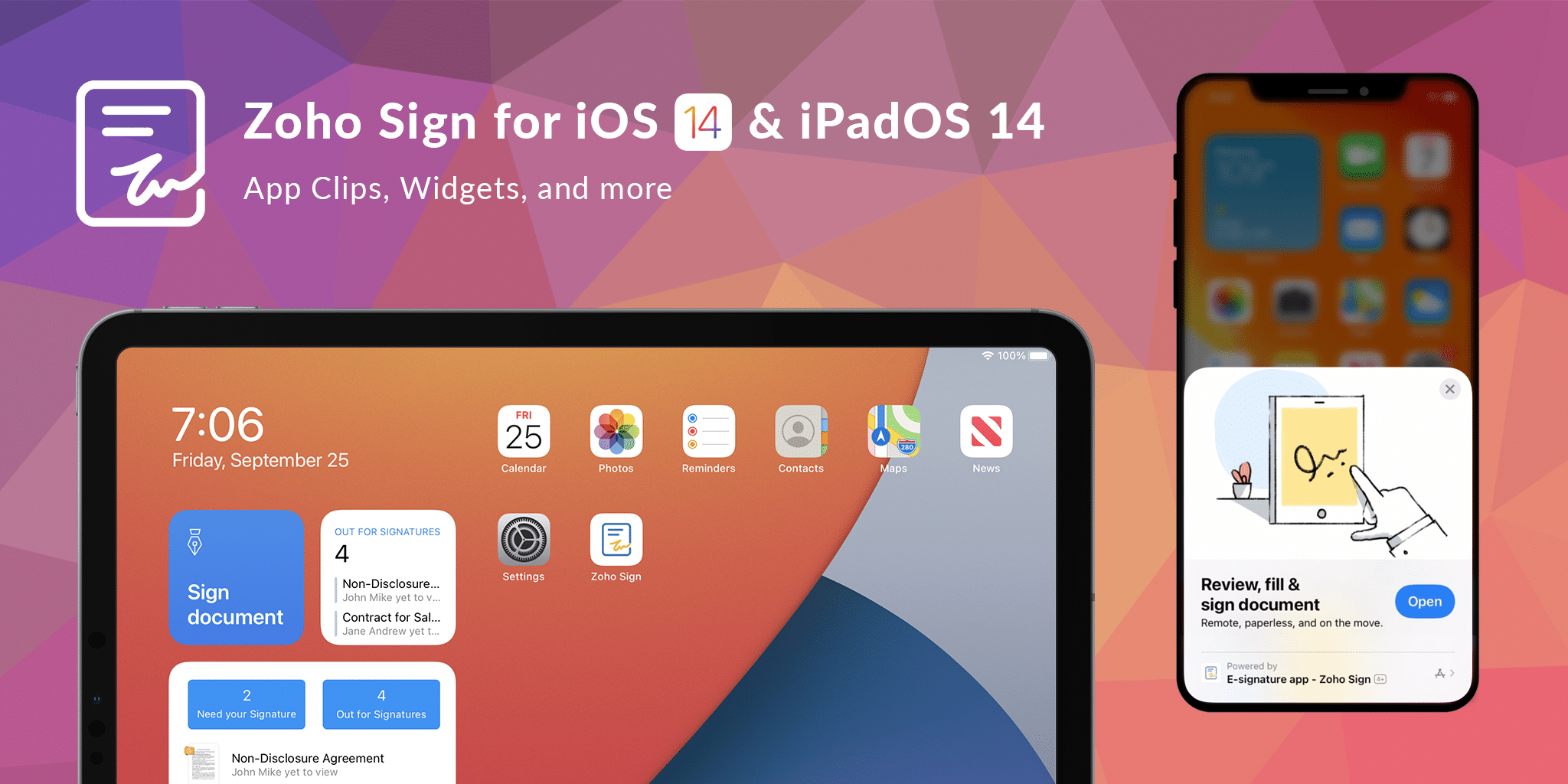
Zoho Sign for iOS 14 and iPadOS 14

Zoho Sign for iOS 14 and iPadOS 14

As we move closer to the holiday season, Apple has shown no signs of slowing down, despite 2020 being a turbulent year. They didn’t stop after announcing major updates to their software with iOS 14, iPadOS 14, and macOS Big Sur. They’re also launching a new generation of gadgets, accompanied by an all-new services bundle.

These introduce several improvements to the iOS user interface that once again look to fundamentally change the way users interact with mobile apps. Here’s a quick round-up of the enhancements available to users when they upgrade their operating system and the Zoho Sign app to the latest updates with iOS 14 and iPadOS 14.

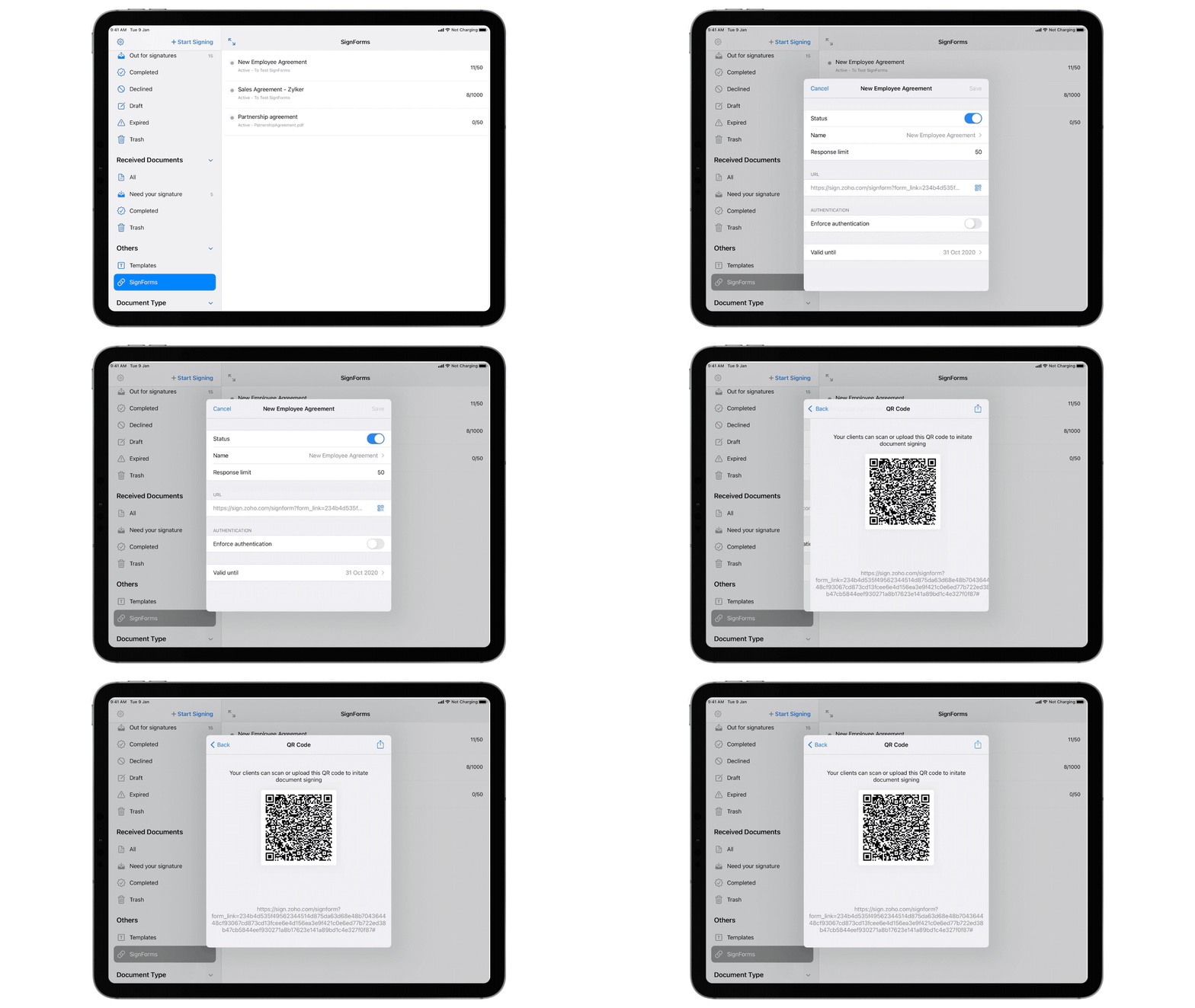
SignForms
You can now access and manage your SignForms on the Zoho Sign mobile app. From there, you can enable or disable SignForms, change names, modify response limits, enforce authentication, share public URLs, and monitor responses.

SignForms

App Clips
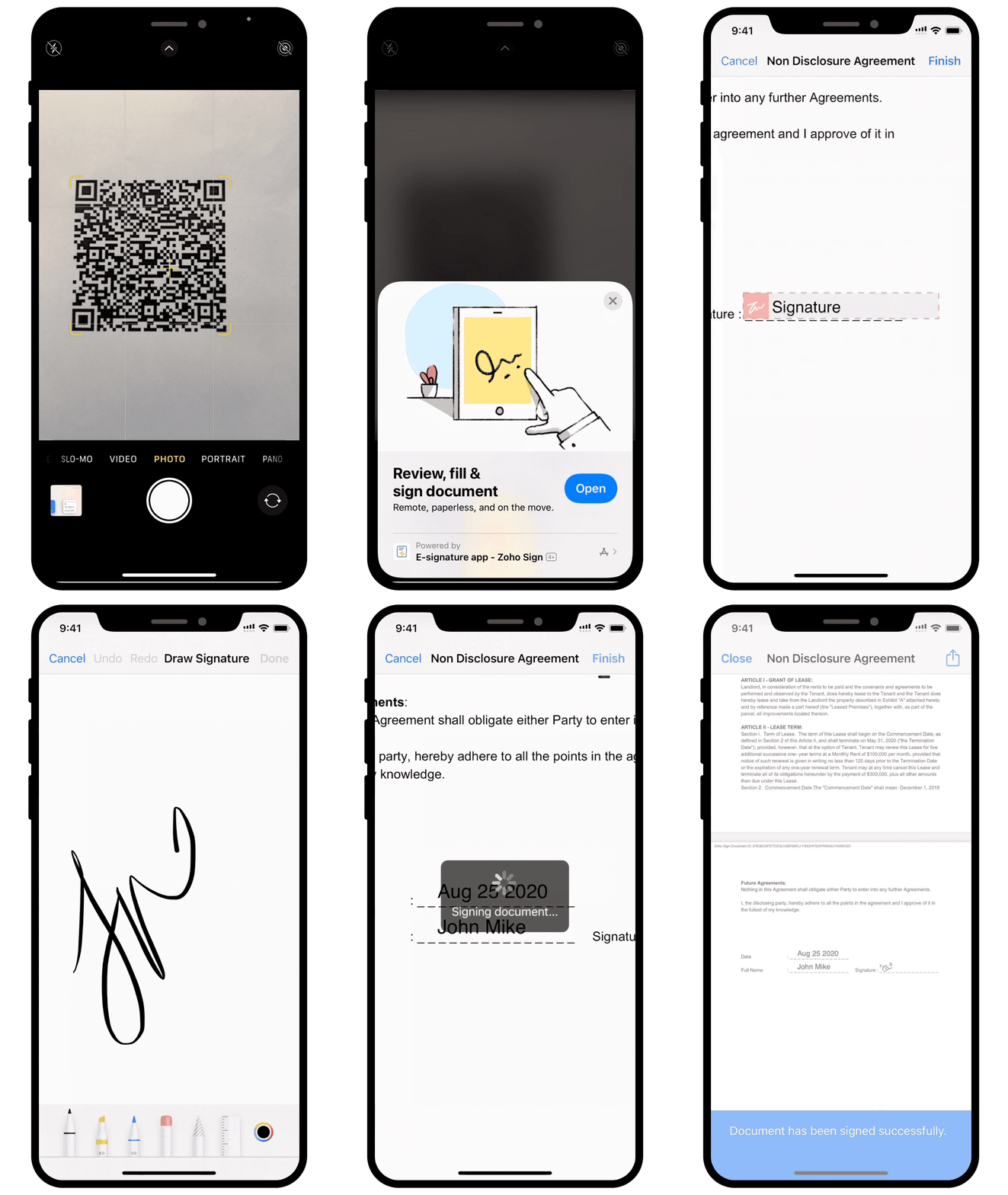
With the help of App Clips, any iOS 14 user can access and sign documents digitally via SignForms, even if they don’t have the Zoho Sign app. This lets you share policies, agreements, and forms via NFC tags, QR codes, iMessage, and other methods. After that, the recipient can quickly sign them via a lightweight workflow powered by the Zoho Sign app directly from the App Store.

For example, let’s say you’re hosting a PR event with an open invitation to all influencers, journalists, and analysts. With App Clips, it’s easy to incorporate the registration form and any associated paperwork directly into your promotions. You can simply include the QR code for the event registration SignForm in your collateral, both print and digital. Interested parties can scan it on their phone to fill out the form and sign the accompanying documents. This makes e-signing documents quick and accessible. It also offers users a glimpse of what they can do with the Zoho Sign app, without needing to install it from the App Store.

App Clips

Widgets
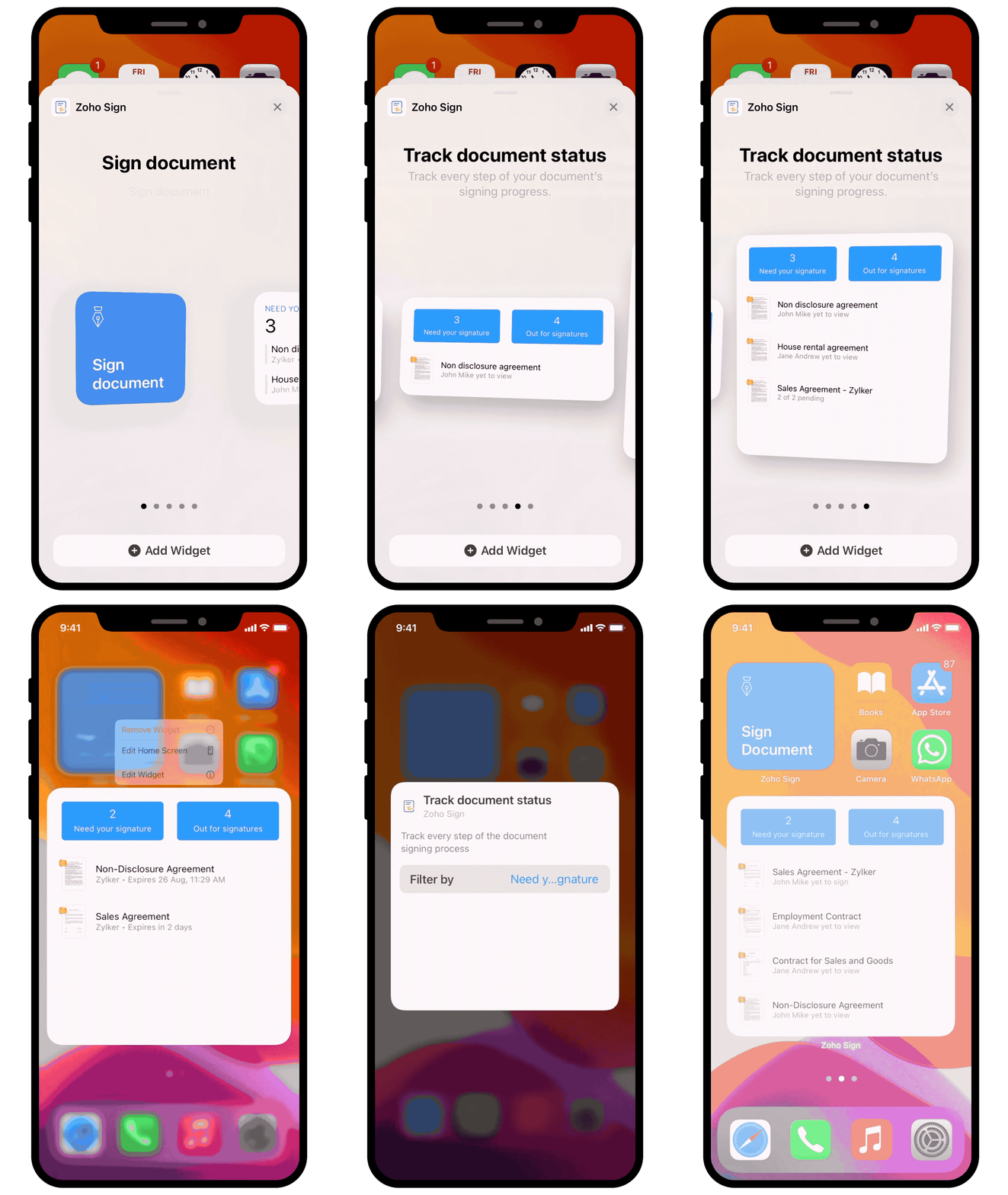
Apple is finally treating users to widgets on their home screen in iOS 14. Of course, we wanted to let Zoho Sign users make the most of them. You can now track and manage your paperwork with a tap of your fingers by adding Zoho Sign widgets to your home screen. These widgets help you perform common actions, such as signing documents, sending documents for signatures, and tracking document progress, all without having to open the Zoho Sign app.

Widgets

Scribble with Apple Pencil
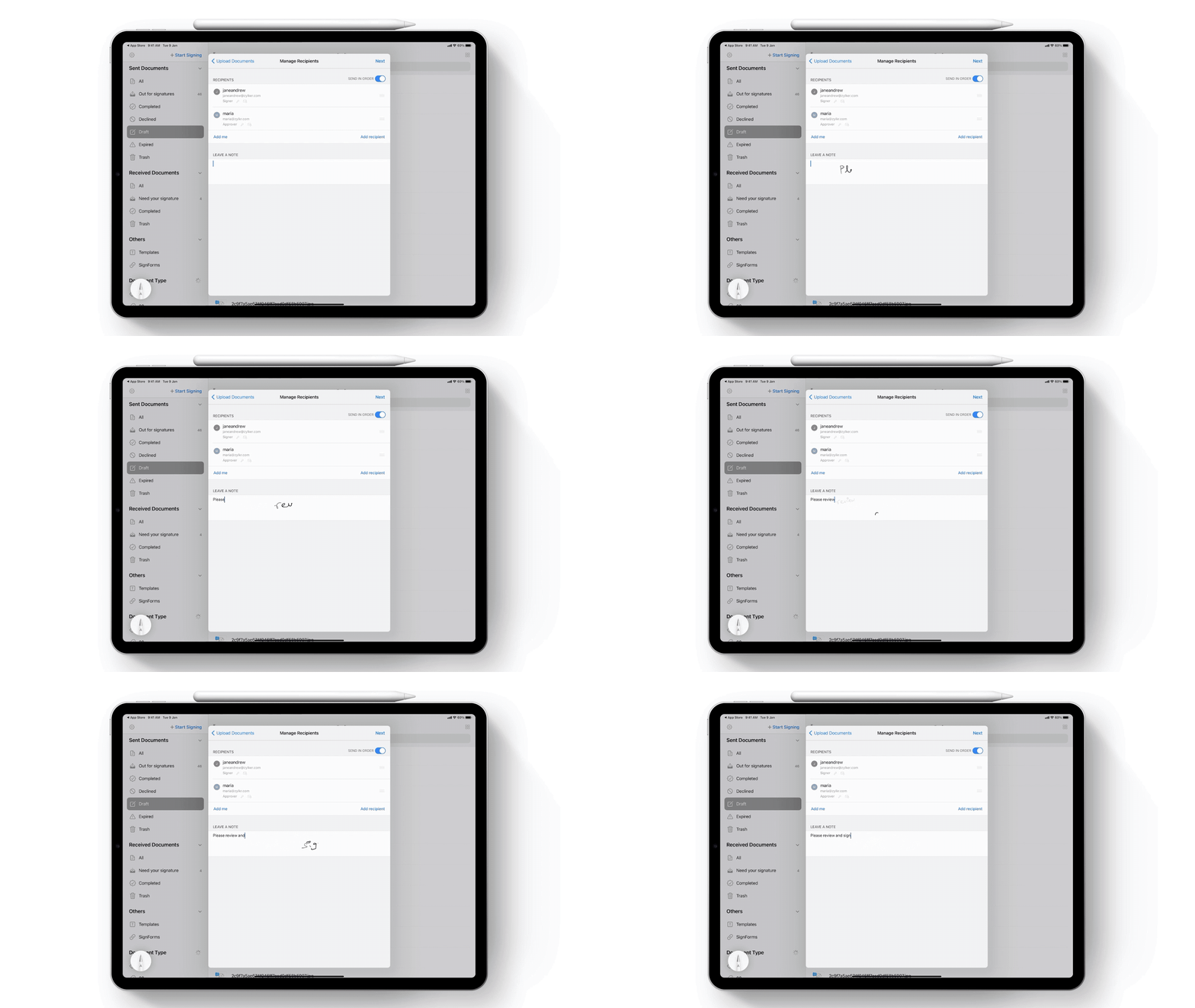
With iPadOS 13, you could use your Apple Pencil to create your e-signature for signing documents using Zoho Sign. With the latest round of updates, you can now use it to write on text fields when signing documents or sending them out for signatures. Then, just let iPadOS 14’s built-in OCR work its magic. This is our way of letting you enjoy pen-and-paper nostalgia, while continuing to operate paperless. 😉

Scribble with Apple Pencil

Besides these cool features, we have also updated the Zoho Sign app to support other new interface components such as the sleek menus, the photo picker, and the date picker to ensure we leave no stone unturned in offering our users the complete iOS 14 experience.

Update to iOS 14 and iPadOS 14 today for an updated digital signature experience with Zoho Sign. And if you don’t have the app yet, you can download it by clicking the button below:

Download on the App Store

Try these updates and let us know your feedback in the comments below, or write to us at support(at)zohosign(dot)com.

Happy Signing!


Sai Anand


Sai Anand is a Marketing Analyst for Zoho Sign. You can engage in a conversation with him by leaving a comment on any of his blog posts.

Net Universe offers all Zoho subscritpions and consultant services with worldwide Delivery Services.
Send us an email to [email protected] for more information or visit https://www.netuniversecorp.com/zoho.

Help teams get back to work safely with Office Readiness

Office Readiness in Zoho People


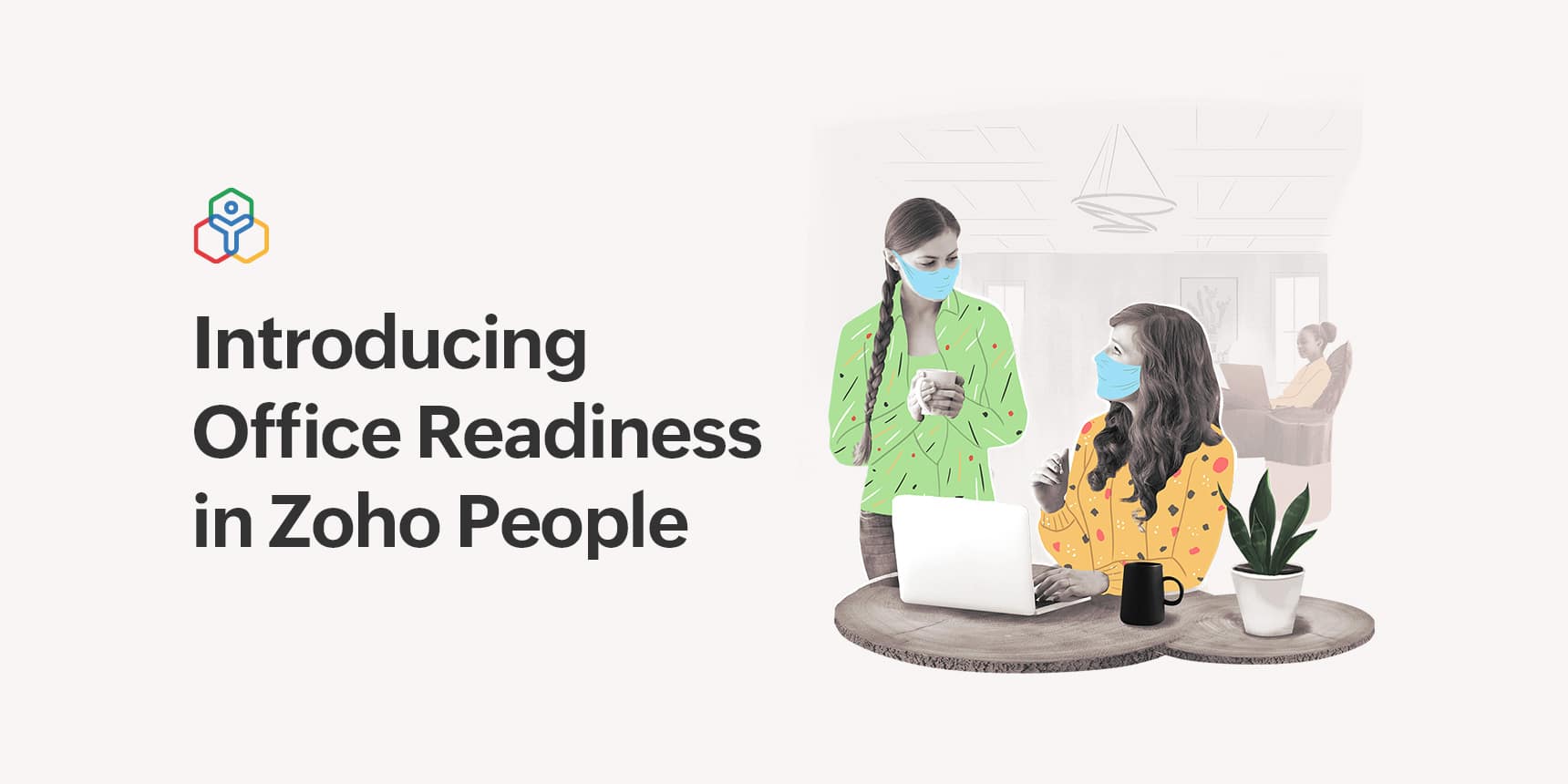
As you reopen your worksite for your employees, it’s essential to follow the guidelines issued by the government and take steps to improve employee safety. You should ensure that both your employees and worksites are ready for reopening. We at Zoho People are here to help you make this transition safe. We’re introducing Office Readiness, a new feature in Zoho People.

Office Readiness in Zoho People

With the help of three forms, you will be able to assess if your worksites are ready to function and accommodate employees and outside visitors. Here’s how these forms work:

  • Work Premises
    With this form, Zoho People’s Admin will be able to record work location details including the name, premises in charge, maximum capacity, and more.
  • Work from Office
    With this form, your employees can request to work from the office. They will be asked to fill in details including their work location, work premises, requested dates, mode of travel, and more. You can also require employees to fill in their employee health form at least once in the 15 days before the requested start date. Approvals can be configured to send the request to the reporting manager and the premises in charge.
  • Visitor at office
    This form can be filled by your employees to request entry for outside visitors like interview candidates, clients, maintenance personnel, etc.

Read more about how our Office Readiness feature facilitates a safe return to work in our HR Knowledge Hive.

Net Universe offers all Zoho subscritpions and consultant services with worldwide Delivery Services.
Send us an email to [email protected] for more information or visit https://www.netuniversecorp.com/zoho.

Inbox placement through the lens of a marketer

A marketer's gear

When you Google “how do I land my emails in inbox,” you’ll find close to 195,000,000 results.

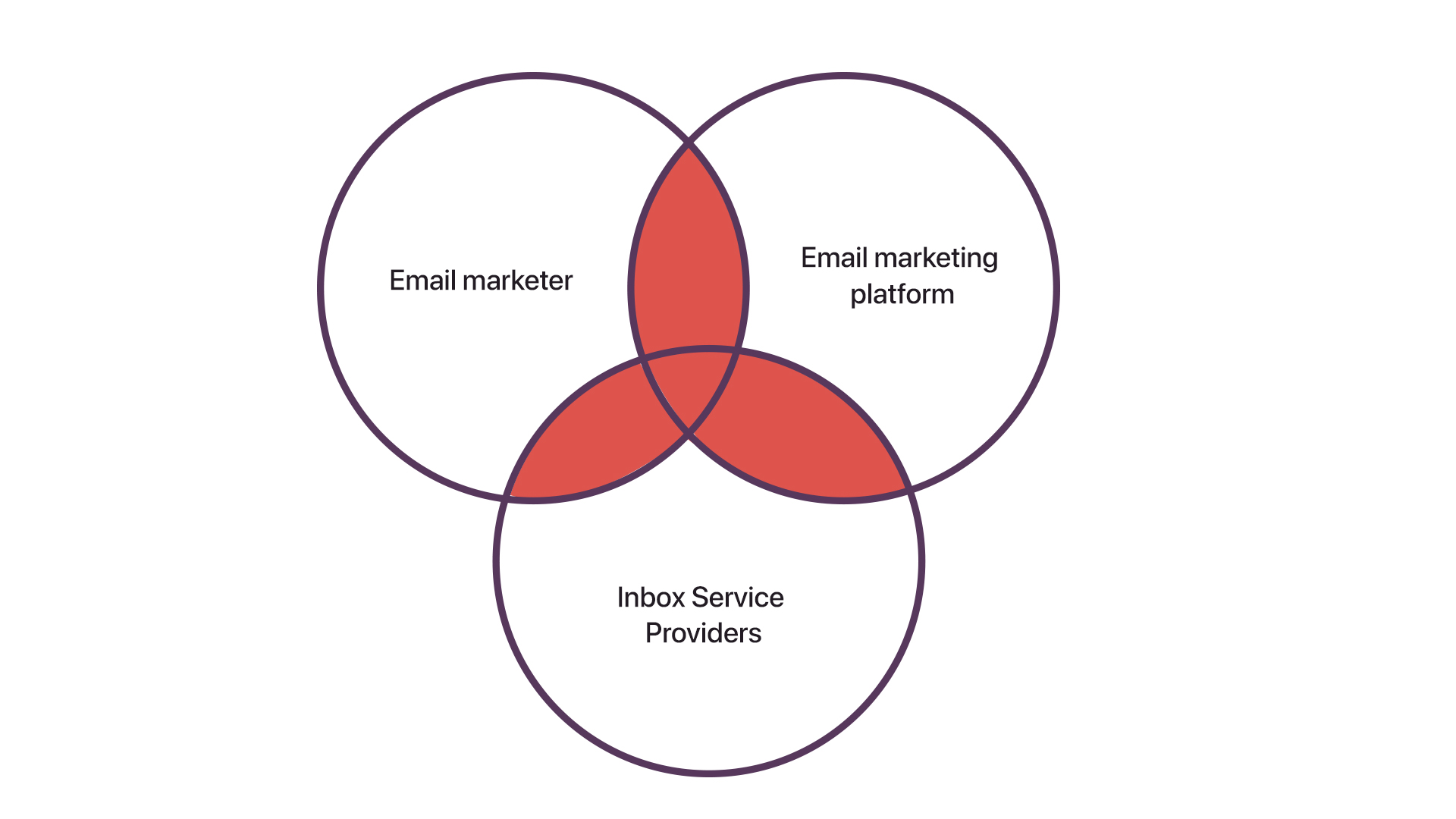
While this doesn’t come as a surprise considering the longevity of email marketing, it certainly testifies to one thing: Email deliverability (inbox placement) is arguably the most-discussed topic in email marketing. This is because the process equally involves the email marketer, email marketing platform, and the Inbox Service Providers. And the resulting area of intersection is a bit challenging to understand while starting off.

Participants of email marketing process

In our recently concluded webinar, we set out to explain email deliverability in simple terms.


Here’s the rundown of the conversations we had during the webinar. For those of you who prefer reading, we decided to summarize the webinar’s key takeaways below.

Key terms 

ESP – Email Service Providers (for example, Zoho Campaigns)

ISP – Inbox Service Providers, aka mailbox providers (for example, Gmail)

Email-sending domain – Your own domain associated with the email marketing platform (for example, zylker.com) 

Lookup site A site that provides crucial information about a domain in an easy-to-understand way

DNS – Domain Name System

User scenario

Alex is a marketer trying to reboot email marketing for his company, Zylker. He’s signed up for an email marketing platform and is going to send his first email campaign as per the user manual.

Your takeaway

Alex’s first email campaign will help you learn three aspects:

  • The role of anti-spam services and Inbox Service Providers in email marketing
  • The whys and hows of configuring your email marketing software
  • The specifics of content creation and mailing list management

In summary, you’ll learn what happens after you hit an email’s send button and how to put the best foot forward to achieve inbox placement.

Step one: Studying the domain’s reputation

Before associating his domain with the email marketing software, Alex wants to ensure that it’s not in the bad books of anti-spam services. To check this, he turns to one of the lookup sites.

Reasoning:

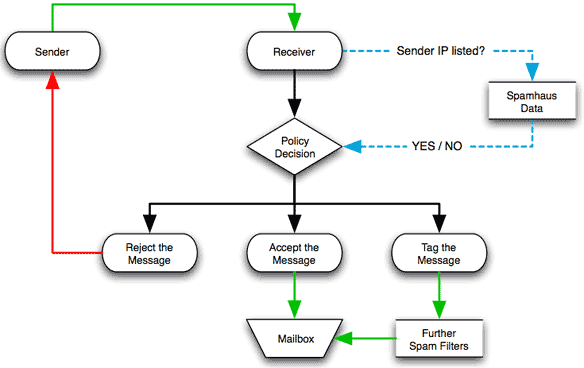
Anti-spam services create and maintain blacklist(s), online registries of domains and IP addresses that were used to send any form of spam. Some of the mailbox providers likely join forces with anti-spam services to strengthen their security system. This way, they accurately prevent an incoming email with blacklisted domains and IPs from reaching the mailboxes.

The image below shows how Spamhaus—one of the prominent anti-spam services—contribute to email security.

Spamhaus and ISPs

Source: Spamhaus

While these services use different under-the-radar techniques to maintain blacklists, the usage of spam traps is widely known.

Step two: Associating the domain

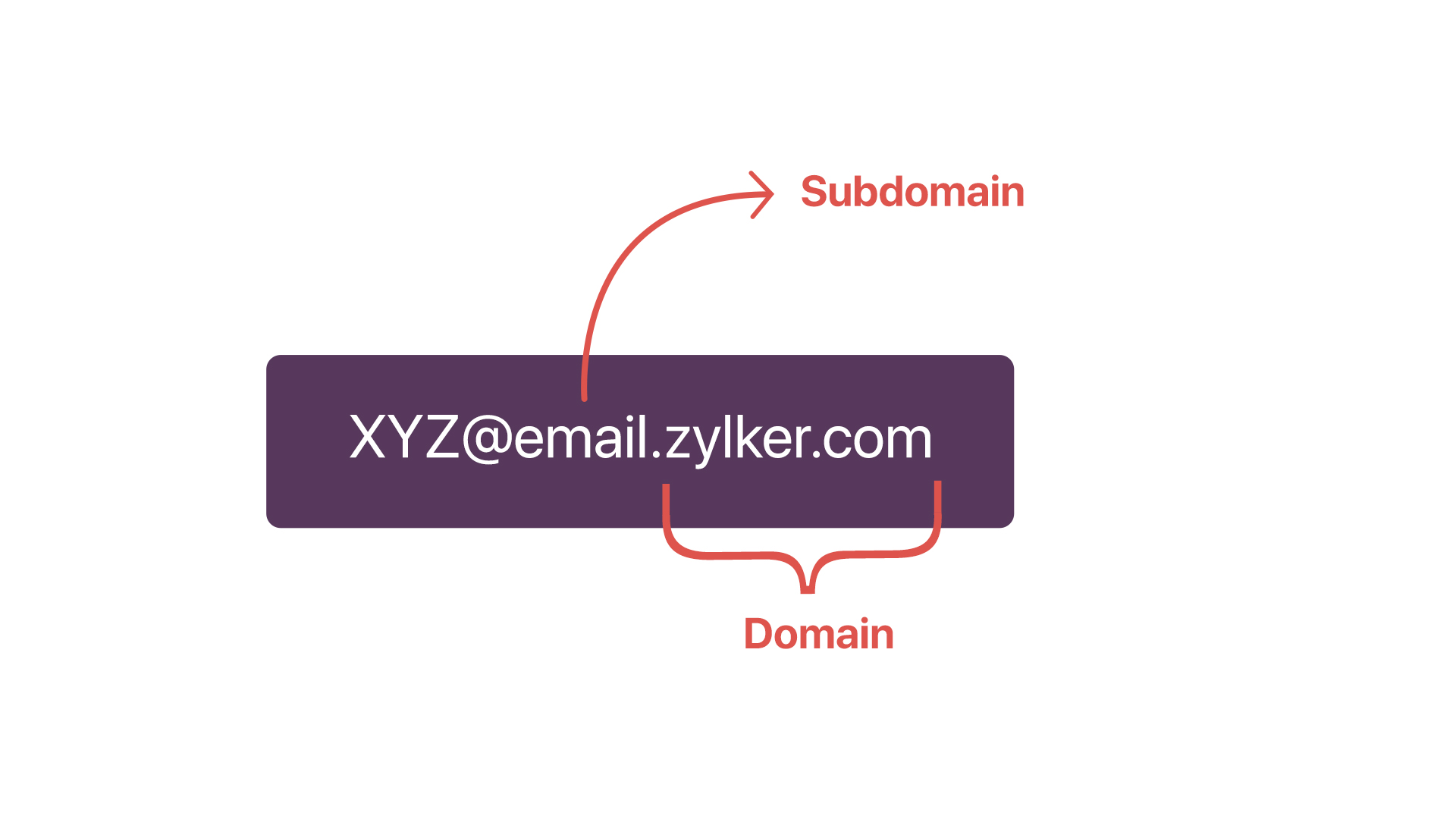
After knowing the domain is in the good books of anti-spam services, Alex creates a subdomain to easily narrow down email-deliverability problems in the future and safeguard the reputation

Difference between domain and subdomain

Reasoning:

When you use your primary (or parent) domain for several purposes, there’s no room for error at all. A non-email-marketing problem hurting your domain’s reputation has a bearing on your email marketing and vice versa. This is where subdomains come into play; they help you identify email-deliverability-based problems with a macroscope instead of a microscope. The best part? It works as a separate domain while still being connected to your primary domain.

Step three: Authenticating the domain

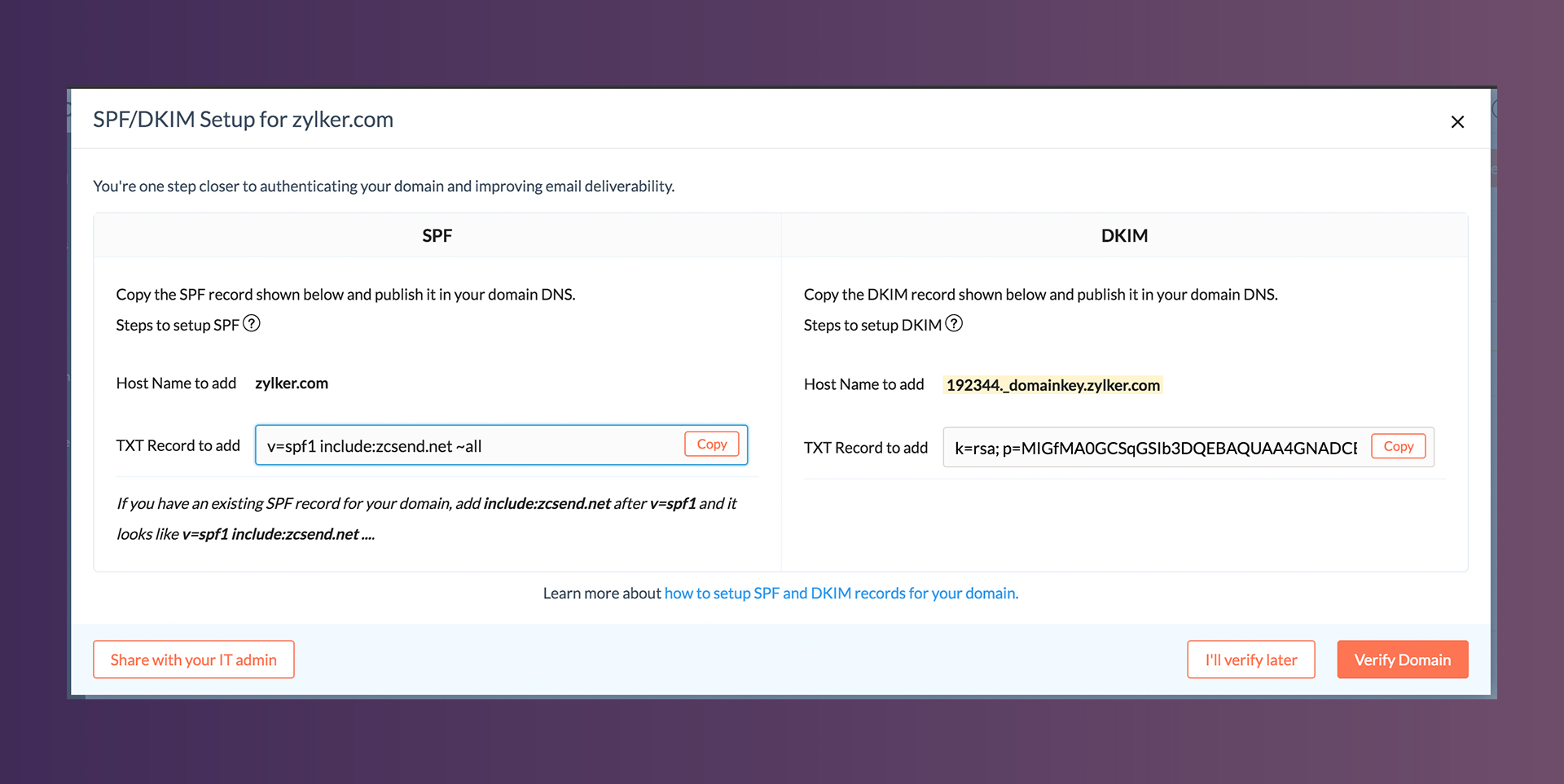
Now Alex has to prove that he’s a safe and authenticated sender in the eyes of mailbox providers (because of rising spam activities). To achieve this, he uses two mechanisms prescribed by his ESP: Sender Policy Framework (SPF) and DomainKeys Identified Mail (DKIM). He copies the SPF and DKIM records exclusively generated by his ESP and pastes them in the TXT record of his domain’s DNS.

Domain authentication

Reasoning:

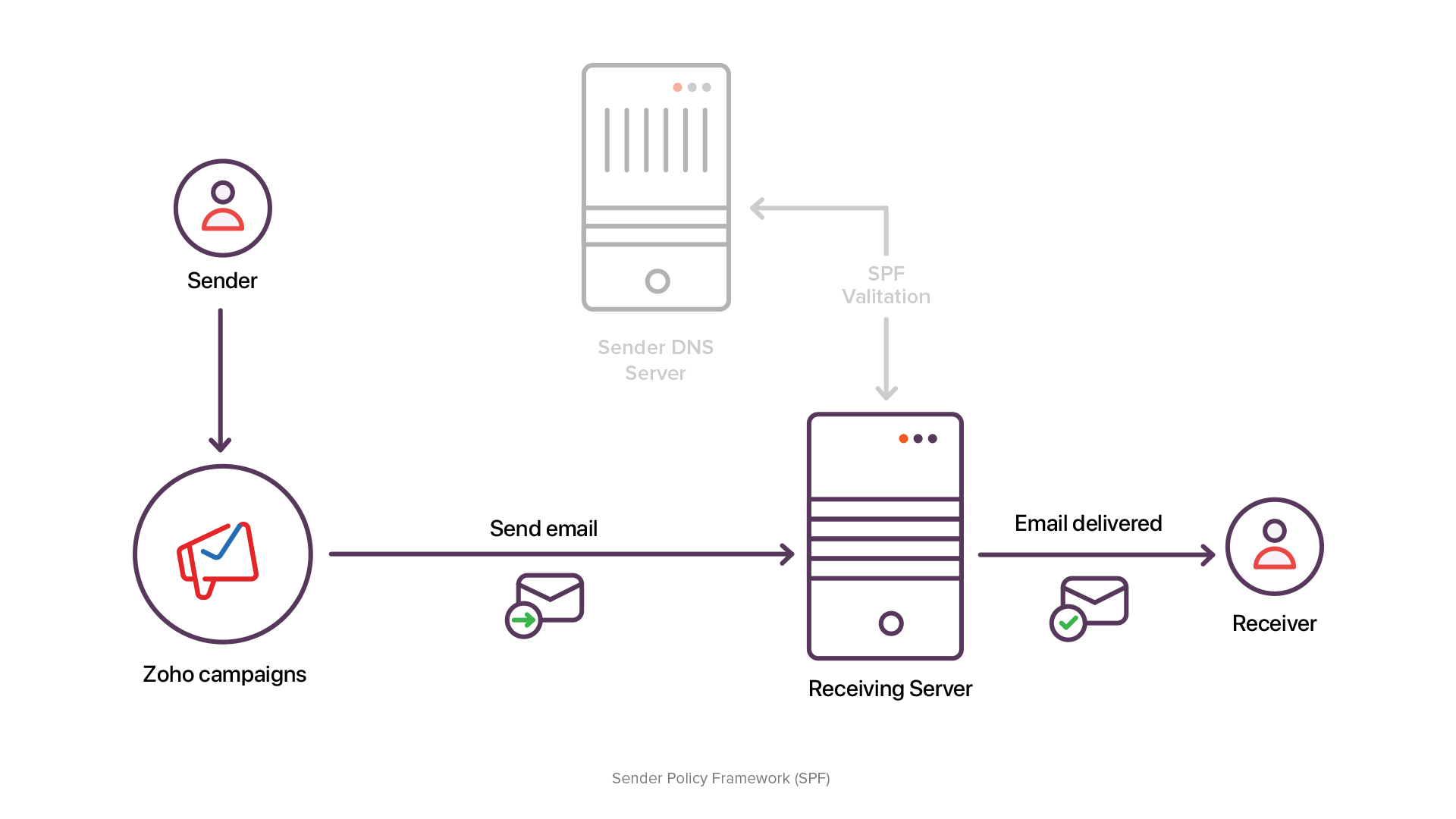
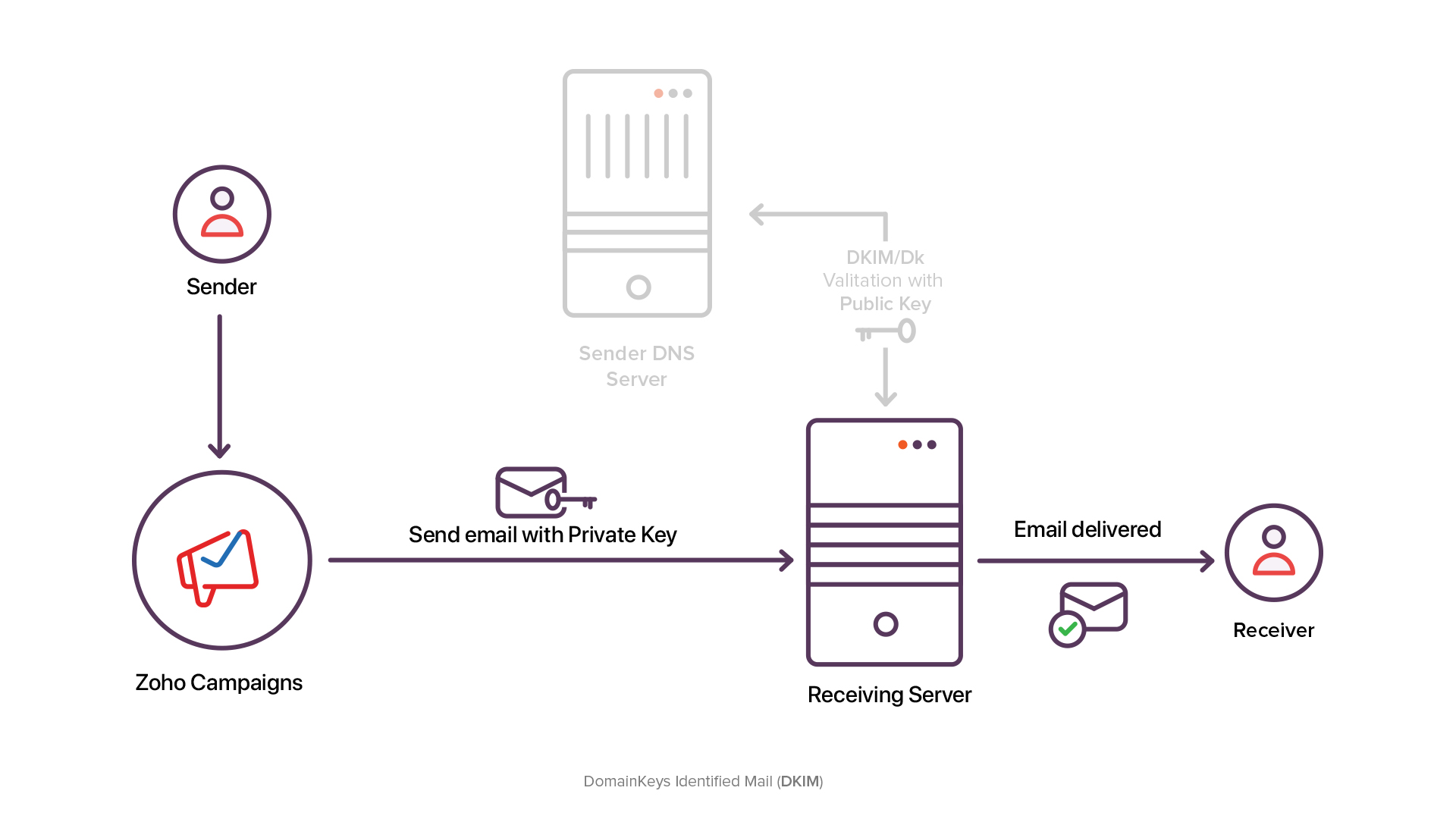
Since your emails are always bypassed via the servers of your ESP, their domains and IPs also enter the picture. Therefore, the mail servers of your recipients ask a question to your ESP: “How can we ascertain that this email is actually from the concerned sender?” This is when the SPF and DKIM mechanisms come in handy.

With the SPF record, the ESP will hint the domain and IPs assigned for your account. (They also communicate to the mailbox providers the entire set of domains and IPs used by them.) By publishing the SPF record on your DNS, you validate your email’s point of origin.

SPF flowchart

With the DKIM record, a unique alphanumeric key is assigned to your account. So every time you send an email, an encrypted code along with a special header is added to it by the ESP. The code is then decrypted by your recipients’ mail servers using the key present in your DNS, thereby again validating the email’s point of origin and, most importantly, ruling out any possibilities of foul play in transit.

DKIM flowchart

Step four: Crafting content

With the account set up, Alex is now raring to use the creative freedom that ready-made email templates offer. He heads over to the template editor and customizes the template, ensuring that his email is a combination of plain text, image, and, most importantly, (healthy) URLs.

Reasoning:

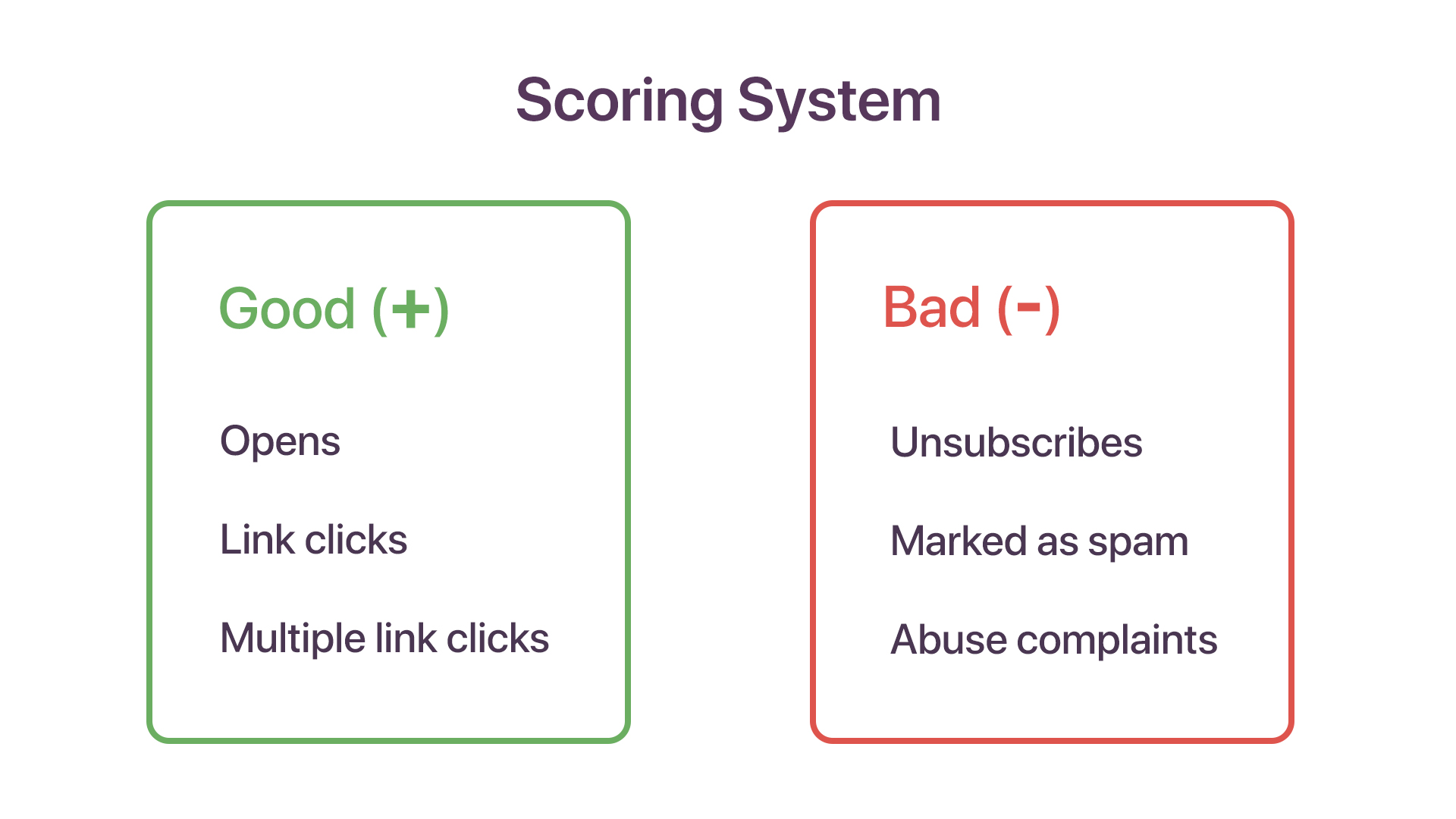
The ultimate goal of every email marketer is this: creating content that persuades their audience to complete the end action. The scoring system of mailbox providers—which is used to gauge your email-sending domain’s reputation—is also in line with that.

The way your recipients react to your email generates positive and negative scores. If someone clicks your links (preferably and visibly embedded as CTA buttons or hyperlinks), you garner the highest-possible score. However, if your score declines below the cut-off range, your domain gets blacklisted.

Scoring system of ISPs

Now comes a question: What if you’re using a brand-new domain that has a zero reputation? Simple! Warm up your domain. Start off with low-volume emails, build a positive reputation, and go through the gears.

Step four: Selecting the recipients

Since Alex is resuming email marketing for Zylker after a hiatus, he wants to know how healthy the current mailing lists are. For this, he turns to the analytics of the previous campaigns.

Subsequently, he segments the database into three based on receptiveness: inactive contacts, partly active contacts, and highly active contacts. Finally, he overlooks the inactive contacts and associates the other two segments for this campaign.

Reasoning:

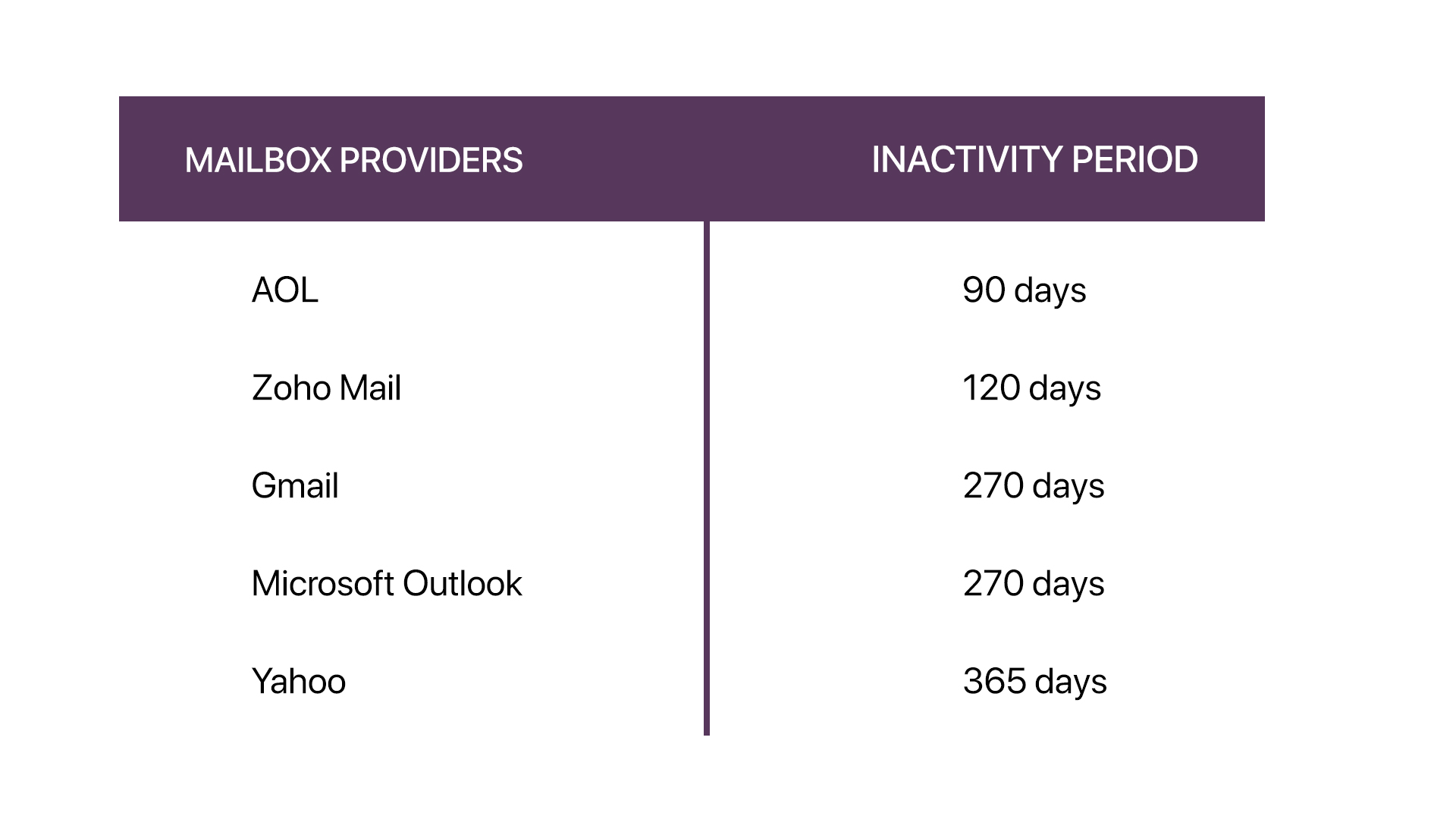
Continuously sending emails to (highly) inactive contacts can affect your domain’s reputation in the long run. Furthermore, if a contact doesn’t access their mailbox for a very long time, the ISPs convert the email address into a spam trap. (This is called recycled spam traps, and the cut-off time before the email address is converted into a spam trap varies from one ISP to another.) If an email is sent to such spam traps, it takes a huge toll on your reputation.

Inactivity period set by ISPs


Note: Like anti-spam services, the ISPs also generate pure spam traps (fake email addresses) and disseminate them on the internet, presuming spammers will use or sell them in the dark-web marketplaces. From there, it’s only a matter of time before it reaches email marketers who’re looking to purchase mailing lists. Here’s an extensive guide on spam traps and how to avoid them.


Alex is set to push the send button now. And, like most email marketers, he can’t wait to come back and check the analytics so he can sharpen his next campaign.

Net Universe offers all Zoho subscritpions and consultant services with worldwide Delivery Services.
Send us an email to [email protected] for more information or visit https://www.netuniversecorp.com/zoho.

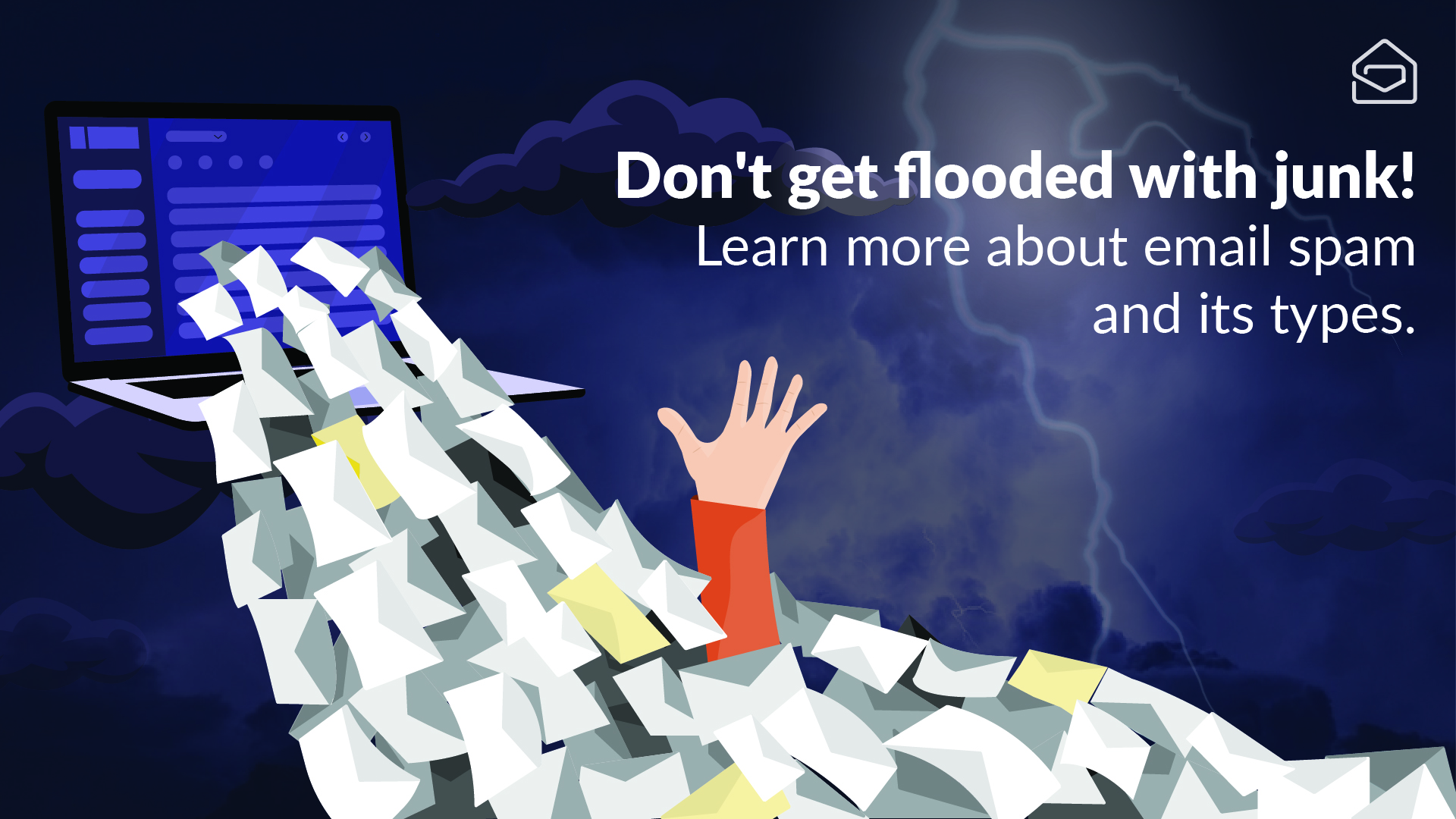
Think Twice: Email spam and its types

If there is one thing present on every email user’s wish list, it would be to never receive spam again. It’s like those inserts that fall out of a newspaper when we open it. Nobody asked for them and getting rid of them is more work than they’re worth, yet can’t escape them. Making up almost 70% of total email traffic, spam reaches every corner of the email world. Email service providers go out of their way to protect users from this problem with a wall of filters, still some of them make their way through to end up in your inbox.

One question I commonly notice users asking is, “How did the spammer get my email address?” The answer may come as a surprise. Remember that seemingly harmless form you submitted after your online Christmas shopping? The pop-up you filled out to download the latest episode of a series? A bumper email you forwarded to 100 friends promising you the chance to win a Tesla car? These are some of the sources spammers use to harvest email addresses.

Unfortunately, these social engineering methods are not the only ways they rely on. Spammers use multiple techniques, from simply deploying crawlers to pull contact information from websites and social media platforms to the more difficult method of guessing combinations of email addresses using the brute force method. Once they confirm that your email is receiving messages (using deliverability and click records), you are now forever trapped in the spammer’s database. According to TechRadar, email spammers receive approximately one reply for every 12.5 million emails. And even with a small 0.00001% click rate, the average full-time spammer makes around $7000 a day.

While spammers profiteer by sending unsolicited advertisements and fraudulent emails, the effect on a victim is often quite brutal. The dangers of loss of data, money, and privacy surrounding spam makes it more vital than ever for email users to be aware of spam, and it’s working.

Let’s take a look into some popular types of spam.

Product marketing: The one where everything’s a hoax

Here, spam is used as a marketing tool, like an advertisement to sell a product. Putting aside the fact that you never signed up for these ads, there is also another concern regarding the products spam emails advertise. These products are usually unauthorized and unregulated by any government bodies. Around March 2020, several spam emails started flying around claiming to have found the “cure to the Coronavirus.” Many users believed those spam adverts and paid to buy such items, only to be left with unapproved, ineffective, and misbranded products. So, the next time you see a spam ad you didn’t sign up for but end up feeling tempted, think twice, or even three times.

Scam: The one where bogus offers are the norm

Scam spam uses human psychology and highly engineered catchphrases to manipulate readers into believing something extraordinary can be attained with minimal effort. A few trademark subject lines of these emails would be something like “Once in a lifetime opportunity!” or “Earn $2000 a day with risk-free investment!” among others. One notable thing is that most of these scams are finance-based, usually promoting non-existent ventures, fake job offers, lottery wins, or pyramid schemes. It, more often than not, results in the victim paying lump money as “advance-fee” to enjoy the benefits of the shady scheme. After the victim pays the required money, the spammer would not only disappear without fulfilling their claim but will also steal the victim’s payment details for further exploitation. A golden rule is that when an offer looks “too good to be true,” it most probably is.

Phishing: The one where fake websites deceive you

With phishing, spammers disguise themselves as a legitimate organization, sometimes one the recipient is associated with, intending to extract sensitive personal and financial data from their victims. Phishing uses advanced social engineering techniques that require human interaction, identity theft, fraud, and advanced coding skills to extract your data. It works because most people don’t pay close attention to the little details and skims through emails or websites. So, the next time you receive an email with a link to recover your bank account and you are not sure why, hold on to that thought, look carefully, and don’t skim through the details.

Spoofing: The one where identity theft is common

The premise of spoofing lies in forging a legitimate email address to trick the recipient into believing that the email is from a trusted source. Essentially, the spammer cons you by disguising themselves to be a sender you are familiar with. Wondering how someone can make the displayed email address look legitimate in a forged email? Unfortunately, it’s not a complicated task. The shortcoming of SMTP servers email relies on is that they make it possible for a spammer to disguise the original “from” address.

Business Email Compromise (BEC)—also called man-in-the-email scams—is one of the most prominent attacks that use spoofing techniques to devise fraudulent money or data theft. This is usually done by scrapping publicly available email addresses of prominent people in an organization’s websites. And to add more, spoofing coupled with phishing can result in disastrous financial loss for the victim. So, the next time your boss emails you out of the blue asking for login credentials or an immediate asset transfer, make sure you cross-check before doing so.

Something to note: the types of spam we’ve discussed here don’t have to be confined to emails. Email is only one form of communication. And nowadays, spam happens everywhere, from social media to personal calls and messages. So beware, everywhere.

Spam is an inconvenience at best, and there are many types to be aware of. Although only approximately 2.5% of spam emails are dangerous, this small percentage involves identity theft, compromised financial security, and invaded privacy. While ignoring spam is one solution, it is not always the best. The presence of spam can be distracting and is a waste of time, storage space, and email efficiency.

Fortunately, there are ways to limit the spam you receive. We will talk more about how you can avoid spam attacks in the next blog post. But before that, what’s your take on spam? Let us know in the comments. Until we meet again, stay informed and stay safe!


Yamine Durai


Yamine Durai, a part of Zoho Mail’s marketing team, is a tech enthusiast.
But if you spot her away from office hours, you will probably find her reading a history book while honing her oratory skills.

Net Universe offers all Zoho subscritpions and consultant services with worldwide Delivery Services.
Send us an email to [email protected] for more information or visit https://www.netuniversecorp.com/zoho.

What’s new in Zoho People this September

September Product Updates in Zoho People


Every month, we at Zoho People, strive to develop features that make Zoho People more useful to our customers. These features are aimed toward providing a more complete HRMS, where our customers are able to perform all of their HR-related work within Zoho People.

September Product Updates in Zoho People

This September, we have some amazing features in store, and we are super thrilled to share them with you. Here’s a quick glimpse at what’s new in Zoho People:

Read how each of these features eases people management in our HR Knowledge Hive.

Net Universe offers all Zoho subscritpions and consultant services with worldwide Delivery Services.
Send us an email to [email protected] for more information or visit https://www.netuniversecorp.com/zoho.

Two simple ways to improve your email list hygiene

This is a guest post by Corina Leslie, PR Manager at ZeroBounce.

How much do you think about your email list? If you’re in email marketing, I bet you keep count of the number of people who come and go. You can’t do much about those who unsubscribe, other than honor their request right away. On the other hand, making sure those who stay are genuine is a must for your emails to perform.

Let’s see how keeping up with your email list hygiene can influence your metrics and how you can do this the easy way.

Why your email list hygiene matters and how to improve it

Email marketing is hot: for every dollar spent, you can expect a return of $42. It’s no surprise when you consider the number of email users worldwide will top 4 billion this year. Email is thus a growing and lucrative channel, but the truth is it takes consistent effort to do it right.

“There are many pieces in this puzzle and each one plays a vital role,” says ZeroBounce founder and CEO, Liviu Tanase. “Number one: your email list. It’s the foundation of your email marketing. Reaching actual human beings, in their inboxes, is the first step to getting results,” he adds.

How does a messy email list prevent you from reaching inboxes? Here are a few ways:

  • When you get bounces, it’s not just those invalid addresses you’re not reaching. A bounce rate that’s higher than 2% (the accepted industry benchmark) is a sign you’re not following email marketing best practices. Email and Internet Service Providers (ISPs) don’t support sloppy senders. On the contrary, they discourage and block them, so your emails may start going to spam or won’t even get delivered.

  • Getting one spam complaint for every 1,000 emails is natural—ISPs won’t punish you for that. However, getting more than that places you in a risky area, where you may come across as a spam sender. Spammers don’t get a spot in the inbox. Their emails go directly to the spam folder.

Bounces and spam complaints tremendously affect your overall email marketing performance. However, invalid and abuse emails are not the only ones that can affect your email list hygiene and derail your campaigns. There are also:

  • Catch-all emails, which are prone to bouncing

  • Role-based emails that hardly anyone checks and don’t add much value to your list

  • Spam traps, designed to expose and block spam senders

Keeping such email addresses on your list has a dramatic impact on your sender reputation and, ultimately, on your email deliverability.

So how do you ensure your subscribers, customers, and prospects are genuine so you can hit “Send” confidently, every time?  Keep up with your list hygiene by validating your contacts regularly.

How to validate your contacts and maintain good email list hygiene

All data degrades, and if you run email marketing campaigns or work within a CRM, you’ve seen it happen. You sent a marketing email that never got opened, or you tried to get in touch with a customer but their email bounced. It’s frustrating, and it slows you down.

The good news is there are two easy ways to:

Let’s see how you can get started!

Use a bulk email validation service

First, you want to remove any obsolete data from your email list—contacts that may cause bounces, spam complaints, and other issues. The easiest way to do that is by running your database through an email validation and verification service. The process is fast and easy: you upload your list on the cleaning platform, allow the system to check and scrub it, then download your results.

With ZeroBounce, you’ll be able to see how many of your contacts were valid and which ones you should remove. The service returns specific percentages so you get a clear breakdown of the types of contacts on your list: valid, invalid, abuse, catch-all, and so on.

Use a real-time email validation API

Now that you’ve removed risky email addresses, you want to keep your list clean for as long as possible. An email validation API is your most reliable tool here. It works just like a bulk email verifier, only in real-time. Once activated, it checks every new contact instantly to prevent poor-quality data from being added to your list.

If you use Zoho, you’re in luck: ZeroBounce integrates with Zoho CRM and can validate any email field in your Zoho CRM with 98% accuracy, allowing you to keep only valid contacts in your CRM.

The benefits of good email list hygiene

Whether you have a list of contacts for email marketing or need reliable data in your CRM system, there are solid benefits to maintaining good email list hygiene. Here are just a few of them:

  • By removing outdated and invalid emails, you keep your bounce rate under control.

  • You can set up the API to reject abuse emails, which means you’re less likely to receive spam complaints.

  • The ZeroBounce API can reject role-based emails (such as info@ or office@), catch-all domains, and disposable addresses.

  • Your CRM data stays fresh longer and you keep a good sender reputation.

  • More of your emails will land in people’s inboxes, giving you a chance to connect, convince, and convert.

Check out our ZeroBounce – Zoho CRM integration to see how easy it is to set up your email validation API.

Work smarter by adding new capabilities to Zoho CRM with business solutions from Zoho Marketplace.

Explore Zoho Marketplace

Net Universe offers all Zoho subscritpions and consultant services with worldwide Delivery Services.
Send us an email to [email protected] for more information or visit https://www.netuniversecorp.com/zoho.