Here are the release notes for the recent minor updates to Sophos Central Firewall Reporting.
Updates and Improvements
Central Firewall Reporting Advanced: Save Reports as Templates. Central Firewall Reporting Advanced lets you save custom report templates.
First, configure a report with the columns and layout you want. Then save it in your template library for quick access whenever you need to run it.
Central Firewall Reporting Advanced: License transfer workflow enhancements make it easier to understand how to manage your CFR Advanced licenses.
Issues Resolved
CFR-811 [UI] column width expand issue & table raw line break while resizing the window
CFR-944 [UI] Unable to scroll through log view and the log viewer becomes blank after resizing the browser window
CFR-839 [Licensing] During transfer, devices list displays the last transferred device name instead of “Select a Device”
CFR-695 [Licensing] When a user double clicks on “Remove and delete all data” on licensing UI, 500 internal server error is triggered
Net Universe offers all Sophos Devices and subscritpions also consultant services with worldwide Delivery Services. Send us an email to [email protected] for more information or visit https://www.netuniversecorp.com/sophos.
Hi All,
Here are the release notes for the recent minor updates to Sophos Central Firewall Reporting.
Updates and Improvements
Central Firewall Reporting Advanced: Save Reports as Templates. Central Firewall Reporting Advanced lets you save cu…(read more)
Net Universe offers all Sophos Devices and subscritpions also consultant services with worldwide Delivery Services. Send us an email to [email protected] for more information or visit https://www.netuniversecorp.com/sophos.
Ransomware continues to plague organizations, with over half of companies surveyed across 26 countries revealing that they were hit by ransomware in the last year.
Modern firewalls are highly effective at defending against ransomware attacks, but they need to be given the chance to do their job.
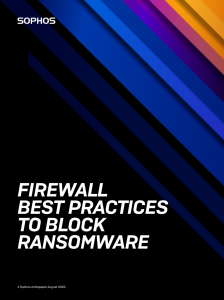
Our guide, Firewall Best Practices to Block Ransomware, explores how ransomware attacks work, how they can be stopped at the gateway, and best practices for configuring your firewall to optimize your protection.
Eight firewall best practices to block ransomware
To maximize the effectiveness of your anti-ransomware defenses, we recommend you:
Start with the best protection, including a modern high-performance next-gen firewall with IPS, TLS inspection, zero-day sandboxing, and machine learning ransomware protection.
Lock down RDP and other services with your firewall. Your firewall should be able to restrict access to VPN users and only allow sanctioned IP addresses.
Reduce the surface area of attack as much as possible by thoroughly reviewing and revisiting all port-forwarding rules to eliminate any non-essential open ports. Where possible, use VPN to access resources on the internal network from outside rather than port-forwarding.
Be sure to properly secure any open ports by applying suitable IPS protection to the rules governing that traffic.
Enable TLS inspection with support for the latest TLS 1.3 standards on web traffic to ensure threats are not entering your network through encrypted traffic flows.
Minimize the risk of lateral movement within the network by segmenting LANs into smaller, isolated zones or VLANs that are secured and connected together by the firewall. Be sure to apply suitable IPS policies to rules governing the traffic traversing these LAN segments to prevent exploits, worms, and bots from spreading between LAN segments.
Automatically isolate infected systems. When an infection hits, it’s important that your IT security solution be able to quickly identify compromised systems and automatically isolate them until they can be cleaned up (such as with Sophos Synchronized Security).
Use strong passwords and multi-factor authentication for your remote management and file sharing tools so that they’re not easily compromised by brute-force hacking tools.
These best practices and more are covered in greater detail our new Firewall Best Practices to Block Ransomware whitepaper.
Give your organization the best network protection with Sophos
Sophos XG Firewall gives you the best possible network protection against ransomware and other advanced threats, including cryptomining, bots, worms, hacks, breaches, and APTs.
Industry-leading IPS stops attackers using the latest network exploits to infect your organization
Deep learning technology identifies new and zero-day ransomware variants before they get on your network
Sophos Sandstorm analyzes suspicious files in a safe cloud environment
XG Firewall also provides a simple, elegant way to manage your RDP, as well as support for the latest TLS 1.3 standards.
Visit Sophos.com/Firewall today to learn more and try it yourself!
Net Universe offers all Sophos Devices and subscritpions also consultant services with worldwide Delivery Services. Send us an email to [email protected] for more information or visit https://www.netuniversecorp.com/sophos.
Customer profile: A non-profit organization based in the USA, with approximately 1,000 devices.
The Sophos Managed Threat Response (MTR) team provides customers with swift, human-led responses to the nastiest threats and most sophisticated adversaries.
The hunt begins
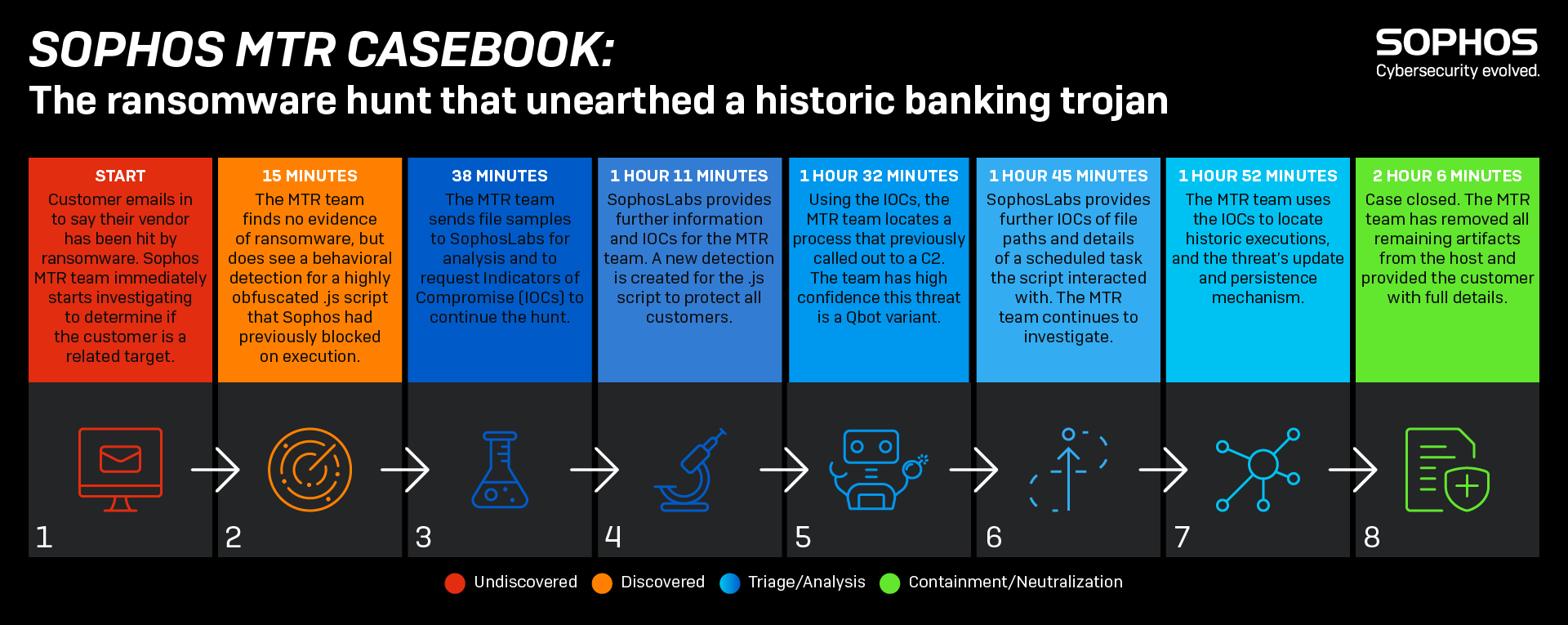
This case started with an email from a brand-new MTR customer. The customer had just heard that a third-party vendor they work with had been hit by ransomware and was worried they might also be affected.
The MTR team immediately picked up their request, opened a new case, and initiated a threat hunt. Within 15 minutes they were highly confident that there was no ransomware in the customer’s environment.
But the team did find something suspicious. Very recently, a script had been detected and blocked by the customer’s Sophos endpoint protection software.
What was odd was that it was in JavaScript which is typically used by websites to make them interactive. However, this detection wasn’t coming from a web browser – it was coming from the command line.
And it was obfuscated: someone didn’t want it to be read by human eyes.
Diving deeper
We sent the script to SophosLabs, our threat research and intelligence team, to get a deeper analysis of this script and what it was trying to do. Within minutes, SophosLabs began sharing actionable intelligence:
The script was a downloader. It would have tried to download a malicious payload hosted at a URL. A search across network traffic data reveals the URL was never connected.
The downloader script would have attempted to make a scheduled task.
While we couldn’t find any evidence of this task being created, we did find another suspicious-looking scheduled task that would run a different script.
This new script would attempt to find two files with the file extension .zzz and join them together into a .exe. It would then run this .exe, delete the scheduled task, delete the .zzz files, and finally delete the script.
This scheduled task was waiting to do its job but the files it was waiting for never appeared.
Situation resolved
The picture was clear. The suspect scripts and tasks belong to a variant of a banking trojan and information stealer known as Qbot. And had been running undetected on a device in the customer’s network for a very long time.
The criminals behind Qbot were trying to orchestrate the download of an update as two .zzz files in order to evade perimeter defenses, and then join them together once on the inside.
Unlucky for Qbot, we caught this process in the act.
As the customer had authorized Sophos to respond on their behalf, we cleaned up the Qbot infection, and informed the customer of what we had discovered.
The whole investigation, from the initial customer email to final clean up, took just 2 hours 6 minutes.
The customer was able to relax knowing that they hadn’t been affected by ransomware and that a historic banking malware had been fully removed.
And as this story shows, while ransomware is often the threat that is front of mind, it’s important to also be alert to the attacks that prefer to hide in the shadows.
Click image to expand
Learn more
For more information on the Sophos MTR service visit our website or speak with a Sophos representative.
If you prefer to conduct your own threat hunts Sophos EDR gives you the tools you need for advanced threat hunting and IT security operations hygiene. Start a 30-day no obligation trial today.
Net Universe offers all Sophos Devices and subscritpions also consultant services with worldwide Delivery Services. Send us an email to [email protected] for more information or visit https://www.netuniversecorp.com/sophos.
Anyone who’s tried to configure network address translation (NAT) rules knows how challenging this can be. But it doesn’t have to be.
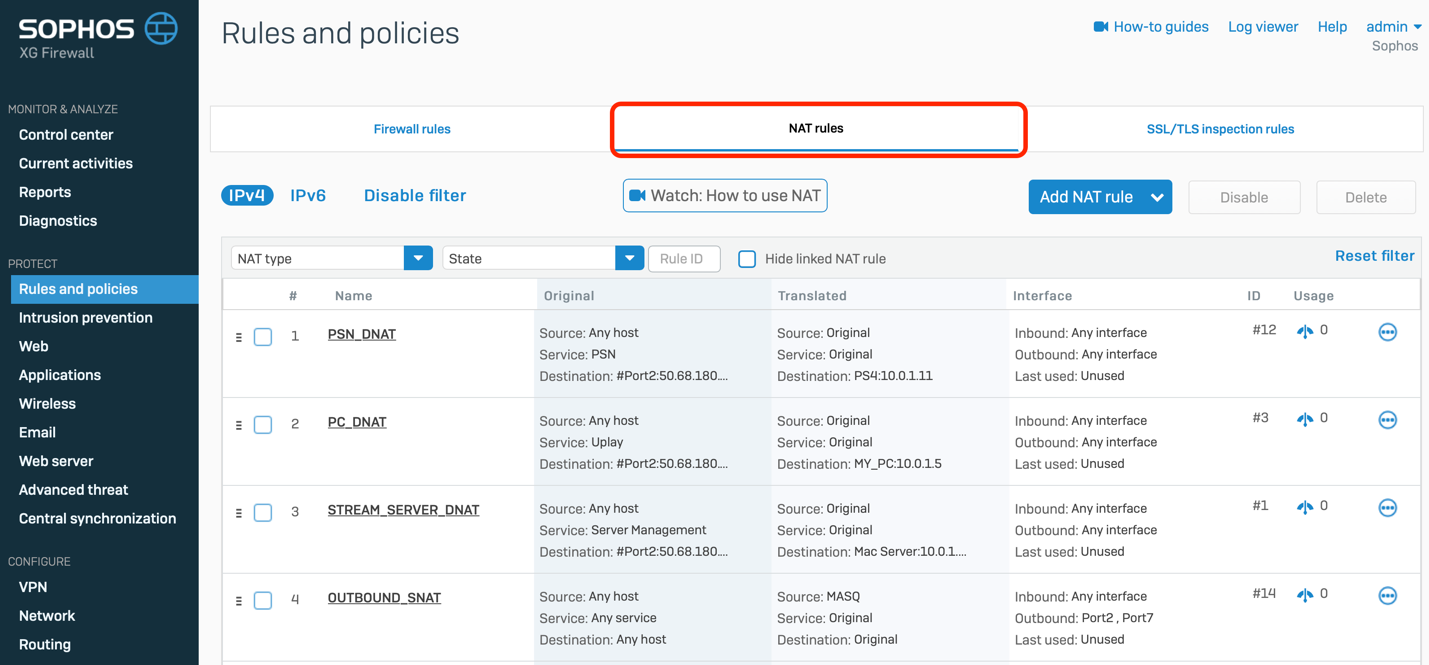
Sophos XG Firewall includes an all-new powerful but intuitive NAT capability for source NAT (SNAT), destination NAT (DNAT), and other network translation tasks that actually makes NAT easy.
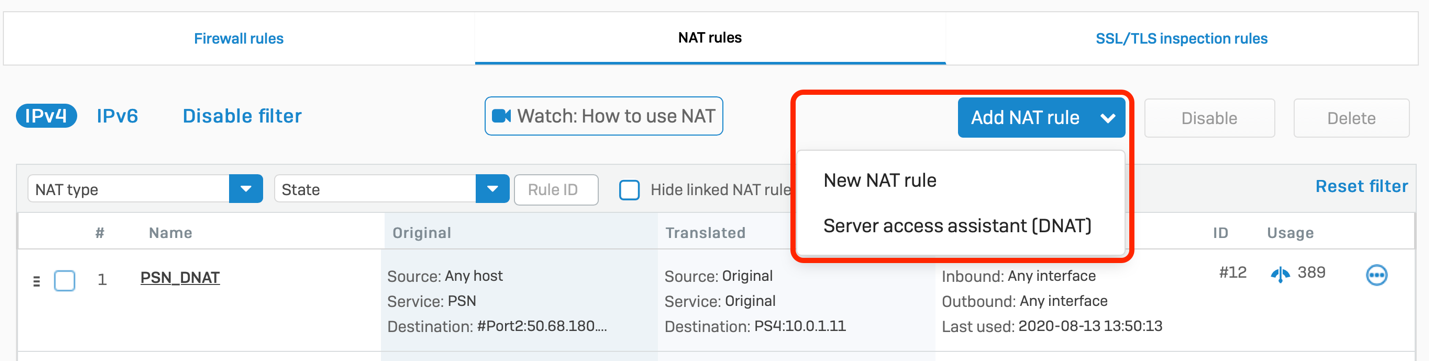
The new NAT rules are found on the Rules and Policies Screen.
There are a few different types of address translation tasks that are covered by the new NAT rules in XG Firewall v18:
Source network address translation (SNAT) translates internal private IP addresses to a public IP address, dramatically reducing the consumption of public IP addresses, which have now been exhausted.
Destination network address translation (DNAT) or port forwarding is commonly used to publish a service located on the private network to the publicly accessible IP address. Port address translation or PAT is a subset of DNAT that translates private IP addresses to the public IP address via port numbers.
NAT hairpinning, or loopback, or NAT reflection is a combination of address translation that permits access of a service via the public IP address from inside the private network, thus facilitating two-way communication via the public IP address and simplifying domain name resolution.
NAT migration from previous versions
Those familiar with NAT in previous versions of XG Firewall will know SNAT was bound to firewall rules and DNAT was combined with WAF in creating business application rules. In XG Firewall v18, all NAT rules are now together in the new NAT rules tab, providing much better visibility and a more intuitive set of tools to build more powerful and flexible NAT rules. Linked NAT and firewall rules are still supported for those who prefer that model, but we strongly encourage you to explore the benefits of the new NAT rule scheme and the tools provided.
In order to maintain compatibility, when you upgrade to v18 from previous versions of XG Firewall, you will find several NAT rules have been created automatically. In fact, there will be one new SNAT rule created and linked to each firewall rule that was previously using masquerading (MASQ), and one DNAT rule for each business application rule.
Depending on your previous NAT utilization and firewall rule structure, many of the SNAT rules for LAN to WAN traffic may now be redundant. The firewall is unable to consolidate these rules automatically to ensure compatibility, but you can certainly consolidate them manually.
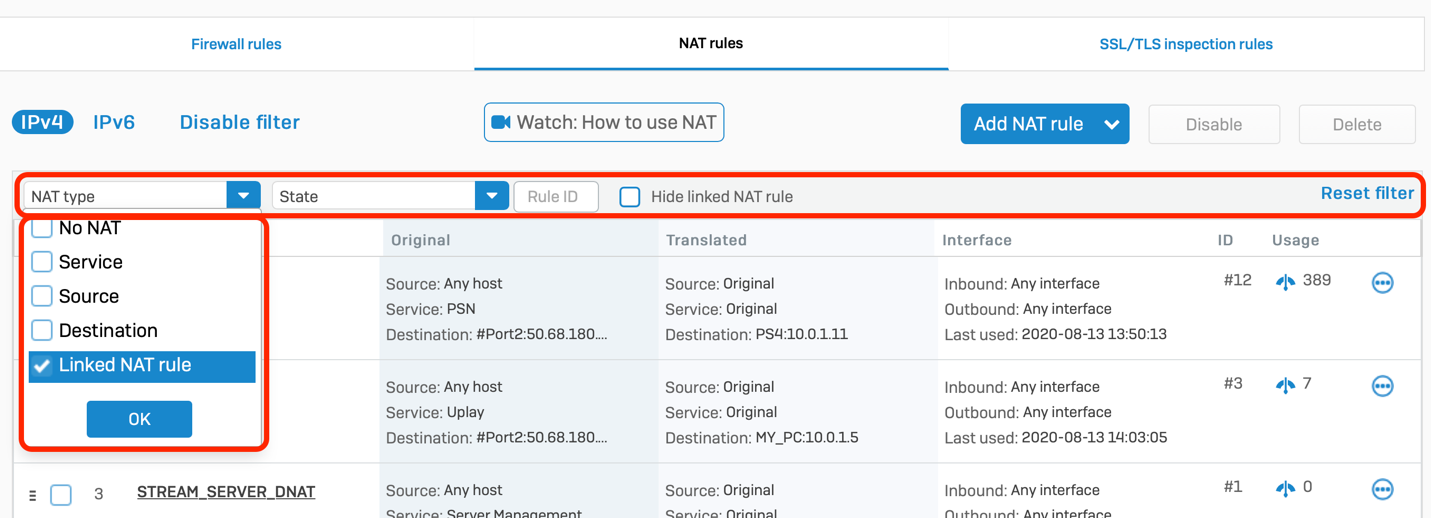
Simply delete any unnecessary, redundant NAT rules as long as you have one matching rule at the bottom of the rule list that will catch all firewall matching criteria necessary. Take advantage of the new filter and sort options available to help with migration housekeeping by looking at all linked NAT rules that were created during migration.
Making the most of NAT in XG Firewall v18
The new NAT capabilities are both powerful and easy to use. For example, creating a port forwarding or DNAT rule has never been easier, thanks to the new server access assistant wizard.
You just need to provide a few vital pieces of information such as the internal host, the services, and the external access criteria, and the wizard will take care of the rest, creating the necessary NAT rules for you.
To learn more about how to make the most of the new NAT rules in XG Firewall v18, watch this helpful how-to video, which is also conveniently linked right from the top of the NAT rules screen in the product.
Read the rest of the series
Here’s a summary of the resources available to help you make the most of the new features in XG Firewall v18, including the new zero-day threat protection capabilities:
If you’re new to Sophos XG Firewall, learn more about the great benefits and features XG Firewall can deliver to your network.
Net Universe offers all Sophos Devices and subscritpions also consultant services with worldwide Delivery Services. Send us an email to [email protected] for more information or visit https://www.netuniversecorp.com/sophos.
We’re excited to announce that we have launched the new Sophos Support Portal, which makes it much easier for you to track and manage all your support cases.
You can now visit support.sophos.com to access and create support cases.
What’s new
Create and manage your own support cases
Your Sophos partner can manage cases on your behalf
More interactive ways to update and track a case
View and manage cases created by others on your team
Chat in real time with our support engineers
Find suitable solutions in our knowledgebase
Manage your team’s access to the Support Portal
How to get started
Please note that the process to create a support case has now changed. From now on, you will need to log into the new Sophos Support Portal with your SophosID. If you do not have a SophosID yet, you’ll be able to create one as part of the registration process. Registration is quick and easy. You can find more information on how to register on our Community page.
Once logged in, you can conveniently create, manage, and follow cases in the Support Portal.
You can also still call in to our support centers to open a case. You can find our phone numbers on the support pages.
Migration of existing cases
Active cases have been migrated to the new Support Portal. If you have an open case with us, you should have received an email with your new case number and further instructions. Please don’t worry that your old case has been closed, as that is just a result of the migration to the new portal.
Your Sophos partner can file cases on your behalf
Your Sophos partner is now able to manage cases on your behalf and escalate cases to support management. This Community page includes a link to the knowledgebase article that explains how you can give your partner access to view your assets and create cases on your behalf. You will still be able to log in and track cases that your partner is managing for you.
Visit our Community page for a demo and the latest information or if you need any help.
Net Universe offers all Sophos Devices and subscritpions also consultant services with worldwide Delivery Services. Send us an email to [email protected] for more information or visit https://www.netuniversecorp.com/sophos.
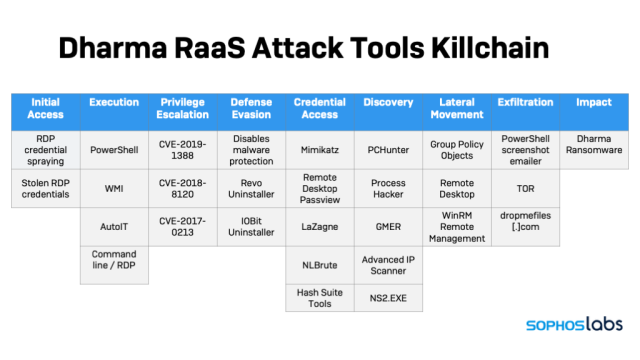
Dharma, a family of ransomware first spotted in 2016, continues to . Part of the reason for its longevity is that its variants have become the basis for ransomware-as-a-service (RaaS) operations—the fast-food franchise of cybercrime. Three recent attacks documented by SophosLabs and Sophos MTR have revealed a toolset used by Dharma “affliliates” that explains why attacks from so many different Dharma actors seem so identical, down to the tools and commands they use.
While other, newer ransomware families have grabbed recent headlines with high-profile victims and multi-million-dollar demands, Dharma has continued to be among the most profitable. In part that’s because actors with access to the source code continue to innovate around delivering the ransomware as a packaged business for less-sophisticated criminal operators. The Dharma RaaS we’ve investigated is targeted at entry-level cyber-criminals, and provides a paint-by-the-numbers approach to penetrating victims’ networks and launching ransomware attacks.
The actors using this particular RaaS are equipped with a package of pre-built scripts and “grey hat” tools that requires relatively little skill to operate. The Dharma operations we’ve documented use a combination of internal Windows tools, legitimate third-party “freeware” software, well-known security tools and publicly-available exploits, integrated together through bespoke PowerShell, batch, and AutoIT scripts. This pre-packaged toolkit, combined with back-end technical support, significantly extends the reach of the Dharma RaaS operators, allowing them to profit while their affiliates do the hands-on-keyboard work of breaching networks, dropping ransomware, and managing “customer service” with the victims.
Ransomware economics
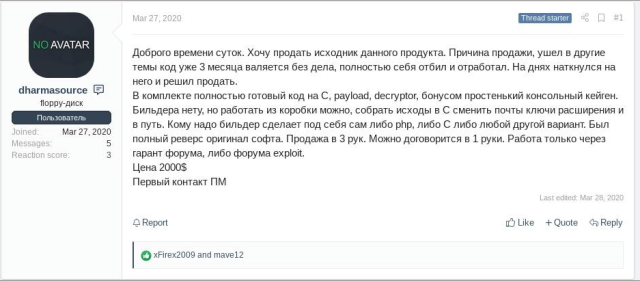
Dharma, formerly known as CrySis, has many variants—well over due to the sale and modification of its source code to multiple malware developers. Those transfers aren’t necessarily from the malware’s original authors, either—in March, a collection of source code for one variant of Dharma was offered for sale on Russian-language crime forums for $2000 through an intermediary.
A forum post from March 2020 offering the Dharma ransomware sourcecode for $2000.
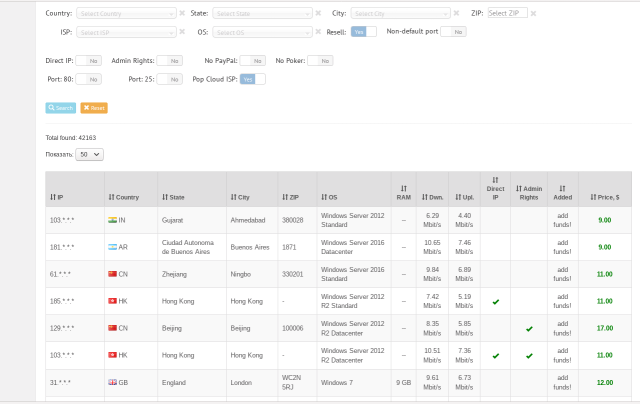
Because of its availability, Dharma has become the center of a criminal ecosystem based on a “syndication” business model. Dharma RaaS providers offer the technical expertise and support, operating the back-end systems that support ransomware attacks. “Affiliates” (often entry-level cybercriminals) pay for the use of the RaaS, and carry out the targeted attacks themselves, using a standard toolkit. Other actors provide stolen credentials and other tools on criminal forums that enable the Remote Desktop Protocol attacks that are the predominant means of initial compromise for Dharma actors. (RDP attacks are the root cause of about 85 percent of Dharma attacks, based on statistics provided by Coveware.)
A dark web site selling RDP credentials, including some with administrative privileges. These marketplaces in some cases allow buyers to verify the accounts work before they buy them,
Ransom demands from Dharma actors trend below those of the other major types of targeted ransomware over the past year. In December of 2019, when the average ransomware demand had surged to $191,000, the average Dharma ransom demand was only $8,620. That’s in part due to the types of targets hit by Dharma (mostly small and medium businesses), and in part because of the skills, experience and location of the affiliates running the attacks. In any case, Dharma operators make up for the lower ransom demands with volume—Dharma remains one of the most profitable ransomware families, according to Coveware.
Dharma uses a complicated two-stage decryption process that partitions the affiliate actors from the actual key retrieval process. Victims who contact the attackers are given a first-stage tool that extracts information about the files that were encrypted into a text file. That text file gets cut-and-pasted into email and is sent back to the affiliates—who then have to submit that data through a portal for the RaaS to obtain the actual keys. This keeps the affiliates dependent on the RaaS, and it keeps them paying for service.
Just how well the decryption process works depends greatly on the expertise and the moods of the affiliates. Occasionally an actor will hold back some of the keys with additional demands. And there’s constant “churn” among the front-end actors, as the “subscriptions” of some to RaaS services expire and others with less experience take their place, resulting in occasional misfires.
The Dharma playbook
Most Dharma operators don’t make significant changes to the source. But Dharma RaaS operators appear to package together a number of tools and best practices for their “affiliates” to use once they’ve gotten onto a victim’s network.
These tools aren’t completely automated, as every attack does not follow the same exact steps. However, they do follow something amounting to step-by-step instructions, akin to a telemarketer’s script, allowing some room for improvisation. And one of those tools is a menu-driven PowerShell script that installs and launches the components required to spread ransomware across the network.
After getting an RDP connection, the attacker maps a directory containing the RaaS toolkit on their local drive as a network drive accessible from the remote desktop. The contents of this directory include a number of applications previously identified as potentially unwanted applications (such as the Mimikatz password extraction tool), customized hacking tools, and freeware versions of a variety of legitimate system utilities. (A full list of the files is included in the indicators of compromise file on SophosLabs’ GitHub page. )
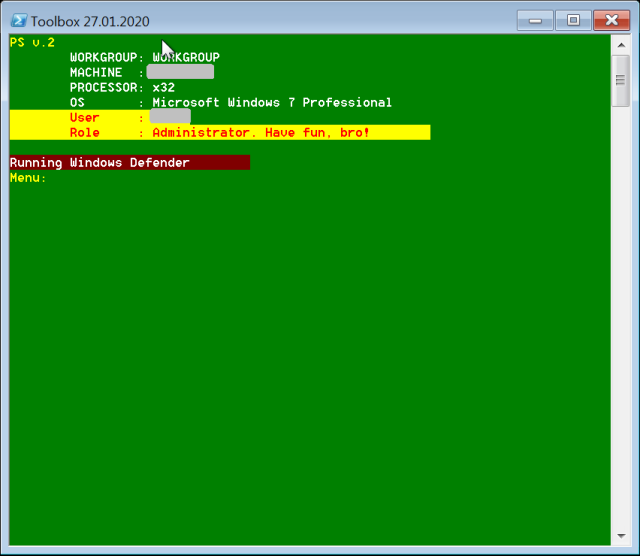
The kit also includes the Dharma ransomware executable, and a collection of PowerShell scripts, most of which we were unable to recover for analysis. However, we did recover a master script from console logs. Called toolbelt.ps1, the menu-driven console script automates the use of the tools, allowing attackers to simply type in the number associated with each pre-scripted element.
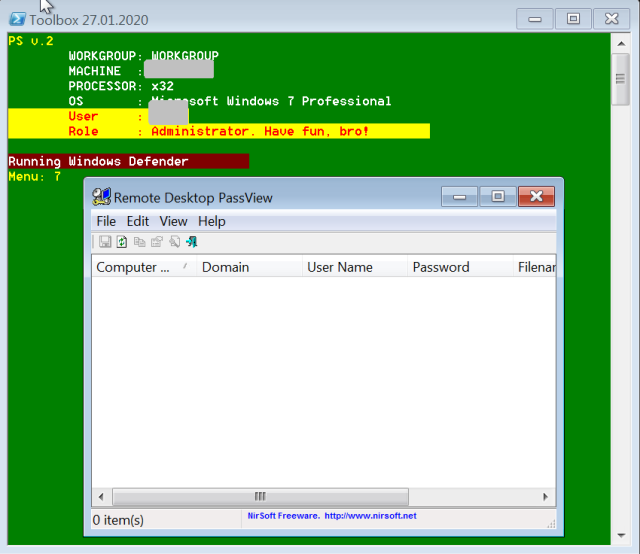
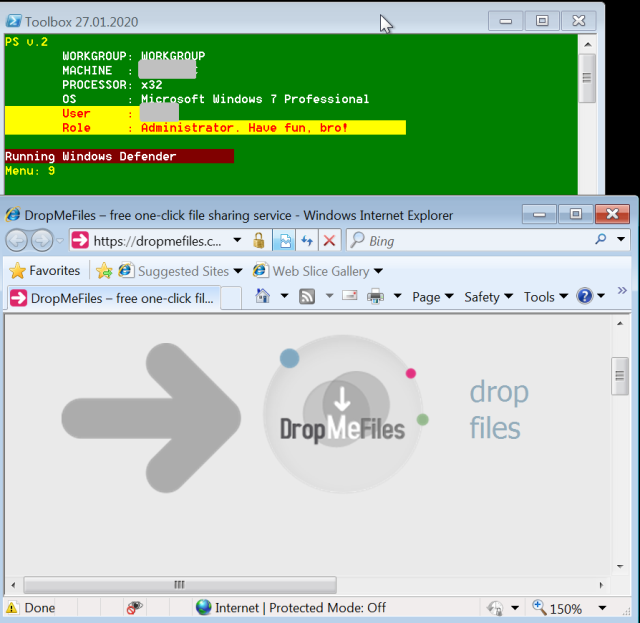
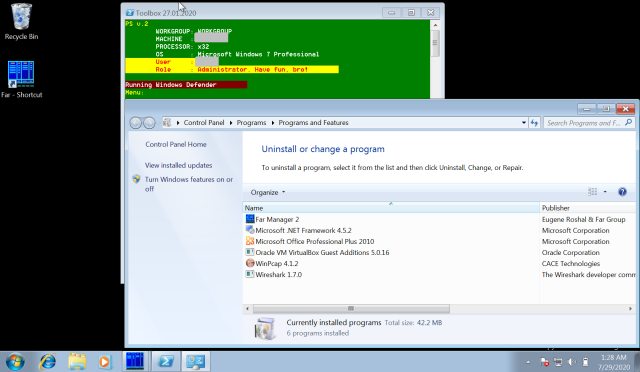
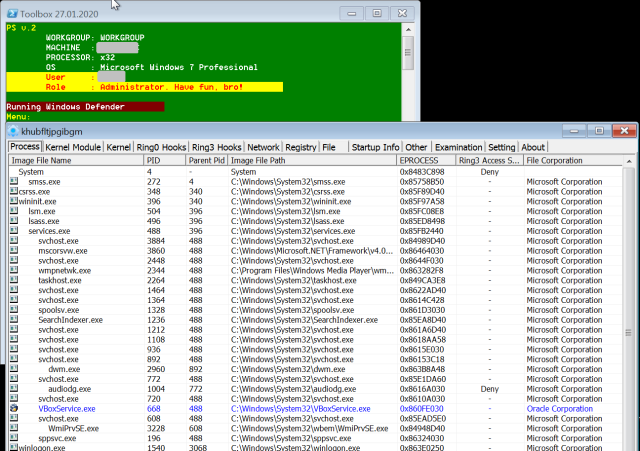
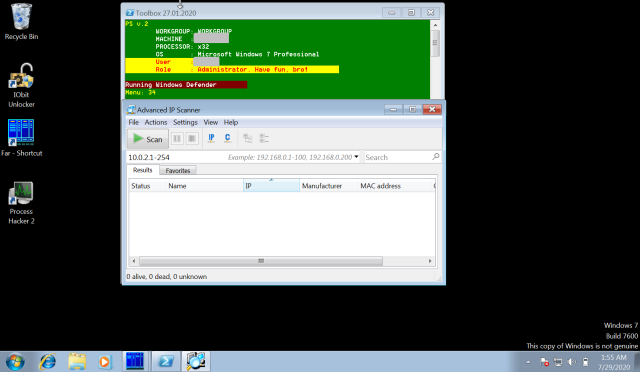
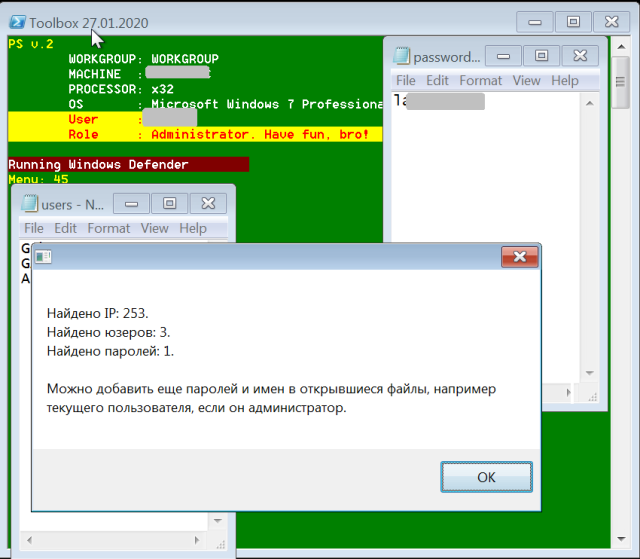
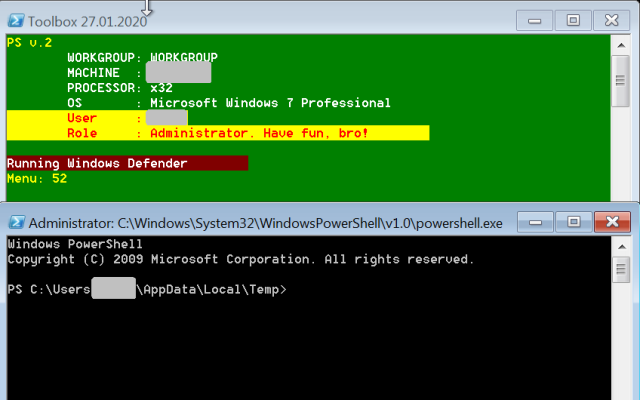
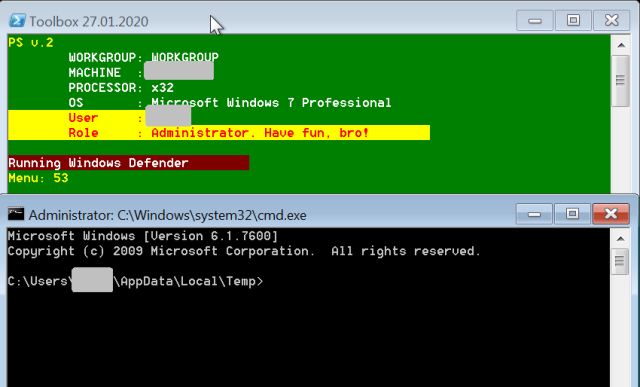
When executed, it identifies itself in the console frame as “Toolbox,” and if executed with administrative privileges, advises the user/attacker, “Have fun, bro!”
The startup screen for toolbelt.ps1
The “menu” selections in Toolbox aren’t displayed as a menu by the script as it executes, though they are largely documented in the script itself. Tools are downloaded to the remote computer by the script as needed, executed, and in many cases deleted after use.
The menu commands we identified, by the numbers and symbols they are called by, were as follows:
“Menu” entry
Triggered function
+
Executes Start-Tor.ps1, a script that launches a Tor network connection.
.
Executes Email-Screenshot.ps1, which creates a screenshot from the remote system and sends to the email address (provided by the operator at a prompt in the script).
1
Runs LaPass.ps1, a “User changer” script. (We could not recover the script itself.)
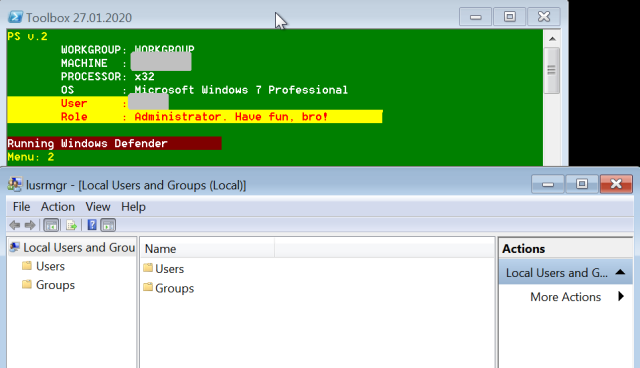
2
Starts lusrmgr.msc, the Windows local user management plug-in.
3
Executes lubrute.ps1, a PowerShell script that attempts to get passwords to local user accounts through a brute force attack.
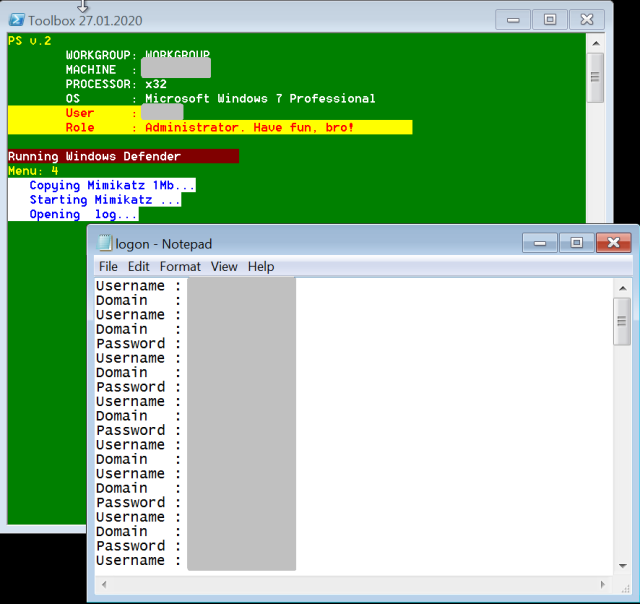
4
Copies and launches Mimikatz password extraction tools, dumping results to a text file.
5
Executes Find-Pass.ps1, a PowerShell script. (We were unable to recover this script for analysis.)
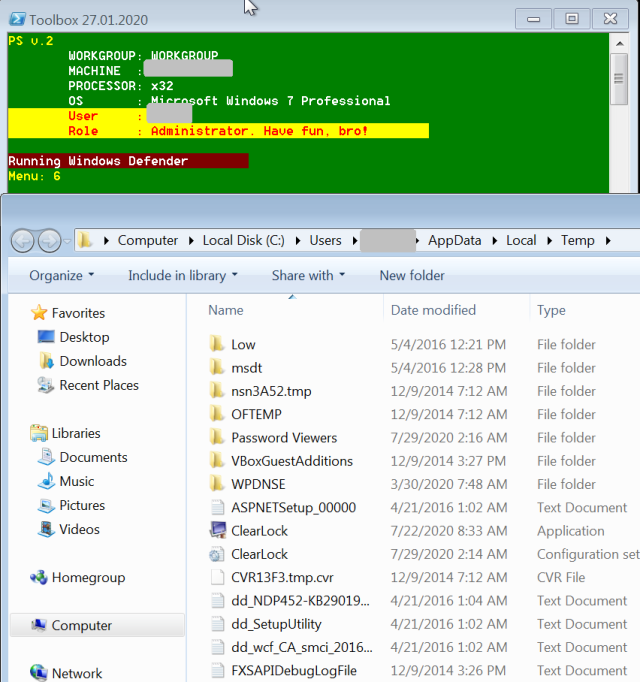
6
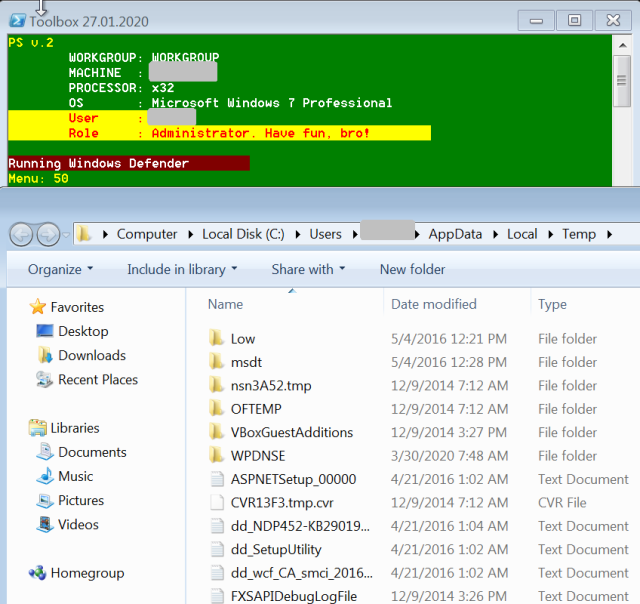
Copies password viewers from a shared directory on the initially compromised machine to %temp%, and then opens a File Explorer window on that directory.
6
7
Copies and and executes the NirSoft Remote Desktop PassView password viewer tool.
8
Copies and executes LaZagne.exe, the Windows executable version of the LaZagne password scraper.
9
Copies and executes Hash Suite Tools Free edition’s Hash Dump utility, and opens the website dropmefiles[.]com—potentially to exfiltrate the password hashes for remote matching attempts.
10
Runs the script Delete-AVServices.ps1, which searches a list of malware protection related Windows services and partial service names to search for and kill.
11
Launches appwiz.cpl , the Add/Remove Programs Windows control panel.
12
Copies and executes the PC Hunter system diagnostics tool.
13
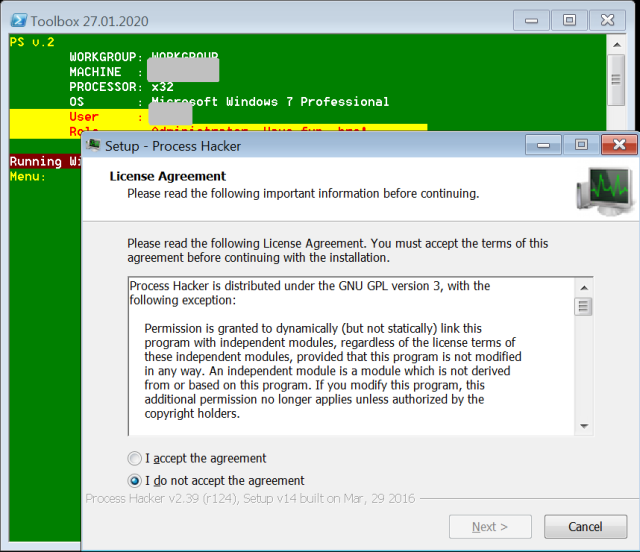
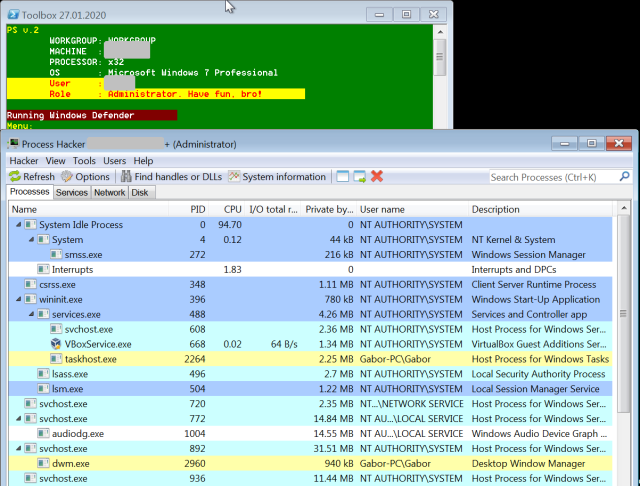
Copies, installs and executes ProcessHacker:
14
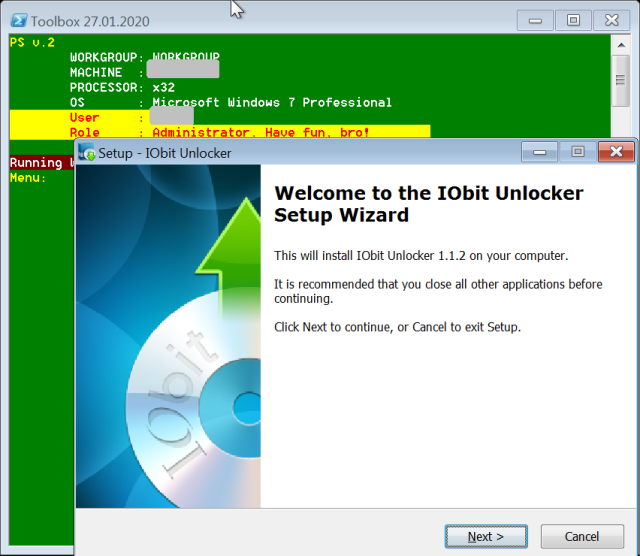
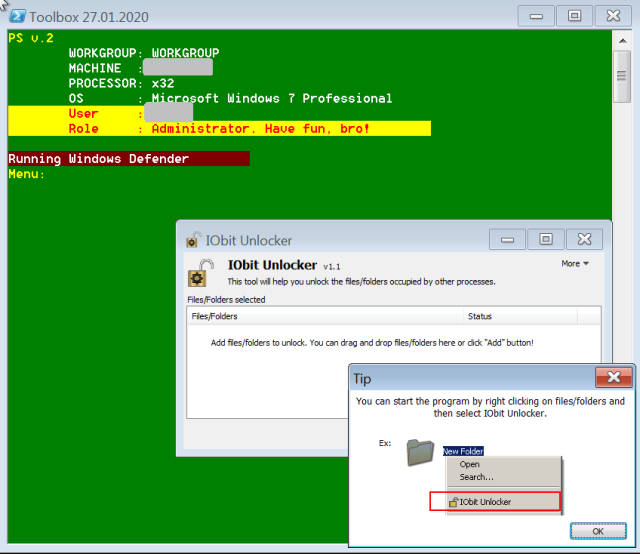
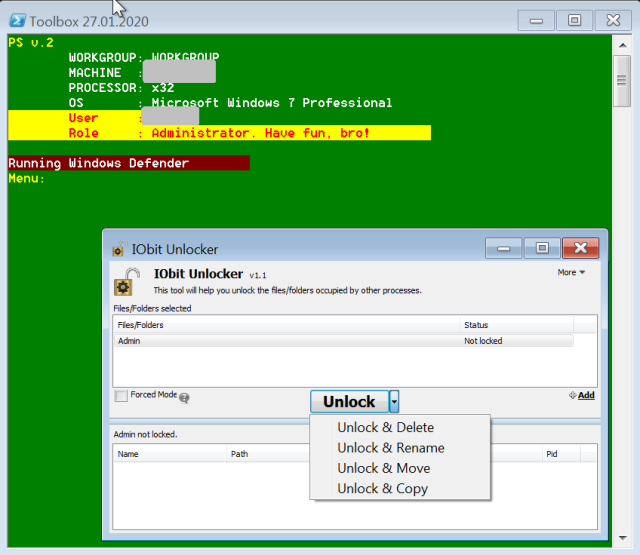
Copies, installs and executes IOBit Unlocker, a utility for removing file locks that would prevent deletion or encryption,
15
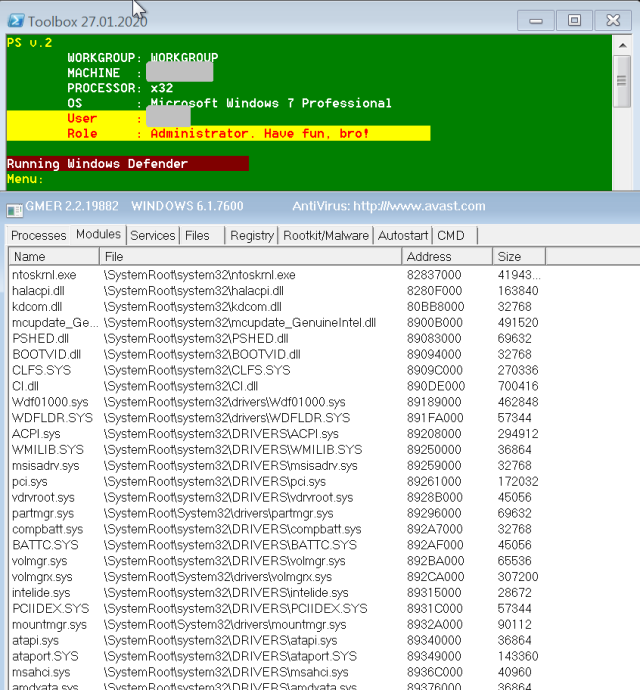
Copies and executes GMER, a “rootkit detector” used to reveal hidden processes.
16
Copies and executes a freeware version of Revo Uninstaller, a tool for uninstalling Windows software and cleaning up files left over from an uninstall.
17
Copies and executes IOBit Uninstaller, another software uninstaller tool.
18
Executes a PowerShell script, “Disable-WinDefend.ps1 /t” .
20
Executes a PowerShell script, “purgeMemory.ps1/” .
21
Executes takeaway.exe , the payload package that drops the ransomware.
22
Stops the winhost.exe process (the Dharma ransomware executable)
23
Executes a PowerShell script, winhostok.ps1.
25
Calls a function of the script called “Infect”, which deploys a file called javsecc.exe — called a “zombie” by the Dharma developers.
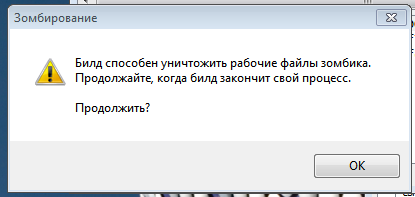
Message box from javsecc.exe
Upon execution, a message box pops up (the window name translates as “Zombification”). The message reads:
This build is able to destroy the working files of the “zombie”. Continue, when the build process is finished. Continue?
Clicking “OK” executes an AutoIT process that:
obtains the external IP address of the system it runs on by calling multiple remote services:
downloads and installs a Tor network client (tor.exe) ;
checks install of Tor by pinging the local host address, then deletes temporary files;
collects system information and user account data, and sends to a remote .onion (Tor) server.
sleeps and waits for timer events.
30
Executes a PowerShell script described as “Local Network Computer Listing” by the console output, called NetPC.ps1.
31
Executes the PowerShell script NetSubPC.ps1, another network computer name browser.
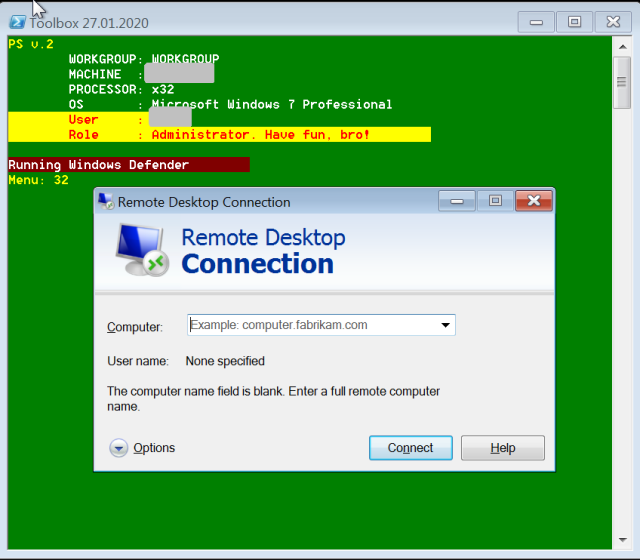
32
Launches mstsc.exe, the Remote Desktop Connection (RDP) client.
33
Copies and starts ns2.exe, a known PUA. The executable can scan for network shares and local unmounted volumes.
34
Copies and starts Advanced IP Scanner (IPScan2.exe), a commercial freeware tool that can identify and access shared network folders, control other computers on the network via RDP and Radmin remote control software, and execute remote shutdowns.
40
Retrieves a list of computers from Active Directory by running NetADPC.ps1.
41
Executes a PowerShell script named adbrute.ps1 (likely another Mimikatz scripted brute force attack on Active Directory accounts).
42
Copies and executes a PowerShell script named 2sys.ps1.
43
Launches the Windows Active Directory management snap-in (dsa.msc).
44
Launches the Group Policy Management Console snapin (gpmc.msc).
45
Runs “Mimi NL,” a more automated version of the Mimikatz password hacking tool. This tool appears to have been developed by the Dharma RaaS developers.
50
Opens the %TEMP% directory in a Windows file explorer window.
50
51
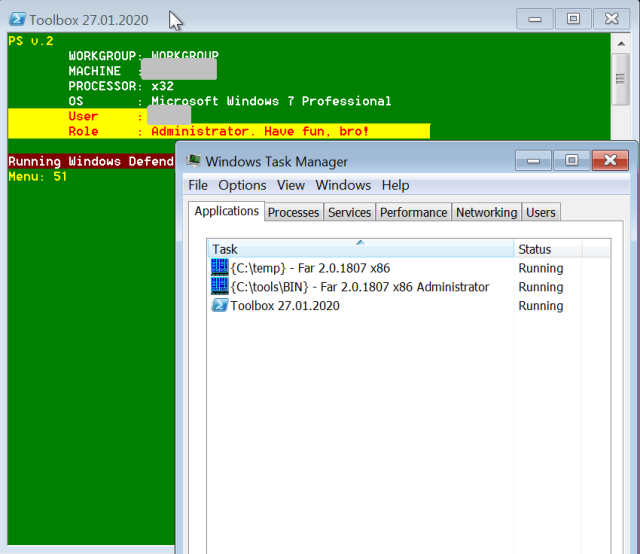
Launches Windows Task Manager.
51
52
Opens a PowerShell shell.
52
53
Opens a command shell.
53
54
Runs rdclip.exe, the Remote Desktop shared clipboard.
55
Reboots the computer.
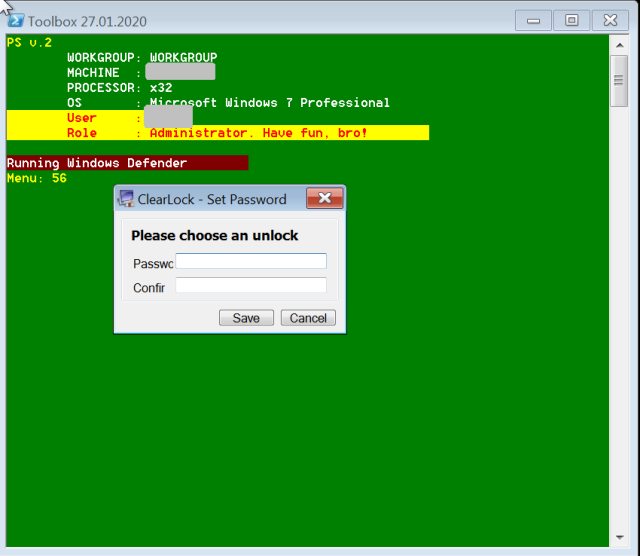
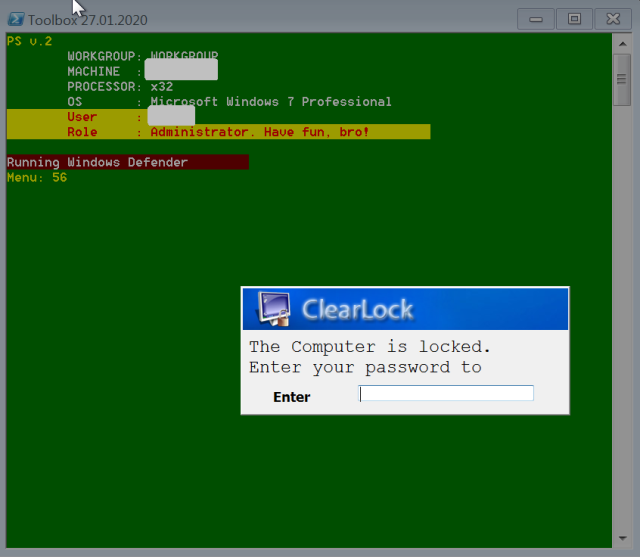
56
Copies and executes ClearLock.exe, a screen locker.
57
Executes a PowerShell script called wallet.ps1.
60
Copies and executes a batch script, addSupport.bat.
61
Copies and executes a published proof-of-concept privilege escalation exploit (CVE-2018-8120) —either the 32-bit (x86.exe) or 64-bit (x64.exe) version.
99
Starts toolbelt1.ps1 (which could be updated version of toolbelt).
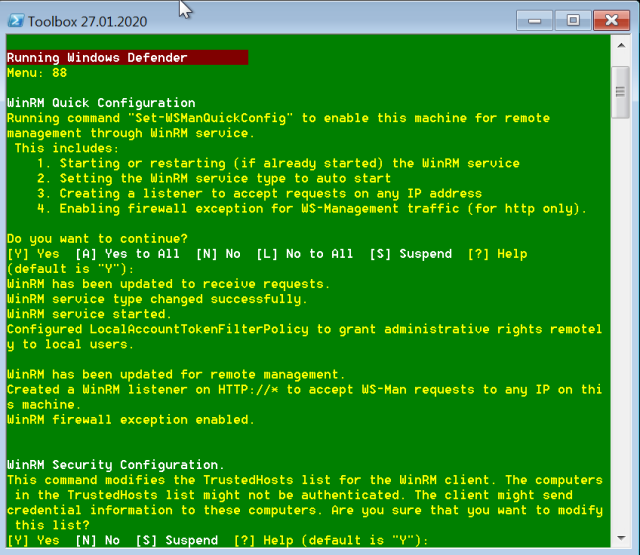
88
Enables WinRM remote management using the WS-Management protocol, This allows administrative commands to be sent to the computer via an HTTP request from any IP address.
101
Copies and executes a program called SafeMode, launched with a batch script called AsAdmin.bat. (We did not recover these files for analysis.)
155
Copies and executes Registry Finder, a tool for editing Windows’ Registry.
211
Copies and executes the Dharma payload package from the path mapped to the attacker’s computer: $tsclientx1Takeaway.exe.
212
Copies and executes the Dharma payload package from the path $tsclientx2Takeaway.exe.
213
Copies and executes the Dharpayload package from the path $tsclientx3Takeaway.exe.
214
Copies and executes payload package from the path $tsclientx4Takeaway.exe.
222
Copies and executes javsec.exe, another automated Mimikatz password cracking tool built with AutoIT. The executable runs mimikatz.exe and a disguised version of the NL Brute utility named postgresqlapi.exe (a network login brute force tool).
223
Opens the directories $envtemp$guid and $envappdataPostgreSQLAPI$guid (probably for temporary storage)
224
Performs “cleanup” by deleting processes tor, torque, and PostGreSQLapi.exe, and clears the directories $envtemp$guid and $envappdataPostgreSQLAPI$guid.
300
Unpacks and executes the contents of the package LBru4v4.zip
401
Copies a directory called “WMIDomain” from the toolset share and executes a PowerShell script called GetHosts.ps1.
600
Kills all processes except for PowerShell and unnamed windows.
666
Executes a PowerShell command that writes a new script called “sample.ps1” from the contents of the Windows clipboard. That script is then executed in opens a command shell with the permissions of an account passed to the script with an environmental variable and a password encoded into the command opening the PowerShell shell (2qaz!QAZ).
{try {Add-Type -AssemblyName PresentationCore`
$clip = [Windows.Clipboard]::GetText()`
$clip | Out-File $destinationsample.ps1}`
catch {RedAlert Failed to copy vicious code. Try 52, then right click...}`
start  $PsHomepowershell.exe " -NoProfile -ExecutionPolicy Bypass -File $destinationsample.ps1" -Verb RunAs }`
- {start -FilePath cmd.exe -ArgumentList "/c net user $env:USERNAME 2qaz!QAZ & pause"}`
The pasted code executes Takeaway.exe, the Dharma payload. If the code creation fails, the script advises the attacker to use menu entry 52 to respawn PowerShell.
The order of the use of the toolbelt,ps1 script varies, but we have observed common patterns among Dharma attackers. In one typical attack, we saw the operators follow the following steps:
The attacker launched the toolbelt script (toolbelt.ps1 -it 1)
10: , delete-avservices.ps1
15: GMER (gamer.exe)
13: installing and launching ProcessHacker
executing processhacker-2.39-setup.exe
executing processhacker.exe
222 :javsec.exe (Mimikatz /NL Brute wrapper)
34: ipscan2.exe (Advanced IP Scanner)
32: mstsc.exe
21: takeaway.exe (ransomware package)
executes winhost.exe (Dharma)
executes purgememory.ps1
33: ns2.exe (network scan)
Playing by the book
While the toolbelt.ps1 script is somewhat self-documenting, it’s clear that the end users of the script—the Dharma affiliates—are also operating from some other form of documentation. The “toolbelt” gives them all the access they need to move laterally across the network, exploiting domain administrator level credentials that they either steal or create through elevated privileges, but it’s not clear how fully automated some of the steps of that process are. Those steps are likely detailed in a how-to document created by the Dharma RaaS operators.
The ease with which Dharma attackers are able to take these tools and effectively spread ransomware on victims’ networks demonstrates the risks posed by both grey hat and legitimate but potentially unwanted administrative tools .And it underlines the risks associated with improperly secured RDP servers, the major vector for most targeted ransomware attacks. Given that many of these attacks are made with stolen credentials purchased in forums, the Dharma attacks may be just one of many intrusions onto victims’ networks.
The majority of these Dharma affiliate attacks can be blunted by ensuring RDP servers are patched and secured behind a VPN with multi-factor encryption. Organizations need to remain vigilant about credential theft through phishing, particularly as they adjust to having more employees working remotely. And attention needs to be paid to access given to to service providers and other third parties for business purposes.
Sophos detects the tools mentioned in this report as malware or PUAs. And data collected by Sophos MTR helps continuously improve detections of Dharma attacks. A full list of indicators of compromise, including detection names for the tools and malware mentioned in this report, can be found on SophosLabs’ GitHub page here.
SophosLabs would like to acknowledge the contributions of Anand Ajjan, Andrew O’Donnell and Gabor Szappanos of SophosLabs, and Syed Shahram Ahmed and Peter Mackenzie of the Sophos MTR Incident Response team to this report.
Net Universe offers all Sophos Devices and subscritpions also consultant services with worldwide Delivery Services. Send us an email to [email protected] for more information or visit https://www.netuniversecorp.com/sophos.
Remote Desktop Protocol (RDP), while a legitimate tool, is also a common ingress point for attackers looking to break into an organization. A recent Sophos survey found that in 9% of ransomware attacks, RDP was the method used to gain entry.
Fortunately, Intercept X Advanced with EDR makes it easy to identify devices that have open RDP connections and remotely shut them down, all from a single management console.
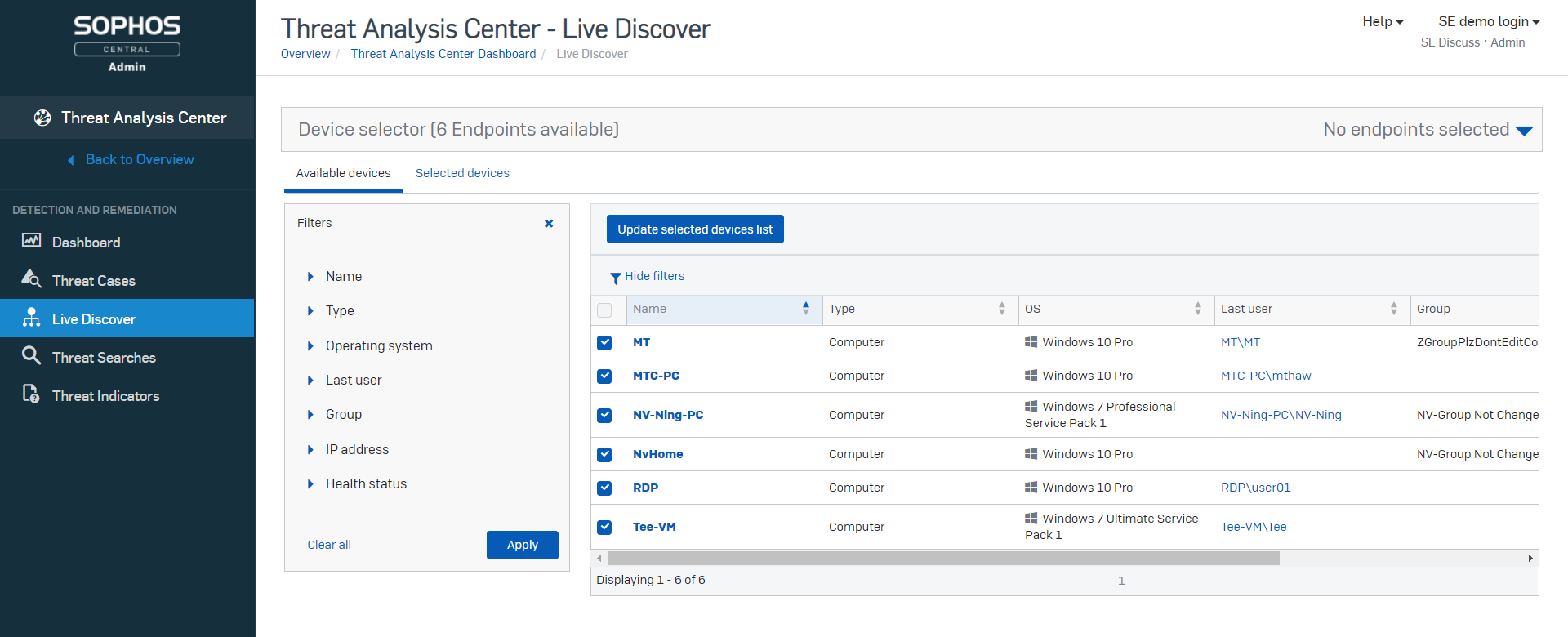
Sophos EDR includes Live Discover, which leverages a collection of pre-written, fully customizable SQL queries to answer IT operations and threat hunting questions.
To begin, we select which devices we want to check.
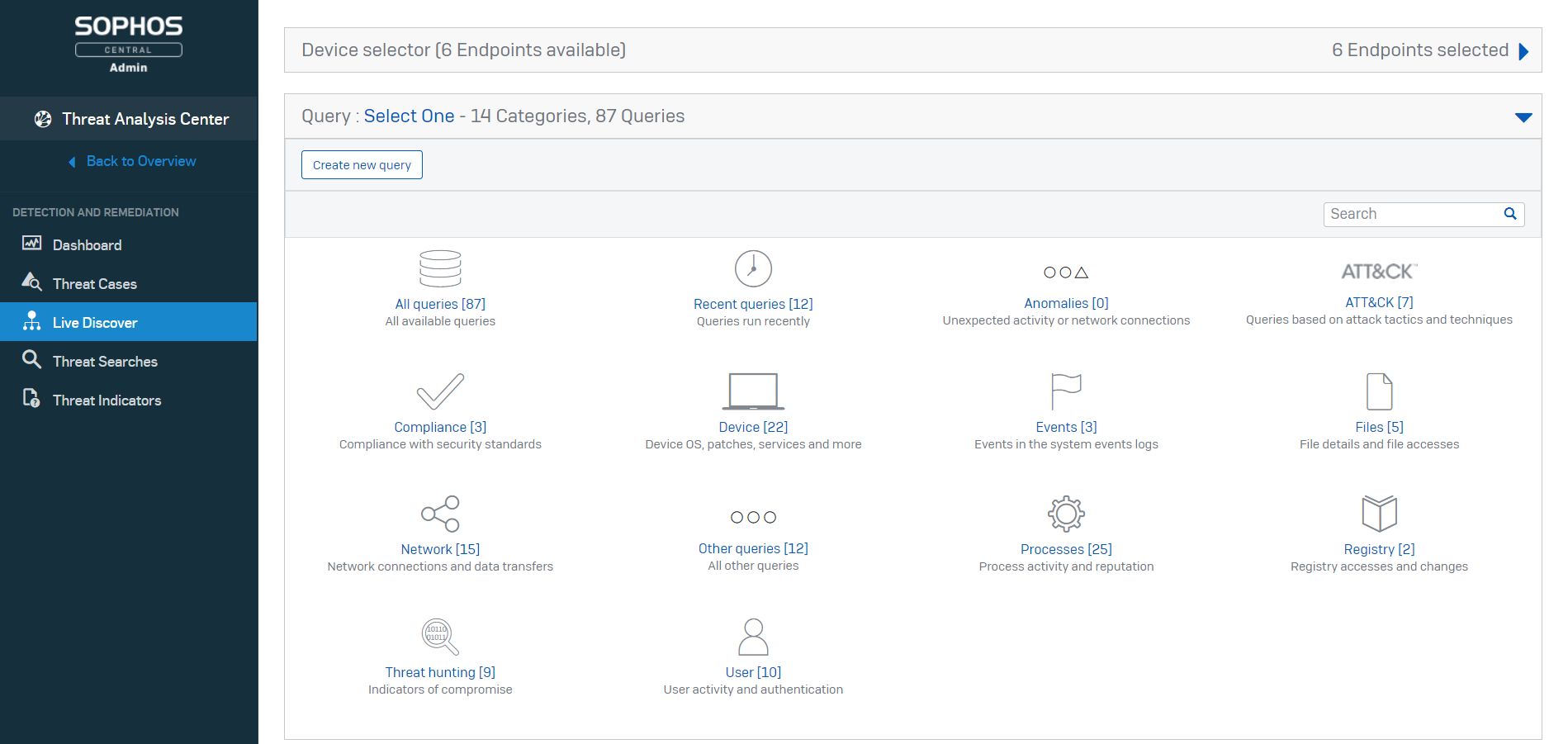
There are a variety of different categories to choose from depending on your needs. We have a couple of options for RDP. Identifying devices with running processes that have active RDP connections or finding devices that have RDP enabled.
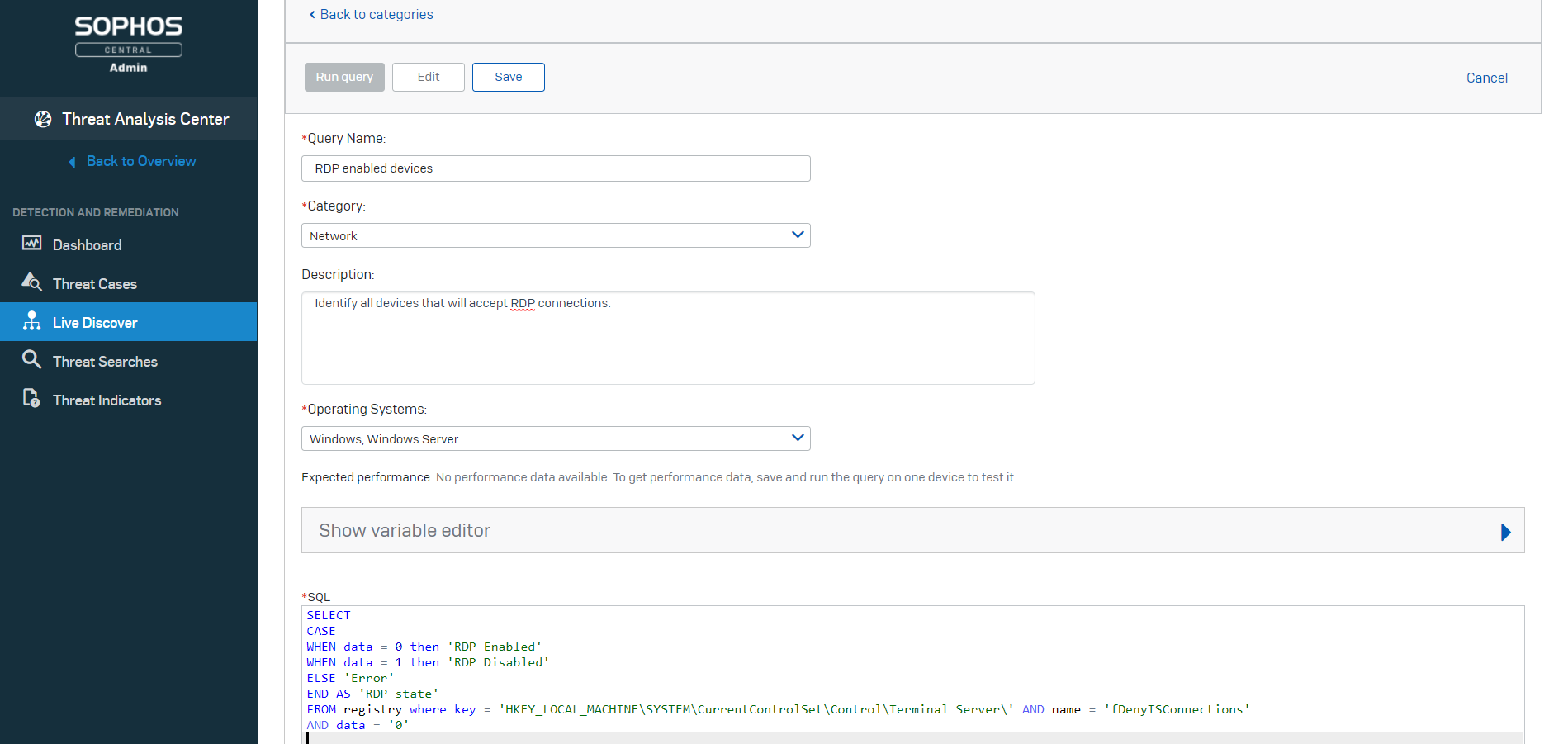
In this case we want to do the latter, so we’re going to create a short query for the task. A quick search of the Live Discover query sharing forum gives us exactly what we need. A couple of clicks later and we have our query ready to run (we also had the option to select a pre-written query to identify devices with active RDP connections).
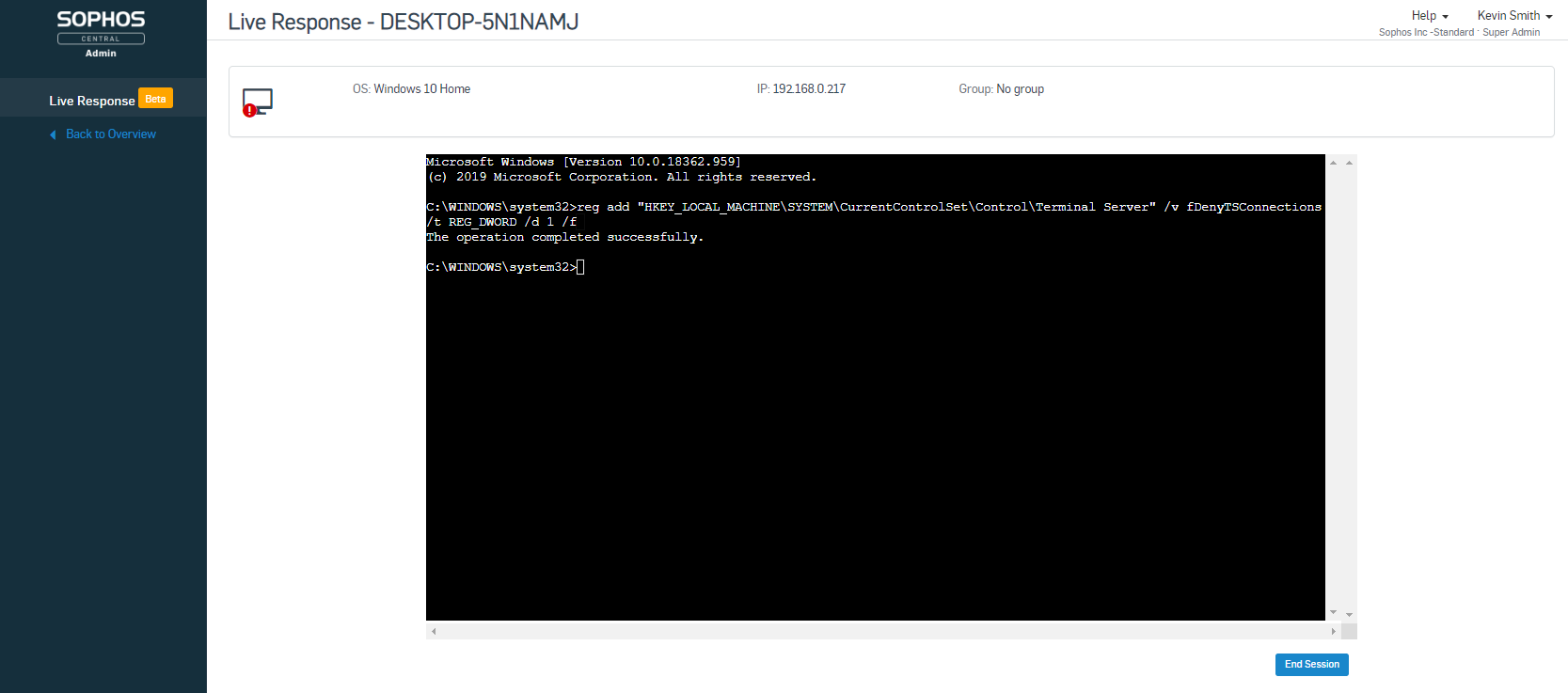
The query identifies a device that has RDP enabled. From the same console, we launch a Live Response remote terminal session to the device and use the command line interface to disable RDP.
It’s that easy to detect RDP and disable it across your entire endpoint and server estates. To learn more about Sophos EDR head over to Sophos.com or to try it for yourself, you can start a no-obligation 30-day trial.
Net Universe offers all Sophos Devices and subscritpions also consultant services with worldwide Delivery Services. Send us an email to [email protected] for more information or visit https://www.netuniversecorp.com/sophos.
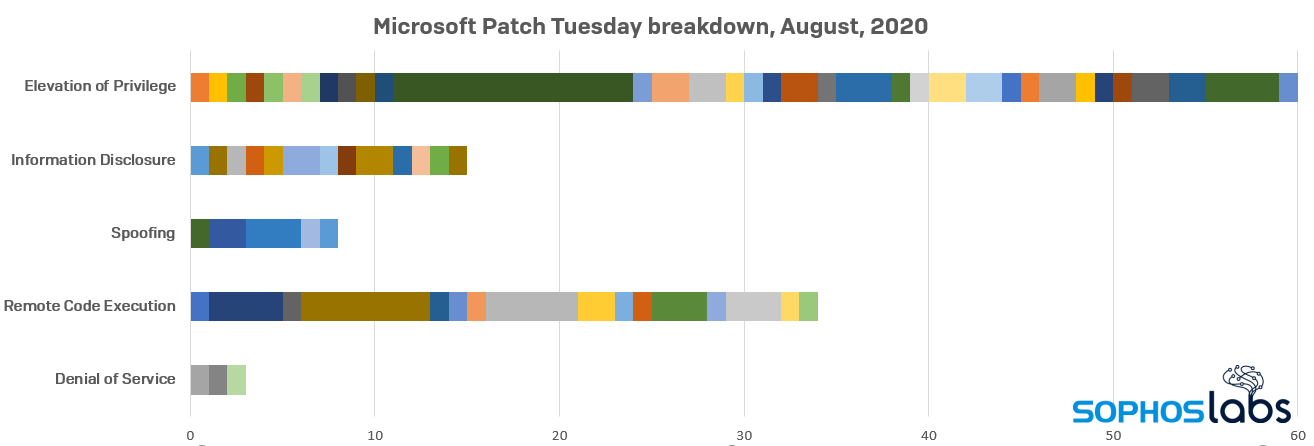
Microsoft has squished 120 bugs in this month’s release of software updates spanning its product lines. While the total number of bugs that have been fixed this month dropped slightly compared to last month, the number of critical bugs fixed this month was higher, at 32, compared to July’s 20.
All but one of those critical fixes addressed a remote code execution vulnerability that affected the .NET framework (CVE-2020-1046), media codecs (CVE-2020-1560, -1574, -1585) and engines (CVE-2020-1379, -1477, -1492, -1525, -1554), scripting engines (CVE-2020-1555, -1567, -1570), and the Edge browser’s PDF renderer (CVE-2020-1568). The only non-RCE critical vulnerability is a privilege escalation that affects the Netlogon component (CVE-2020-1472).
The bug that affects the Print Spooler isn’t critical, but both the relatively old code (the bug affects systems as mature as Windows 7) and its assigned CVE number are notable. The bug was a subject of a talk at the Black Hat Briefings which took place last week. This privilege escalation bug, classified “important,” picked up the most elite reference of the year: CVE-2020-1337. Someone has a sense of humor.
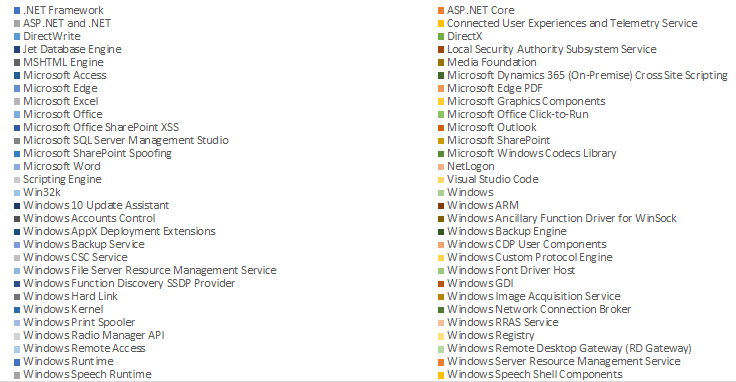
The key identifies the products represented in the patch chart above
While readers can find the full details about every patch this month in Microsoft’s Security Update Guide Release Notes, and Servicing Stack Updates, and users can download patches manually from the Microsoft Security Update Catalog, the Offensive Research team passed along some notes about the patches they found most interesting.
Windows Spoofing Vulnerability
CVE-2020-1464
This vulnerability, formerly titled “Windows Authenticode Signature Spoofing Vulnerability,” has already been exploited in “in the wild” attacks. Authenticode is the component of Windows that validates cryptographically-signed binaries (eg., drivers) and executables. These are important because in latter-day editions of Windows 10, you can’t (for example) load driver files that have not been certified as valid by a legitimate signing authority.
Well, that’s an important security feature, since we’ve been observing for months that ransomware has been using a variety of bypasses to load unsigned driver files, which then are used to load the ransomware payload at a level where some endpoint security products are unable to prevent the ransomware from doing damage.
So while Microsoft has only classified this particular patch as “important,” and not “critical,” it’s actually quite critical that you install updates so your system cannot be abused in this way. Deferring the installation of this patch can have far reaching, negative consequences.
Scripting Engine Memory Corruption Vulnerability
CVE-2020-1380
As if we all didn’t need another reason not to use Internet Explorer anymore, something like this comes along. The bug is a Use After Free vulnerability, in the JIT compiler of Internet Explorer’s JavaScript engine. While bugs like this may lead to remote code execution and compromise if you visit the wrong website with Internet Explorer, we all know better than to use that browser, anymore. Right?
Right?
The bug itself is unremarkable and is similar to your average IE vulnerability that comes a dime a dozen.
If you’re still using Internet Explorer, and you aren’t teaching a lesson on computer history in a museum exhibit, please switch to a modern browser.
Windows dnsrslvr.dll Elevation of Privilege Vulnerability
CVE-2020-1584
the DNS Client network service’s main purpose is to cache DNS (Domain Name System) results, optimizing network communications. It’s enabled by default on Windows systems.
The bug (in the DNS Client’s dnsrslvr.dll library) is an Integer Overflow vulnerability that, when triggered, results in an undersized memory allocation, and a subsequent memory corruption. It’s the memory corruption that may lead to arbitrary code execution.
The vulnerable code path is reachable by the RPC (Remote Procedure Call) invocation of certain methods implemented by the DNS Client service. This can be done by applications running on the same system. Upon successful exploitation, an application may elevate its privileges to that of a network service – “NT AUTHORITYNETWORK SERVICE” privileges.
This is only the second time a vulnerability has been reported in dnsrslvr.dll, the previous one (CVE-2019-1090) only having been discovered last year.
Windows Ancillary Function Driver for WinSock Elevation of Privilege Vulnerability
CVE-2020-1587
The file afd.sys is the driver responsible for the Windows kernel’s side of Winsock (Windows Sockets) functionality. It has a Race Condition vulnerability: An attacker can attempt to “race” multiple threads into executing the vulnerable code concurrently. If the timing is precise, and the “race” is won, a Use After Free condition follows, and ultimately an attacker can run arbitrary code.
This bug was mitigated by the introduction of proper thread synchronization around the vulnerable code.
Despite the driver’s name and purpose, the bug itself is not part of networking code and is not reachable by network traffic. It is only triggerable by applications running on the same system. If such an application interacts with afd and successfully exploits the bug, it can escalate its privileges to Kernel privileges.
Sophos protection
Here is a list of protection released by SophosLabs in response to this advisory to complement any existing protection and generic exploit mitigation capabilities in our products.
CVE
SAV
IPS
CVE-2020-1380
Exp/20201380-A
SID:9000225
CVE-2020-1567
Exp/20201567-A
SID:2303521
CVE-2020-1570
Exp/20201570-A
SID:2303522
CVE-2020-1578
SID:2303523
How long does it take to have Sophos detection in place?
We aim to add detection to critical issues based on the type and nature of the vulnerabilities as soon as possible. In many cases, existing detections will catch exploit attempts without the need for updates.
Net Universe offers all Sophos Devices and subscritpions also consultant services with worldwide Delivery Services. Send us an email to [email protected] for more information or visit https://www.netuniversecorp.com/sophos.
We use cookies to ensure that you get the best experience on our site and to present relevant content and advertising. By browsing this site without restricting the use of cookies, you consent to our and third party use of cookies as set out in our Cookie Notice. Close
This website uses cookies to improve your experience. We'll assume you're ok with this, but you can opt-out if you wish. Cookie settingsACCEPT
Privacy & Cookies Policy
Privacy Overview
This website uses cookies to improve your experience while you navigate through the website. Out of these cookies, the cookies that are categorized as necessary are stored on your browser as they are essential for the working of basic functionalities of the website. We also use third-party cookies that help us analyze and understand how you use this website. These cookies will be stored in your browser only with your consent. You also have the option to opt-out of these cookies. But opting out of some of these cookies may have an effect on your browsing experience.
Necessary cookies are absolutely essential for the website to function properly. This category only includes cookies that ensures basic functionalities and security features of the website. These cookies do not store any personal information.
Any cookies that may not be particularly necessary for the website to function and is used specifically to collect user personal data via analytics, ads, other embedded contents are termed as non-necessary cookies. It is mandatory to procure user consent prior to running these cookies on your website.