New quick settings help you optimize your Gmail layout

What’s changing 

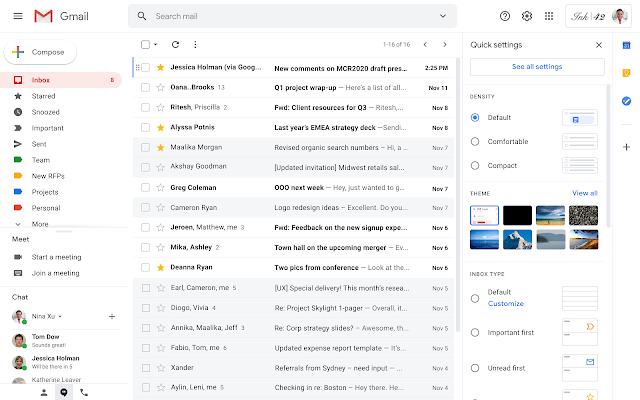
We’re adding a quick settings menu that helps you easily find and use different layouts, settings, and themes to make Gmail look and feel right for you.

When you click on Settings, you’ll now see different interfaces, inbox types, and display options alongside your real inbox. When an option is selected, the inbox will immediately update so you can compare choices and see how settings work in real time.

The full settings menu is still available by clicking the “See all settings” button at the top of the new quick settings menu.

Who’s impacted 

End users

Why it matters 

Gmail has many options to customize layout, look and feel, and other details to make sure the interface is personalized and optimized for how you like to work. These include:

  • Customizing the density of text and information displayed 
  • Choosing a different inbox type to help intelligently prioritize and organize emails 
  • Adding reading panes to quickly see email contents 
  • Applying themes to personalize the look and feel of your inbox 

We’re making these options easier to find, and letting you explore them in real time, so your actual inbox will update immediately to show you exactly what the setting will do. We hope this makes it easier to set up Gmail the way that works best for you.

Additional details 

Note that this update just adds an easier way to access settings that already exist in the full Gmail settings menu. There are no new settings, and users’ existing settings won’t be changed with this update. You can still see the full settings menu by clicking the “See all settings” button at the top of the new quick settings menu.

Getting started 

Admins: There is no admin control for the feature.
End users: This feature will be ON by default. Visit the Help Center to learn more about customizing Gmail settings, or how to help users switch to Gmail from Microsoft Outlook.

Rollout pace 

Availability 

  • Available to all G Suite customers as well as users with personal accounts. 

Resources 

[ad_2]

Net Universe offers all Google devices with worldwide Delivery Services.
Send us an email to [email protected] for more information or visit https://www.netuniversecorp.com/google.
You can visit our Shop Online


Updated Admin console for 2-Step Verification and SSO for SAML controls

Quick launch summary 

We’re making two updates to the Admin console:


New 2-Step Verification (2SV) controls: 
We’re updating the controls you use to configure 2SV in the Admin console. You may notice:

  • A new “2-Step Verification settings” section of the Security page where you can turn 2SV on or off and control other related settings. You can find this at Admin console > Security > 2-Step Verification
  • The ability to turn 2SV enrollment on or off for each organizational unit (OU). Previously you could only turn it on or off for the whole domain. Once it’s turned on, additional 2SV policies can be adjusted. 
  • New interfaces which prevent admins accidentally locking themselves out of an account by enforcing 2SV without being enrolled in 2SV. 
  • An updated and streamlined interface. 

The new 2-Step Verification settings section in the Admin console

In the 2SV section you can configure 2-Step Verification enforcement by OU

New section for single sign-on settings for SAML applications 
We’re making some updates to the settings you use to set up single sign-on for SAML applications. You may notice:

  • The settings that apply to all SAML applications when Google is the Identity Provider (IdP) are now in their own section in Security settings at Admin Console > Security > Set up single sign-on (SSO) for SAML applications
  • The functionality is not changing but you will find a more streamlined experience for managing certificates and to download IdP metadata. 

The new SSO for SAML settings section in the Admin console

 The new SSO for SAML area where you can control related settings

Getting started 

  • Admins: The new per-OU 2SV enforcement feature will be set at the organization level (root OU) to the value you had prior to the launch, so that there is no change in behavior. After the launch, you can now change 2SV enforcement at an OU level. You can also use exception groups for 2SV enforcement settings, in addition to 2SV settings where you could already use exception groups. Visit the Help Center to learn more about how to deploy 2-Step Verification for your organization. 
  • End users: There is no end user impact for the feature. 

Rollout pace 

Availability 

  • Available to all G Suite and Cloud Identity customers 

Resources 

[ad_2]

Net Universe offers all Google devices with worldwide Delivery Services.
Send us an email to [email protected] for more information or visit https://www.netuniversecorp.com/google.
You can visit our Shop Online


Change to the format of secondary Calendar and resources

Quick launch summary

Starting June 3, 2020, the calendar IDs associated with newly created secondary calendars and resources will have a new format. In the new format, your G Suite account’s domain name will not be included in secondary or resource calendar IDs.

  • The existing email format for calendar resources is the following:
    {customer domain}_{random characters}@resource.calendar.google.com
  • The format for secondary calendars is the following:
    {customer domain}_{random characters}@group.calendar.google.com
  • The new format for newly created calendar resources will be the following:
    {random characters}@resource.calendar.google.com
  • The new format for newly created secondary calendars will be the following:
    {random characters}@group.calendar.google.com

This change is only cosmetic and no Google Calendar functionality is affected because of it. However, if you maintain a script that parses/extracts the domain name from Resource/Secondary Calendar IDs, please update your scripts to ensure they continue to work following this change.

Rollout pace

Availability

  • Available to all G Suite customers

[ad_2]

Net Universe offers all Google devices with worldwide Delivery Services.
Send us an email to [email protected] for more information or visit https://www.netuniversecorp.com/google.
You can visit our Shop Online


New user setting to hide or show Google Meet in Gmail

Join the official community for G Suite administrators

In the Cloud Connect Community, discuss the latest features with Googlers and other G Suite admins like you. Learn tips and tricks that will make your work and life easier. Be the first to know what’s happening with G Suite.

______________

Learn about more G Suite launches

On the “What’s new in G Suite?” Help Center page, learn about new products and features launching in G Suite, including smaller changes that haven’t been announced on the G Suite Updates blog.

______________

View active G Suite Beta Programs

G Suite Beta Programs give participating customers an opportunity to help us improve and develop new products and features as well as provide feedback on them, before they’re made generally available.

[ad_2]

Net Universe offers all Google devices with worldwide Delivery Services.
Send us an email to [email protected] for more information or visit https://www.netuniversecorp.com/google.
You can visit our Shop Online


Distribute certificates for mobile devices via MDM

What’s changing 

We’re making it possible to issue digital certificates to iOS and Android devices for secure access even when those devices are not connected to the corporate network. This will make it easier to provide new mobile devices with identification, authentication, and access to G Suite and other corporate resources. This is available to G Suite Enterprise, G Suite Enterprise for Education, and Cloud Identity Premium customers using Google Endpoint Management via an on-premises connector.

Who’s impacted 

Admins

Why it’s important 

Certificates are an important way to identify and authenticate mobile devices so they are able to securely access corporate resources. These resources can include G Suite, enterprise WiFi hotspots, and more.

Some customers include a requirement for devices to be on-premise and protected by a firewall in order to distribute device certificates. As some users can no longer access corporate locations and networks, customers need a way to issue these certificates remotely.

By providing this feature, we are helping these customers keep their employees connected and productive even when they’re not in the office.

Getting started 

Rollout pace 

  • This feature is available now. 

Availability 

  • Available to G Suite Enterprise, G Suite Enterprise for Education, and Cloud Identity Premium customers 
  • Not available to G Suite Basic, G Suite Business, G Suite for Education, G Suite for Nonprofits, and Cloud Identity Free customers 

Resources 

[ad_2]

Net Universe offers all Google devices with worldwide Delivery Services.
Send us an email to [email protected] for more information or visit https://www.netuniversecorp.com/google.
You can visit our Shop Online


ASUS New Google Meet Hardware kits and updated Meet compute system

Video conferencing solutions has always been in high-demand and now Asus has introduced a new ASUS starter kit for Google Meet, and a rebranding for the Small and Large versions. 

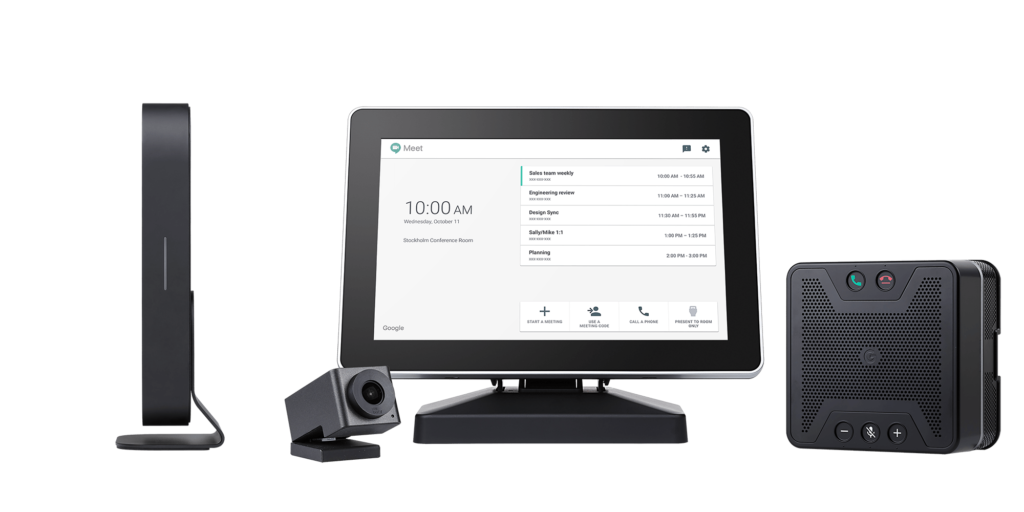
The new starter kit version includes the Huddly IQ camera, speakermic, a new and redesigned compute system, and remote control (versus touch controller). It requires less space and its a more affordable way to keep colleagues, partners, and customers around the world connected, face-to-face.

New ASUS starter kit for Google Meet Hardware

The Small version includes the Huddly IQ camera ( instead of the Huddly Go included on the actual version),  speakermic,  the MIMO and a new redesigned compute system.

New ASUS  Google Meet Hardware Small

About the new Google Meet hardware compute system, previously Chromebox.

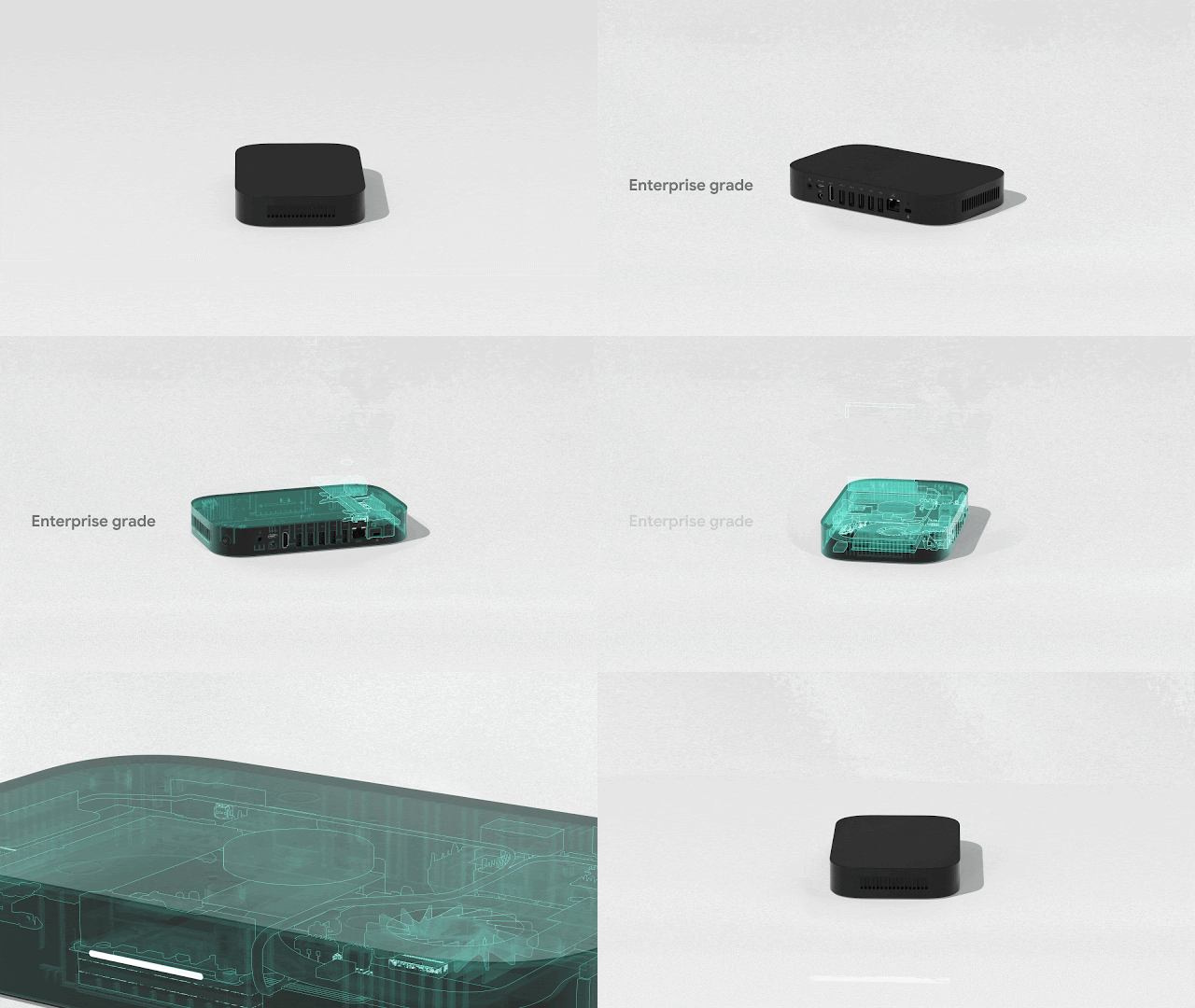
This rectangular, Mac Mini-Esque computer running Chrome OS is powered by an Intel Core i7-8550U processor with 128GB of storage that supports 4K video and can be connected to multiple displays simultaneously. There’s Dual Band 802.11ac Wi-Fi + Bluetooth 4.2 and ports arranged on one side for cleaner cable management.

Design-wise, it has a magnetic chassis and wall mount to stealthily attach to the back of a monitor, while there’s also a desk stand. Asus touts “enterprise-grade manufacturing with testing and quality control.”

Meet compute system

Asus Google Meet Speakermic with Google Assistant
Once these new kits are launched a beta access program for Google Assistant can be requested.

All these kits will be available in June in 28 countries and come in three different price points.

Net Universe offers all Google devices with worldwide Delivery Services.
Send us an email to [email protected] for more information or visit https://www.netuniversecorp.com/google.
You can visit our Shop Online

New ASUS Google Meet Hardware starter kit and updated Meet compute system

What’s changing

We’re introducing a new ASUS starter kit for Google Meet Hardware, helpful for those who take frequent video conferences from home or from smaller-sized rooms. The starter kit includes the Huddly camera, speakermic, compute system, and remote control (versus touch controller). It requires less space and is a more affordable way to keep colleagues, partners and customers around the world connected, face-to-face.

New ASUS starter kit for Google Meet Hardware

We’re also refreshing existing ASUS kits with the new ASUS Google Meet compute system (formerly Chromebox). This new Meet compute system is slimmer and easier to deploy than previous versions, with a longer device lifespan of five years.

We’ll be launching a Meet compute system with Logitech in partnership with CTL, coming soon. Stay tuned to the G Suite Updates blog for more information.

For those returning to shared meeting spaces, we have made voice controls available in beta to make it easier to host touch-free meetings. Customers who wish to sign up for the beta can do so here. Voice controls will be generally available in the coming months.

Who’s impacted

Admins

Why you’d use it

ASUS Google Meet starter kit

  • Remote control with built-in keyboard saves space over having a dedicated touch display
  • More affordably deliver meeting experiences to the home or office

Meet compute system

  • Fast: Ultra-fast boot up and automatic synchronization with existing Chrome services
  • Compact: At less than eight inches around, fits any size workspace or mounting application
  • Powerful: Intel i7 processor upgraded with 128GB SSD
  • Lasting: Five years end-of-life (EOL) support, enterprise grade manufacturing and testing, two-year warranty
  • Innovative: Designed for easy installation with screwless and magnetic mounting
  • Efficient: Single-sided ports for precise cable management and easy access

Meet compute system

Availability

Resources

[ad_2]

Net Universe offers all Google devices with worldwide Delivery Services.
Send us an email to [email protected] for more information or visit https://www.netuniversecorp.com/google.
You can visit our Shop Online


Talk to people outside of your domain in Google Chat

What’s changing

Starting on May 26th, you’ll be able to start conversations in Google Chat (previously known as “Hangouts Chat”) with people outside of your domain. You’ll be able to do this by either sending a direct message or adding them to rooms.

Beginning today, conversations with external users in classic Hangouts will also appear in Chat as new messages are sent.

Who’s impacted

Admins and end users

Why you’d use it

Whether you’re talking to customers, coordinating with a vendor, or trying to keep in touch with your students’ parents, you’ll now be able to use Google Chat with your key contacts. With this change, you can keep all of your communication in one central place.

Additional details

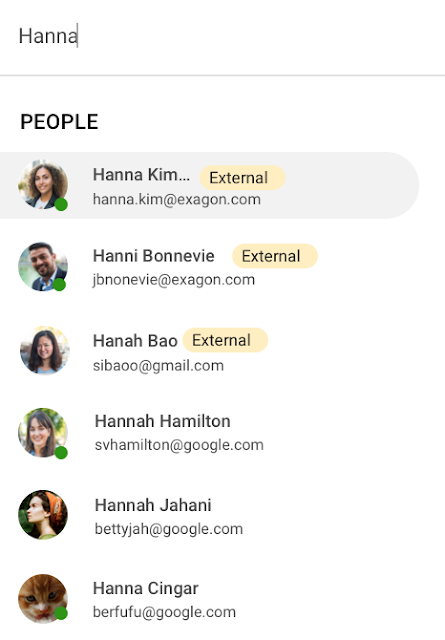
To use Google Chat, people outside your domain need to have a Google Account. These users will have an “external” badge in Chat, so you’ll be sure you’re sharing information with the right people.

Additionally, you’ll need to designate a room as “External” when you create it, and you won’t be able to change this setting after the room is created. This means you won’t be able to add external users to any rooms created before this launch, as those will remain “internal.”

Note: While you can add external users to a room in Chat, you cannot include external users in a group chat.

Getting started

Admins: This feature will respect your existing “Chat externally” setting, which will apply to both classic Hangouts and Google Chat going forward. It can be controlled at the organizational unit (OU) or domain level. Visit the Help Center for more information on how to turn the “Chat externally” setting on or off in the Admin console.

You’ll also be able to control whether users can create and join external Rooms within your organization through the “External Rooms” setting in the Admin console.

End users: There is no end user setting for this feature. Visit the Help Center to learn more about using Chat with external users.

Rollout pace

Existing classic Hangouts conversations appearing in Chat

Ability to start new conversations with external users

  • Rapid and Scheduled Release domains: Gradual rollout (up to 15 days for feature visibility) starting on May 26, 2020. You’ll know this feature has been enabled for your domain when your users begin to see the options to create external rooms and add external users.

Availability

  • Available to all G Suite customers

Resources

Roadmap

[ad_2]

Net Universe offers all Google devices with worldwide Delivery Services.
Send us an email to [email protected] for more information or visit https://www.netuniversecorp.com/google.
You can visit our Shop Online


Google Meet’s Video Platform Open to All

Click “Start a meeting” and a new window opens with a unique, secure meeting for you to join and then share with others. You can also easily join meetings shared with you by entering a meeting code. And you can plan video meetings and invite others directly from Google Calendar.

Because video meetings have never been more important, we’ve been fast-tracking the most requested features for Meet, and are now making them available to all. Anyone can use Meet’s simple scheduling and screen sharing, real-time captions, and layouts that adapt to your preference, including an expanded tiled view—all built on Google’s secure, reliable global infrastructure. Speaking from my own experience, the new features in Meet are already making our team (and my family) meetings better. We love how tiled view makes us feel more connected—and the occasional surprise visits from kids and family pets! 

And we’re continuing to look for ways to make Google Meet more accessible and useful. For example, we know video meetings can be challenging to follow for those with hearing loss, which is why we made sure AI-powered automatic live captioning was available to everyone. One of the most meaningful emails I’ve received was from a parent whose child was able to feel more included thanks to live captioning. Google AI has also made it possible to provide helpful features like low-light mode, which can automatically adjust your video to make you more visible to others.

Meet is available for free for everyone at meet.google.com and on iOS or Android. If you have an existing Google Account (for example, if you’re a @gmail.com user), you can sign in at meet.google.com to get started. If you don’t have a free Google Account, it only takes a minute to create one using your work or personal email address of choice (we require this step as a security measure, and you’ll only need to do this once). Or look for Meet right in Gmail.  

We hope Meet will help you connect to all your important meetings—from work meetings, to graduation meetings, to wedding meetings, and everything in between.

Net Universe offers all Google devices with worldwide Delivery Services.
Send us an email to [email protected] for more information or visit https://www.netuniversecorp.com/google.
You can visit our

How Google Meet supports two million new users each day

More than a decade ago we introduced secure, easy-to-use business collaboration and productivity apps (now known as G Suite), and we envisioned a new way of working in the cloud. And although we always knew the value of cloud-based collaboration, it is more important than ever at a time like this. 

Over the past several weeks, we’ve seen Google Meet—G Suite’s video conferencing solution—help millions of people stay connected, whether it’s colleagues working at home, companies livestreaming to global employees, doctors caring for patients, banks providing loans, retailers and restaurants helping the elderly place orders for home delivery or curbside pickup, social services conducting welfare checks, governments serving citizens, or schools staying in session. 

Earlier this week, we surpassed a new milestone, with more than 2 million new users connecting on Google Meet every day, and they’re spending over 2 billion minutes together—that’s more than 3,800 years of secure meetings in a single day. We’re humbled by the huge responsibility that comes with this growth, and we’re determined to continue doing our part to help.

Here’s a little more on what that means.

Meet, and all of G Suite, runs on Google’s secure, resilient global infrastructure, which helps us reliably manage our capacity to keep our services up and running. With Meet, organizations around the world can take advantage of the same secure-by-design infrastructure, built-in protection, and global network that Google uses to secure your information and safeguard your privacy. You can learn more in our Google Meet security blog post.

Last month, we made advanced Google Meet video-conferencing capabilities available at no cost to all G Suite and G Suite for Education customers. We’ve now extended that availability to September 30, 2020 to ensure businesses, organizations, institutions, and educators continue to be supported during this time.

Earlier this year, G Suite also hit another important milestone, surpassing six million paying businesses and organizations. We’re acutely aware of our responsibility to these teams as they support their own constituents, patients, students, and customers during this pandemic. Here are a few stories they’ve shared.

Cambridge Health Alliance, a health system with 140,000 patients in Cambridge, Somerville, and Boston’s Metro North region, has relied on G Suite to support its staff and caregivers. “We didn’t realize how integral G Suite had become to our daily work until dealing with a pandemic where consistent communication with our CHA staff was of utmost importance,” said James LaPlante, Sr. Director, Technology and Biomedical Services. “With one click, staff have been able to connect from their Gmail, Calendar, or from Meet-enabled conference rooms across three hospitals, 15 health centers, or from home.” 

In the UK, Hackney Council is using G Suite, Meet and Chromebooks to keep its team of 4,000 staff connected and to make sure that essential services can still be delivered for its citizens.

In Peru, the Judiciary branch is using Meet to continue operating during the nation-wide quarantine. Through video conferences they are carrying out both internal meetings and also hearings. By doing this, attorneys, lawyers and judiciary clerks don’t have to physically attend court, keeping the virus from spreading, while maintaining the administration of justice in the country.

Korean Air has transformed its internal business system with G Suite since July 2019, creating a positive company culture. Employees communicate effectively with G Suite in a variety of ways, including chat, voice, and video, which reduces decision-making time. Korean Air recently opened a ‘Google G Suite Meeting Room’ within the company to further enhance its cloud-native communication capabilities and accelerate mobile-based collaboration.

German manufacturing company KAESER Compressors adopted G Suite in 2018, which allowed them to transition 4,000 employees to working from home smoothly, with minimal disruption. They are using G Suite to connect with customers and job applicants.

When their news anchor voluntarily self-quarantined after suspecting he had been in contact with a person with COVID-19 during a convention, Milenio Televisión, a Mexican television cable news channel, had to figure out how to keep their show on the air. They chose Meet for its security, and high quality image and sound. Milenio Televisión is now broadcasting multiple shows through Meet and has been using the tool to have video conferences with correspondents in other countries. 

To help its staff cope with the impact of COVID-19, Italian bank Credem (Credito Emiliano S.p.A.) relied on G Suite, in particular Drive, Docs, and Meet, to seamlessly adapt to a collaborative work-from-home environment. It’s also helping them maintain business continuity, relying on Meet to continue to meet one-on-one with customers. 

In the Philippines, the Department of ICT (DICT) is responsible for the planning and development of information and communications technology. As a result of COVID-19, the department has been continuously seeking ways to improve its programs and services to help quarantined workers and citizens, including use of GovMail, which is built on G Suite, Google Chat, and Google Meet. “The migration to cloud-based GovMail which started last year has proven to be particularly useful for remote government operations in this time. Coordination between government agencies is more organized, resulting in faster responses benefitting their constituents,” said  Emmanuel Rey Caintic, DICT Assistant Secretary for Digital Philippines.

Kärcher, a German company known for its wide range of cleaning products, had initially planned to roll out G Suite to its workforce by 2021. In response to the pandemic, Kärcher rapidly accelerated their rollout, deploying G Suite to its entire 14,000 workforce in only five days. As of the end of March, Kärcher’s number of weekly active Meet and Chat users has grown by 20X.

Salesforce’s CRM solution brings companies and customers together, and they turned to G Suite to bring their own teams together. “With Salesforce employees working from home given COVID-19, innovative solutions like Meet are even more critical for effective virtual collaboration,” said Andy White, VP, Platform Engineering Salesforce. “Even with 2x our daily video calls—50,000 every workday—Google Cloud’s scale and support keep our teams reliably and seamlessly connected.”

The team at Shopify, a leading global commerce company, is relying on Meet to help them keep their workforce connected. “Even with the demand surges seen around the world, recently we had a 20 person meeting livestream to 4,000 people and there were no issues,” said Garth Pyper, Director of Technical Infrastructure. “Google Meet is our primary means of video conferencing across 5,000 people at Shopify, and we are grateful for the security, reliability, and flexibility it provides.”

With the global move to a fully remote workforce during COVID-19, software company Xero has embraced G Suite to help them make a smooth transition. “Google Meet is vital in keeping our teams socially connected, and Docs, Gmail and the full G Suite family of apps has the team’s productivity and collaboration working as if we were in the office. The reliability and performance of G Suite has allowed the IT team to focus on other challenges we face with a remote workforce.”

In Singapore, NTUC Fairprice Co-Operative, the largest supermarket chain of the island nation, has experienced a surge of 400%+ increase in capacity needs as customers urgently prepare for COVID-19 with in store and online purchases of all the necessities. With the help of G Suite, NTUC was able to handle this increased demand even as they transitioned the vast majority of their workforce to remote work.

Schnucks, a family-owned supermarket retailer with 100 stores in Missouri, Illinois, Indiana, Iowa and Wisconsin, was able to think outside the box to keep their business running and employees safe and connected. “We are running our Helpdesk 24/7 on Google Meet so that both our corporate and in-store employees can join in and get questions answered quickly. Our transportation department is able to practice social distancing by using a Google Meet ‘hotline’ as the WFH dispatch platform.” 

Meet had long been the standard collaboration tool for TELUS International, which provides customer experience solutions for global brands. “The Meet platform has helped us maintain and foster our caring culture as we transitioned from an on-site workforce to a work from home model,” said Michael Ringman, Chief Information Officer. “Whether through real-time collaboration, live meetings or a little stress relief with some virtual happy hours, our team’s ability to reliably connect ‘face-to-face’ through Google Meet has been integral to keeping us engaged despite the distance between us.”

These are just a few of the many stories we’ve heard. We’ll continue to support all our users to stay connected in the cloud. Read more on how Google Cloud is supporting businesses and communities here.