Most businesses run on a variety of applications and it’s essential for productivity and efficiency that such applications communicate with each other. If tools are rigid and fail to talk to each other, work can become quite cumbersome.
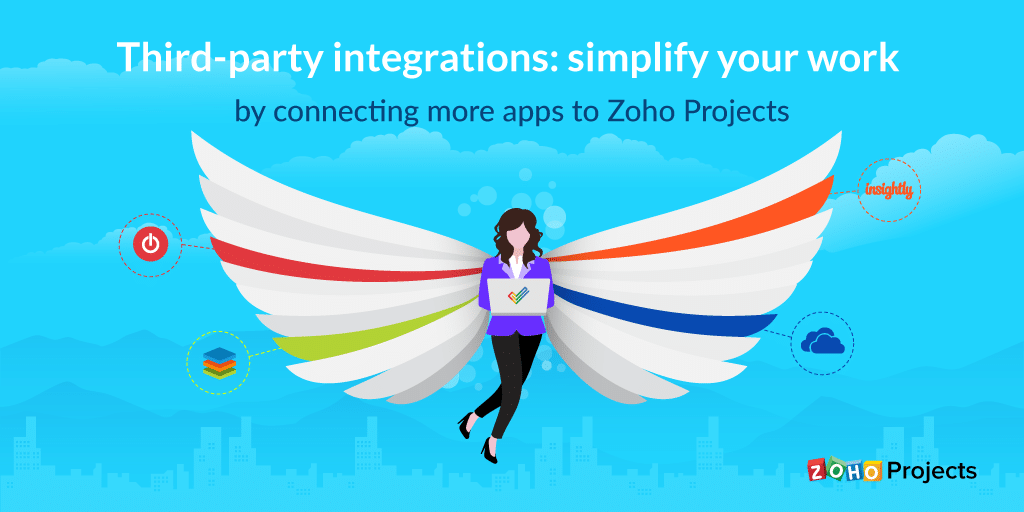
Last year, we asked our users what add-ons you’d like to see in the future for Zoho Projects. Many of you sent in your requests, and we heard you loud and clear! We’re pleased to announce the new third-party integrations we have coming up with in our first release:
SugarCRM
SugarCRM is a customer relationship management tool designed to help teams handle their sales automation, marketing automation, and account management needs.
SugarCRM is also packed with a ton of customization features, making it a versatile tool. SugarCRM is available as a cloud-based or on-premise solution.
Our integration with SugarCRM lets you access everything from one place. By associating projects in SugarCRM with Zoho Projects, you can map SugarCRM modules in Zoho Projects, create SugarCRM projects, and add tasks from Zoho Projects.
OneDrive
OneDrive is a cloud-based file storage tool which helps you store all your files in one place for easy access from wherever you are.
OneDrive for business not only houses all your important files but also helps you share and collaborate with your team. This tool comes with important security features such as personal vault, file restore, ransomware detection, and data recovery.
Our integration with OneDrive helps you manage your files effectively by linking documents from OneDrive to any project in Zoho Projects. It also lets you attach folders to specific projects securely and save time by allowing you to access all your documents on OneDrive directly from Projects.
Insightly
Insightly is a cloud-based customer relationship management tool for small and mid-sized businesses.
With features including lead routing, workflow automation, email tracking, and comprehensive dashboards to track important metrics, Insightly lets you convert won opportunities to projects seamlessly, without losing any data.
Our integration with Insightly makes it easier for you to create tasks or change a task’s status in Insightly, view Insightly project details, and create a Contact, Opportunity, and Organization in Insightly directly from Zoho Projects.
Toggl
In addition to the built-in Global Timer on Zoho Projects, now we have an extension for Toggl, a simple time tracking application with powerful reporting capabilities, built to help you track time and analyze productivity.
With features such as autotracking, tracking reminders, and idle detection, Toggl helps you see where you spend your time across different platforms and use that data to optimize your workflows.
Our integration with Toggl allows you to create projects in Toggl directly from Zoho Projects and also view details about Toggle tasks, such as to whom a task has been assigned.
Additionally, Toggl’s project management dashboard helps you track exactly how long each project and its tasks take to complete. It also calculates the estimated time of completion for ongoing projects and tasks.
The role of HR professionals is becoming more and more prominent in the healthcare sector. It is crucial to manage healthcare workers well, as they are directly involved in saving lives themselves.
To improve patient care, experience, and satisfaction, healthcare firms need to concentrate on establishing an efficient HR process that caters to the needs of employees. Some of the common HR challenges faced by healthcare firms include:
Higher employee turnover rate
Need to upgrade employee skills regularly
Increased burnout among employees
Ensuring regulatory compliance
All these challenges create an undue amount of pressure on HR professionals in the healthcare sector. HR professionals can overcome these challenges easily with the right HR software. Their workload can be reduced by automating every essential HR function, from onboarding to offboarding. Here are some of the many benefits that HR software brings to the healthcare sector:
Ensures open communication among healthcare employees by allowing them to communicate through internal chat, forums, feeds, etc.
Improves learning and development by allowing course admins to create multiple e-learning courses at once. Employees can learn at their own pace.
Ensures compliance by storing all important documents online.
Eases shift schedule management by creating shifts for multiple employees at once. Notifications are sent automatically whenever there is a change in shift.
Enhances employee performance with features like 360-degree feedback, multi-rater feedback, continuous review, skill-set matrices, and nine-box models.
Provides a seamless experience for your employees by allowing them to perform all their HR functions on the go.
Read more about the benefits of HR software for the healthcare sector in our HR Knowledge Hive.
June has been extremely productive for all of us here at Zoho People. Our product developers have come up with some amazing updates to provide a more seamless user experience to our customers, and we’re very excited to announce them.
These updates are also aimed at making HR management easier and more effective for your organization. Here’s what’s new from June:
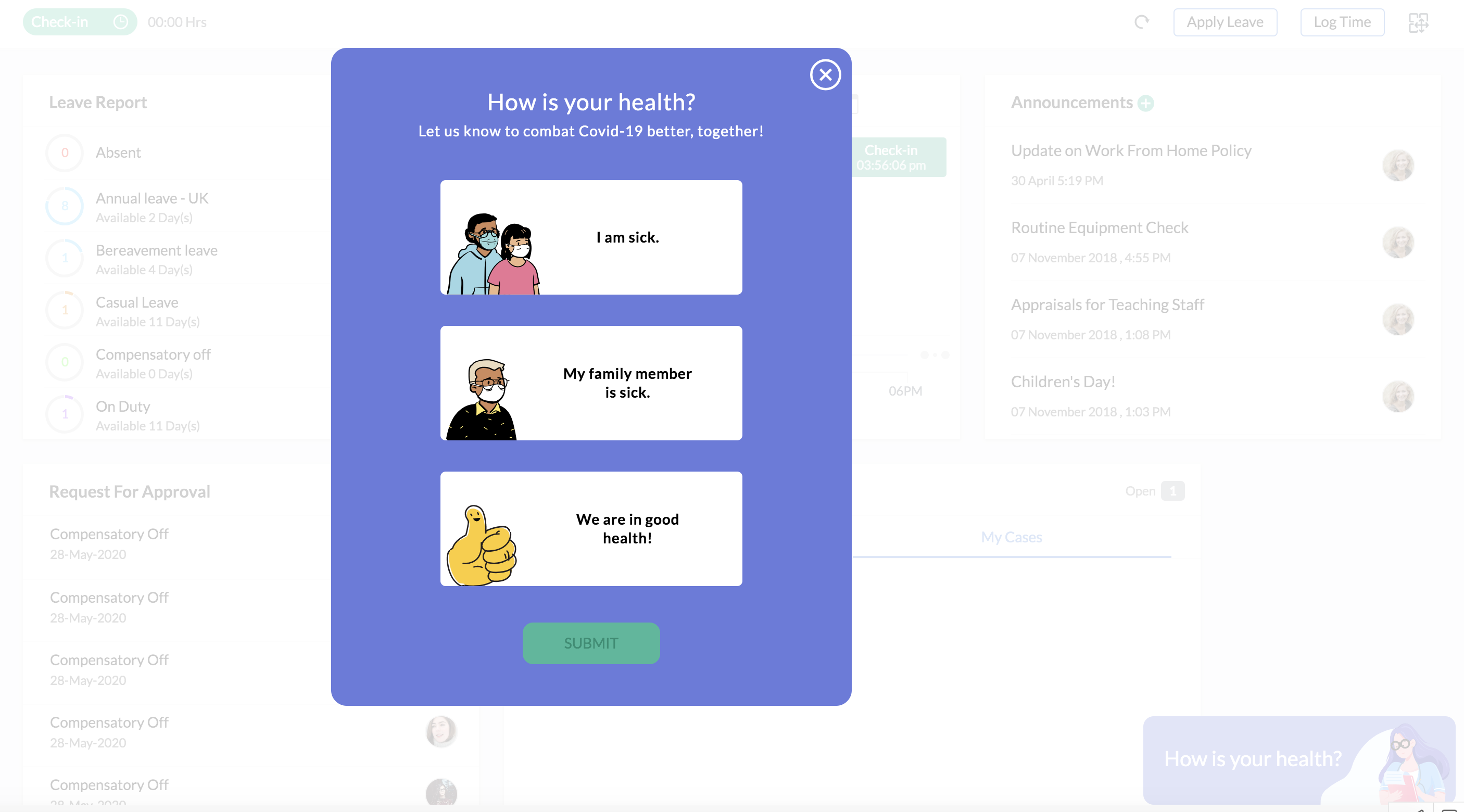
During public health situations like COVID-19, it’s essential to stay on top of the health status of your employees to support them through the crisis. This can also be useful when they have to return to work. With our new employee health status form, you can collect important information in an organized manner, avoiding errors and confusion. Once you enable the form, a short survey will be added to the employee dashboard through which they can submit theirs and their family’s health status. Learn more about this feature here.
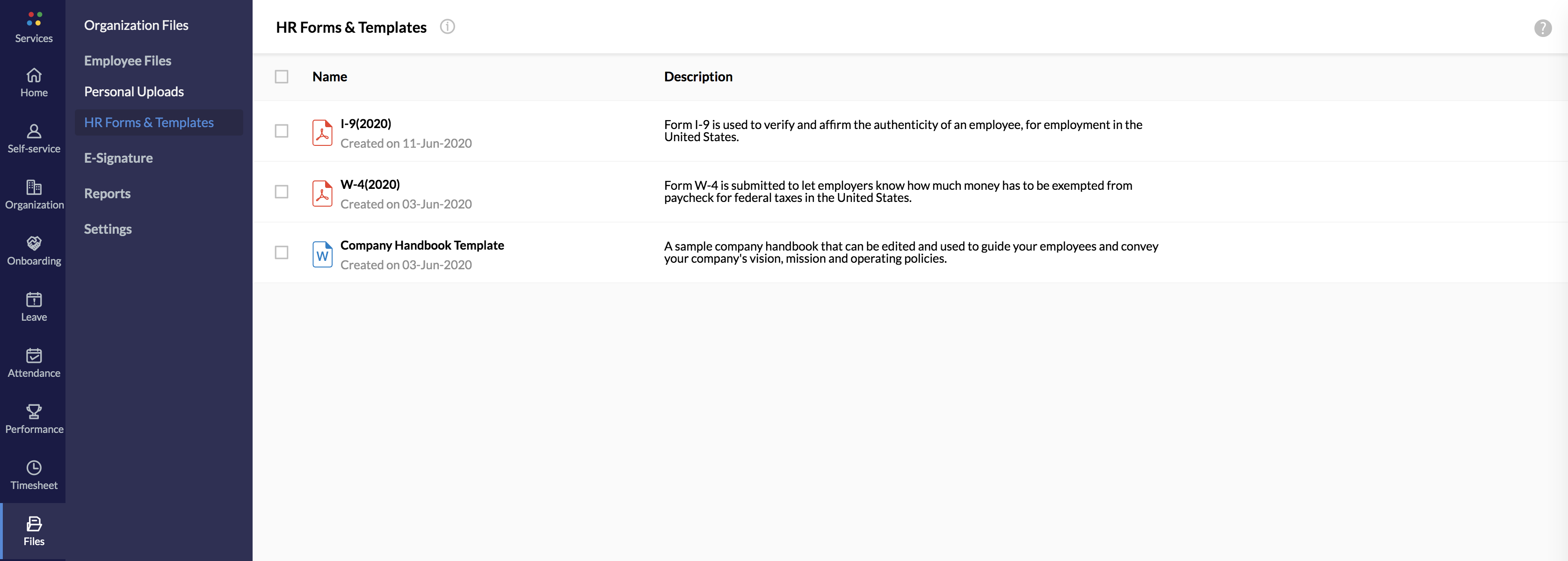
HR reps often have to juggle a variety of forms that have to be sent out to employees to collect vital compliance information. To make this process easier, we have consolidated some of the essential compliance forms like W9, W4, and I9 under the HR Forms and Templates category. You can share it with your employees to gather the necessary information. Company handbook templates, which can be customized according to your organization, have been added, too. Click here to take advantage of this new feature.
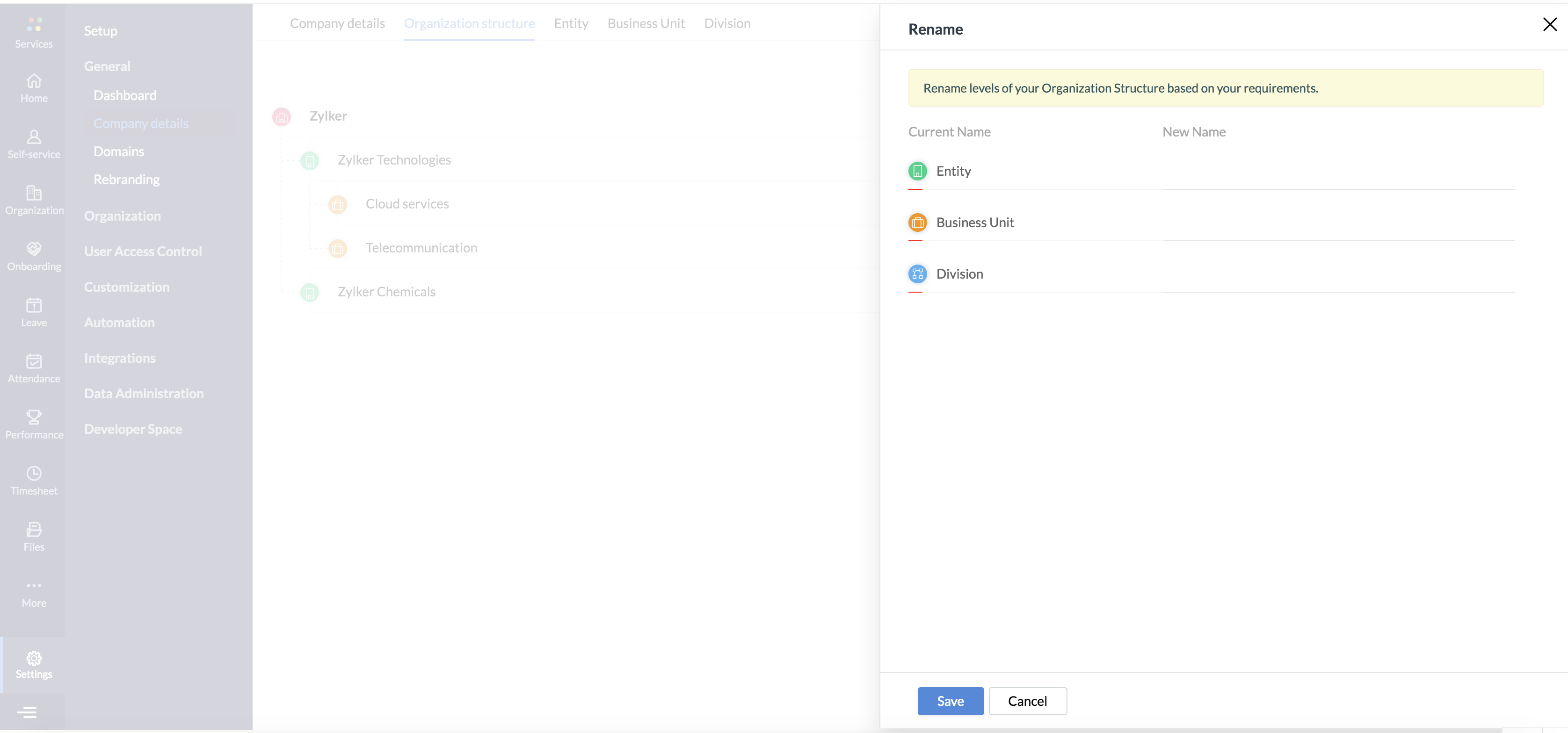
We can now help you lay out your organization’s hierarchy in a better way. The terminology used to denote the different levels of your organization’s structure may vary according to the location. With our new update, you can rename the different levels of your organization structure so that your employees are familiar with the terminology. Find out how to rename the levels here.
With our new Streams feature, you can organize all the related designations in your organization under a single name. You can also group employees who perform jobs of a similar nature under a single stream. Once this is enabled, the stream that an employee belongs to will be displayed in their self-service page. Learn more about the streams feature here.
Our new Batch Scheduler feature in the Learning Management System (LMS) eliminates the need to create every batch manually when a course is conducted in multiple batches. Once you schedule multiple batches at regular intervals (monthly/weekly/yearly), each one will be created automatically before the specified date. You can also clone the existing batch’s configuration to a new batch. Learn how to schedule multiple batches here.
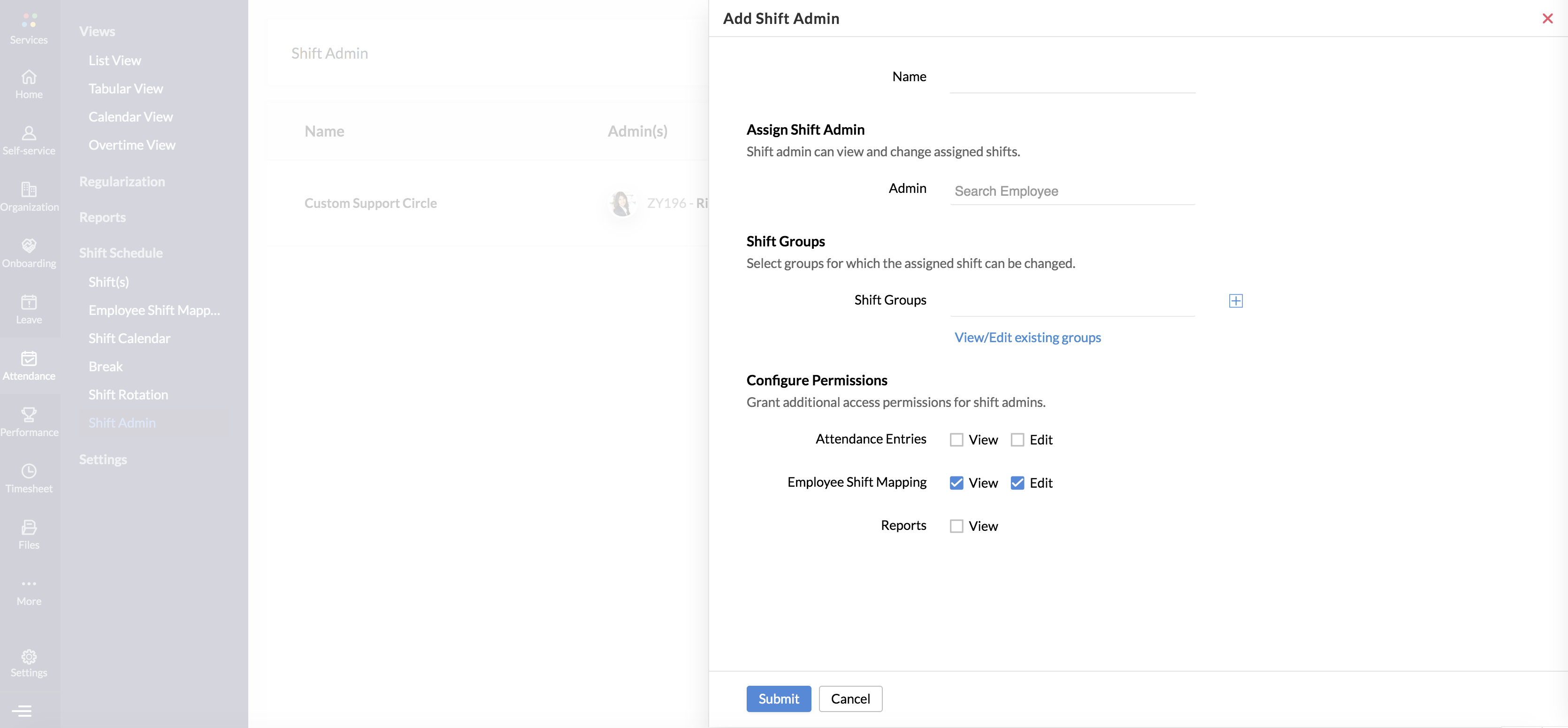
Our new Shift Admin feature is aimed at making the shift scheduling process as simple as possible. In organizations that have a large workforce, one single person can’t handle scheduling the shifts of dozens of employees. That’s why we’ve introduced this useful feature that allows you to assign a Shift Administrator to any group of employees, which are called shift groups. The Shift Administrator can configure the shift for any employee within the shift group. Any employees within your organization, regardless of their hierarchical status, can be selected as shift admin. Learn how to assign a Shift Administrator here.
This set of improvements has been introduced exclusively to transform and strengthen the core HR functions of your organization. Give them a try, and let us know what you think. Have questions? Write to us at [email protected].
Spreadsheets are often the first love of many companies. What’s not to love about them? Many spreadsheet applications are free. They’re familiar and simple enough to work with.
For micro and small businesses that are just starting, or are perpetually in the start-up phase, spreadsheets can be a no-brainer choice. Need to store contact information? Open a sheet. Need to track a deal? Open another sheet. Most fundamental business operations can be done on spreadsheets. That is until it starts becoming too much. In the US, about 50 percent of small business ventures fail in the first four years, because the owners are faced with many challenges that make it difficult to continue operations.
Look, spreadsheets are great for simple bookkeeping, for storing tabular data, and performing statistical operations. But, you don’t peel a carrot with a pair of pliers or paint the walls with a toothbrush, for the same reason you don’t run your entire business on spreadsheets. It’s inefficient and needlessly complicated. More importantly, there are specific tools available in the market that get the job done.
Customer Relationship Management (CRM) is software that serves to help businesses manage their sales pipelines, store contact info, engage with prospects, track deals, and streamline activities. It is indisputably an upgrade from spreadsheet sales and customer management. On paper, CRMs are supposed to help businesses of all sizes, but vendors have infamously ignored small businesses for a long time now.
Small business CRM–a fallacy?
There are over 600 CRM software solutions in the market, yet about 18% to 69% of CRM projects fail. For a market that’s so crowded, a failure rate like that raises a few questions. Every vendor is in a race to bring out new features, add integrations, and publish more content to show off how powerful and advanced their software is. But what is the point, when the software doesn’t meet a customer’s basic needs?
Small businesses end up getting the worst treatment in all of this. Imagine if a pizza kitchen took their 18-inch pizza, made a six-inch hole in the middle, and sold it as a small pizza. That’s the current state of choices that small businesses have when it comes to CRM software. Because what vendors do is strip a bunch of features from their flagship edition, slap a label like “Starter” or “Essentials” on top of it, and list it for sale as a small business edition. No thought put into the customers’ requirements, no science behind the features added.
And the result? Small businesses end up having to settle for the scraps. They find the user interface hard to understand, and the features to either be very limited or useless, due to lack of forethought from the vendor. They’re turned away by the complexity of the software since it’s been made without consideration for their needs. They eventually realize that they’re paying a lot for something that’s more of a burden and less of a help in the long run.
Eventually, small businesses move back to spreadsheets once the contract is over because at least it doesn’t bleed them dry. Some are still stuck with their CRMs because there’s just no better alternative. Once you recognize the potential of CRM, it’s hard to give up and go back. But now, you’re trapped with a solution that’s both cumbersome and indispensable—sort of a love-hate relationship. That’s what happens when a vendor’s goal is to compete in the low-end market with no sincere interest or clear planning.
We at Zoho CRM understood the dire situation that small businesses are forced into, and the lack of a definitive CRM that meets the standards of the market. We’ve launched a brand-new CRM exclusively for micro and small businesses, with features and interfaces that expressly address their requirements and pain points. That’s how Bigin came to be our new standalone product.
Bigin is not a downsized version of Zoho CRM. It’s not cut from the same cloth per se, but it’s made by the same tailor. Our decades of experience in the customer relationship management solutions market were put to use to create the ultimate small business CRM that delivers on three critical promises: ease of use, the right feature set, and affordable pricing.
1) Bigin is a breeze to use. A simple, no-nonsense experience.
One of the biggest pain points for small businesses with CRM is the user experience. Not just the software interface, but the experience. And they both go hand in hand.
User interface (UI) is the leather seat, the dashboard, and the steering wheel of a car. User experience (UX) is the resulting feeling you get when you drive the car. As you can tell, a bad user interface leads to a bad experience. So, maybe the software is robust, has unique features, and provides a lot of value. But, it amounts to nothing if customers have a hard time using it. And business software is infamous for that. Small businesses find CRM software to be complex, hard to navigate, and rigid. There’s a lot going on to understand, and it often requires extensive training for salespeople to get on board.
However, Bigin is a beautiful product, period. That’s not an overstatement. Bigin was built from scratch with the idea of providing the best in class user experience in mind. It’s not just about having the right fields and boxes, it’s also about how it’s arranged and showcased. Bigin’s clean, intuitive interface feels great to use. It has smooth navigation, it’s easy to locate features and information, and it does not require a week-long training to get used to! You can set up and bigin in under thirty minutes. It’s that simple.
2) Bigin has all the best small business features.
Part of what makes Bigin’s user experience so great is the lack of complexity. Here’s the situation–about 80% of features in a typical cloud software product are rarely or never used. Low usage doesn’t mean that it has a low value. There are plenty of critical features that are not used often. Just because the fire alarm in your house is barely used, doesn’t mean it should be removed. But not all features are fire alarms, some can just take up space in your workflow.
This becomes a problem when vendors don’t understand that catering to micro and small businesses is a whole other ballpark. This is why small businesses often find CRMs to be bloated with features that don’t serve them. Let’s face it, most big vendors are not going to stop adding new features to their CRM. There’s a race to create the most advanced, cutting edge CRM in the market, and Zoho CRM is one of the front-runners.
We believe it’d be unfair to leave our small business users in the dark the way that other vendors have. After our meticulous research to understand what small businesses need, what their day to day operations and problems look like, we came to understand what their ideal CRM might look like. That’s why we created Bigin, a CRM that has the right set features that small businesses will greatly benefit from.
There are no bogus feature limitations, no complex features that are unnecessary, and no bloatware that takes up space. Nothing but the essentials—clean and compact. Here’s the full feature list for reference.
While Zoho CRM may be your destination, Bigin is a great place to start your journey.
3) Affordable pricing, no hidden costs.
Bigin is the most affordable CRM solution for small businesses, starting at $7 USD per user. That’s right! Bigin offers the best value for money among any CRM in this price tier. Your sales operations can move out of spreadsheets and continue on a robust small business CRM that’s rich in features, integrates with several applications including the Zoho ecosystem, and provides a refreshingly simple and smooth user experience.
Zoho’s pricing policies are etched in stone, and Bigin follows suit. There are no contracts here—you can cancel your subscription anytime, or upgrade at a moment’s notice. Budgeting can make or break small businesses, and we’re wary of that. You’ll get a refund for your remaining months, and there’s no complicated process.
There are no hidden costs. Once you’re on board, you’ll have unrestricted access to all the features promised on the pricing page. Nothing is locked behind a secret paywall, no separate payments for specific features or integrations. For $7 USD, you get all of Bigin.
Let’s Bigin!
This one’s for all the micro and small businesses, self-employed professionals, and freelancers—you deserve a better CRM. It doesn’t matter how you began, whether it’s bound books, spreadsheets, or a clunky mess of a CRM. It’s never too late to begin again.
Sign up now for a 14-day free trial of Bigin, with no credit card needed! We’ve made it incredibly easy to migrate data from the dozens of spreadsheets you’re currently using. As promised, your business can begin your sales operations and get on board in under thirty minutes! Bigin also has a smartphone app to help make your job easier.
Join the #BiginnersClub today and experience the difference in sales productivity, and the quality of work done. We’re excited to watch your business grow with Bigin, and we know it will. With luck, the day will come when your business outgrows a “small business” CRM. When you’re ready to upgrade, you can seamlessly move your operations and data to Zoho CRM, the world’s favorite CRM!
Bigin, built for small businesses with big dreams. Try now!
“Many SMBs rely heavily on spreadsheets to run their business. And, while spreadsheets are great for managing numbers, they aren’t great at managing relationships with customers. Which is why using a service like Bigin—built specifically to help very small businesses find, catch and keep customers—can improve the likelihood of creating great customer relationships.”
Brent Leary – CRM industry analyst & Partner, CRM Essentials
This is a guest post written by Natalia Tobajas, Content Manager at Plecto.
There are certain things that can be overheard in every sales department. And one of them is that the more leads, the better.
However, is this always true? No doubt that a sales department should be oriented towards converting leads into actual customers. Yet, how many times have we heard that motto that goes: “it’s not the quantity, but the quality”.
It’s time to scale up your sales interactions to deliver the best service to your leads, regardless of the amount! And for that, we’ve gathered the three tips that will make a difference in your sales contacts from day one.
1. From human to human
It might sound weird, but it can be easy to forget who you are talking to when you’re doing countless calls every day. So it’s important to keep in mind that there’s a human, just like you, on the other side of the phone.
This means that, for instance, the priority of a call is not closing the deal straight away, but to humanize the contact as much as possible.
It’s always a good initiative to start the conversation breaking the ice with questions like “how’s your day going?” or “what does the weather look like over there?” This gives you a feeling of the tone to use with each client, which is also part of humanizing a selling conversation.
2. Be aware of the gatekeepers
Especially in the first call, it’s usually a gatekeeper who answers the phone. This is a middleman between the sales calls and the decision-makers, to make sure that the higher levels don’t spend their time answering every sales proposition the organization gets.
But knowing this can take you one step ahead before even making the call. Because you already know that you are most likely not going to close a sale, it’s time to make use of all your salesperson’s skills to earn the gatekeeper’s sympathy.
Working on building a relationship with the gatekeeper can take you further than you might expect, so don’t try to skip this part. If this person ends up liking your product, you already have an ally inside the organization.
Use this relationship to learn valuable information like the company’s processes and needs, the decision-makers’ positions and names, and even other options that the business might be considering apart from yours. This information can just help you close a sale faster once you get in touch with the right person in the organization.
3. Scale up your CRM system
Every sales and support department counts on a CRM system. But are you getting the most out of it? When used to its full potential, a CRM system can really help you make a difference in your sales contacts and build relationships with clients.
The first step is to get your team to fully explore your CRM software, and learn the tips and tricks to use it successfully. We can’t expect all of them to turn into experts, but with practice, you can at least guarantee a certain level of expertise when gathering the clients’ relevant information for your business.
Moreover, you can also promote more data-driven conversations by showing your CRM data more easily. For instance, Zoho CRM integrates with Plecto, a data visualization dashboard that allows you to import and automatically display your Zoho CRM data in real-time. This way, you can share the progress with your whole team and scale up your CRM system.
Try Plecto for Zoho CRM
Work smarter by adding new capabilities to Zoho CRM with business solutions from Zoho Marketplace.
The Government of the Kingdom of Saudi Arabia (KSA) has announced a cut in the living allowance and an increase in the VAT rate from 5% to 15%, effective from 1 July 2020. The triple hike has been implemented to balance the sudden drop in the economy caused by cutbacks in commercial spending, the decrease in oil prices, and the global crisis caused by the coronavirus pandemic.
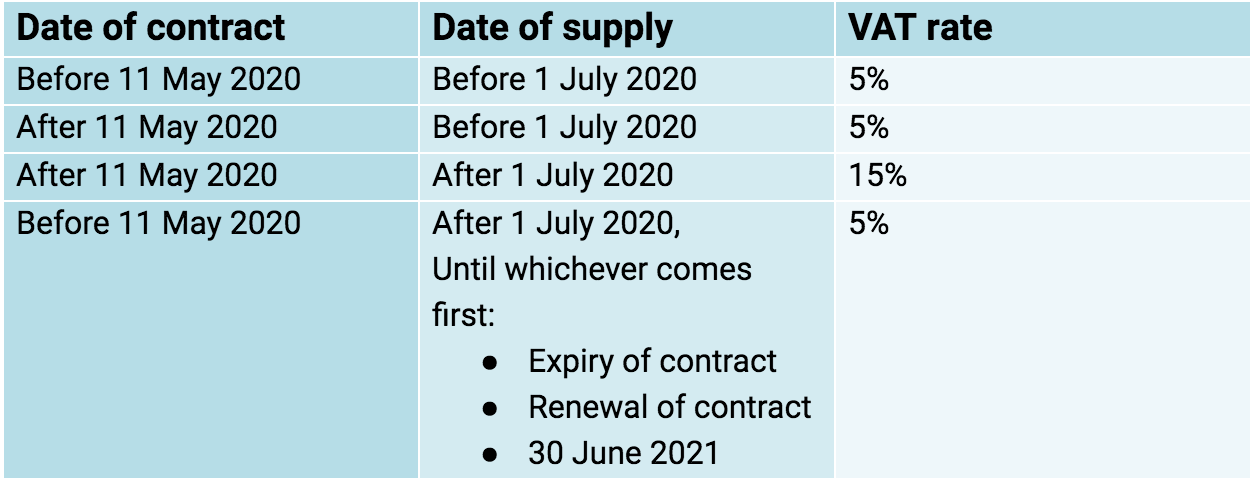
Based on the new tax guidance, all contracts with the date of supply on or after 1 July 2020 will be taxed at 15%.
Transitional provisions
To combat the sudden hike, the government has levied certain transitional provisions based on the date of contract and the date of supply.
In case of imports, VAT will be applied at 5% if the goods are imported on or before 30 June 2020, and 15% if imported on or after 1 July 2020.
To comply with the revised VAT rates, you will have to make the required changes in your Zoho Finance organization(s).
Update the VAT rates in Zoho Books, Zoho Invoice and Zoho Inventory
If you have created items, recurring invoices, bills, or expenses with 5% VAT, you can update the transactions with the new tax rate, using our simple update tool. Click the Update Now button in the organization’s Dashboard to get access to this Update tool.
Modules in the Update tool based on the product:
Zoho Books: Change the VAT rates of items, recurring invoices, recurring bills, and recurring expenses in the Zoho Books update tool.
Zoho Invoice: Change the VAT rates of your items, recurring invoices, and recurring expenses in Zoho Invoice update tool
Zoho Inventory: Change the VAT rates of your items using this Zoho Inventory update tool. However, if your Zoho Inventory organization is integrated with your Zoho Books organization, you will have to update your recurring transactions using the Zoho Books update tool.
To simplify the process, the update is segregated into 4 sections:
Goods and Services
Recurring Bills
Recurring Invoices
Recurring Expenses
Here’s how you can change the VAT rates of each module:
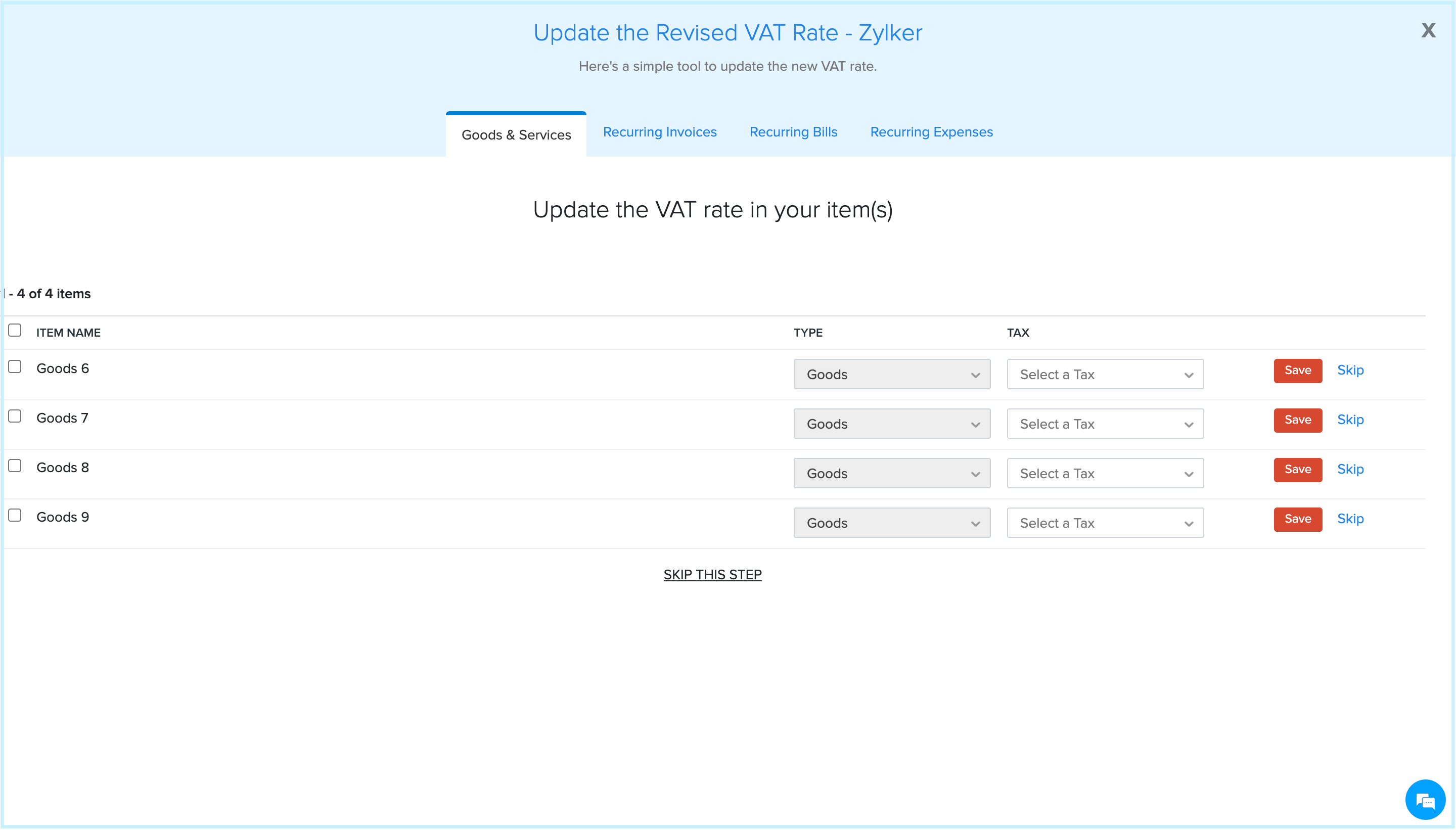
Goods and Services: In this section, all the items with 5% tax will be displayed. Change the tax rate to 15% for each item, or bulk update the tax rate by selecting the checkboxes to the left of the items and clicking Save. You can choose to Skip an item if you do not want to make any changes or click Skip this Step and not change any items. If you want to change the items’ tax rate later, you can do so manually from the Items module.
The list of the items Processed, Skipped, and Updated will be displayed in the following page.
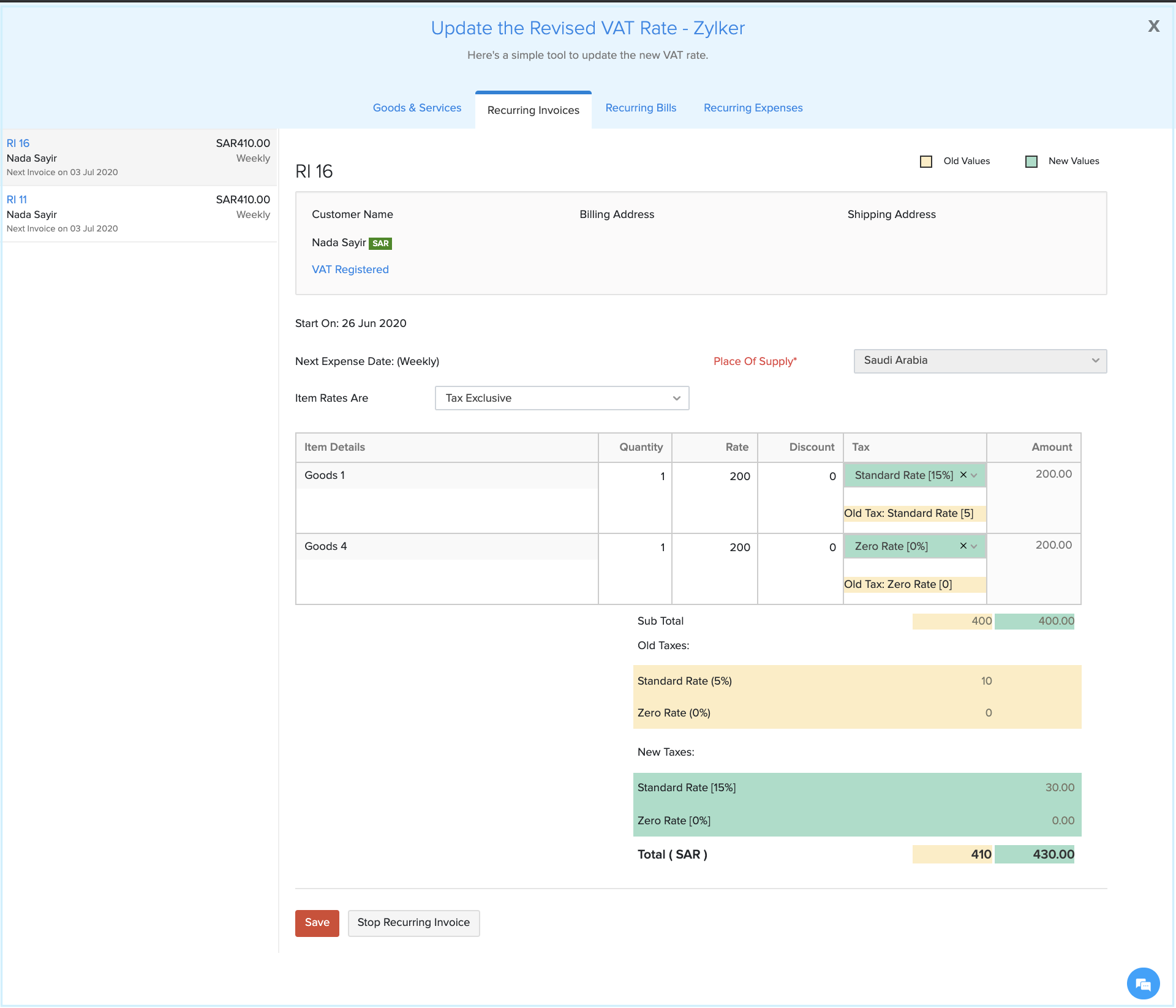
Recurring Invoices: This section lets you change the VAT rates of all the recurring invoices created with items that have 5% VAT rates. Select the recurring invoice in which you want to update the VAT rates. The tax rate will be auto-populated to 15% in the tax column of the item line, and you can change it to 5% if you want to. Once the changes are made, verify the information, and click Save. If you do not want this recurring invoice to generate child invoices anymore, click Stop Recurring Invoice. Make the changes in the same way to all of your other recurring invoices to go to the next step.
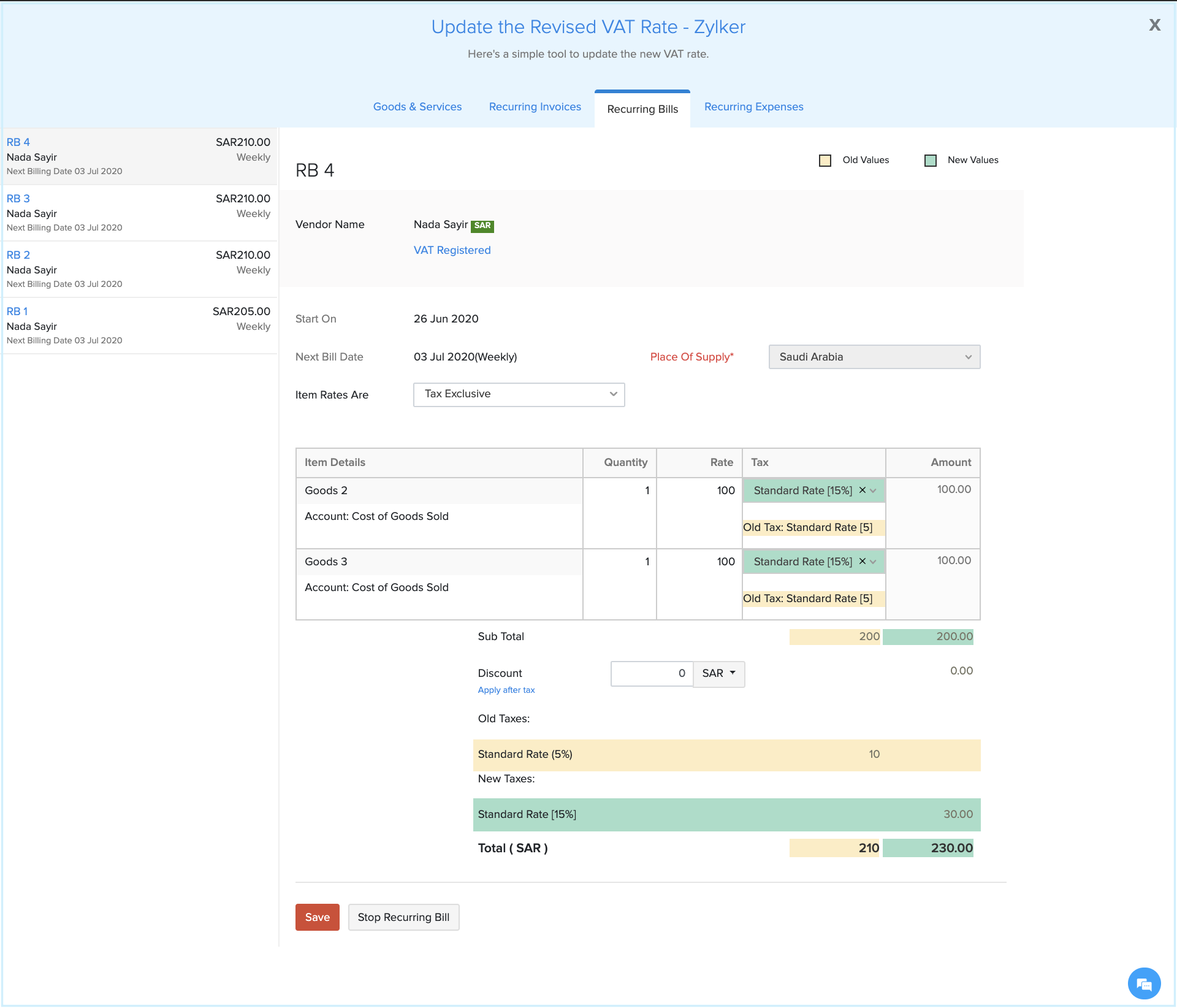
Recurring Bills: In this section, all the recurring bills with 5% tax will be listed. Similar to the previous step, select each bill to verify the VAT rates and click Save. If you no longer want a bill to recur, click Stop Recurring Bill.
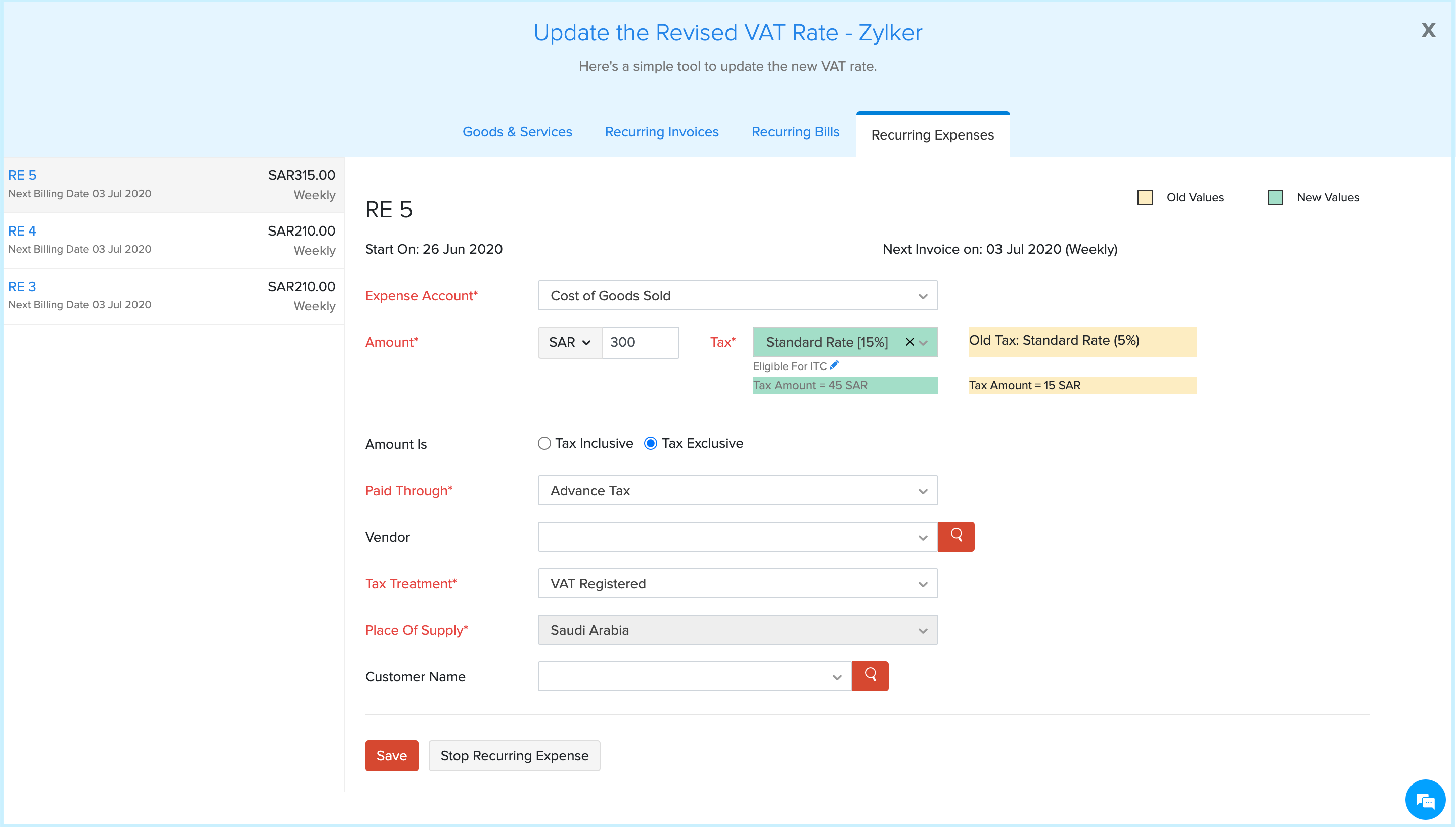
Recurring Expenses: Once you have updated the recurring bills’ VAT rates, you will be taken to your recurring expenses. Here, verify the auto-populated VAT rates and click Save. Follow the same process for the rest of the expenses. If you do not want a recurring expense to generate any further transactions, click Stop Recurring Expenses.
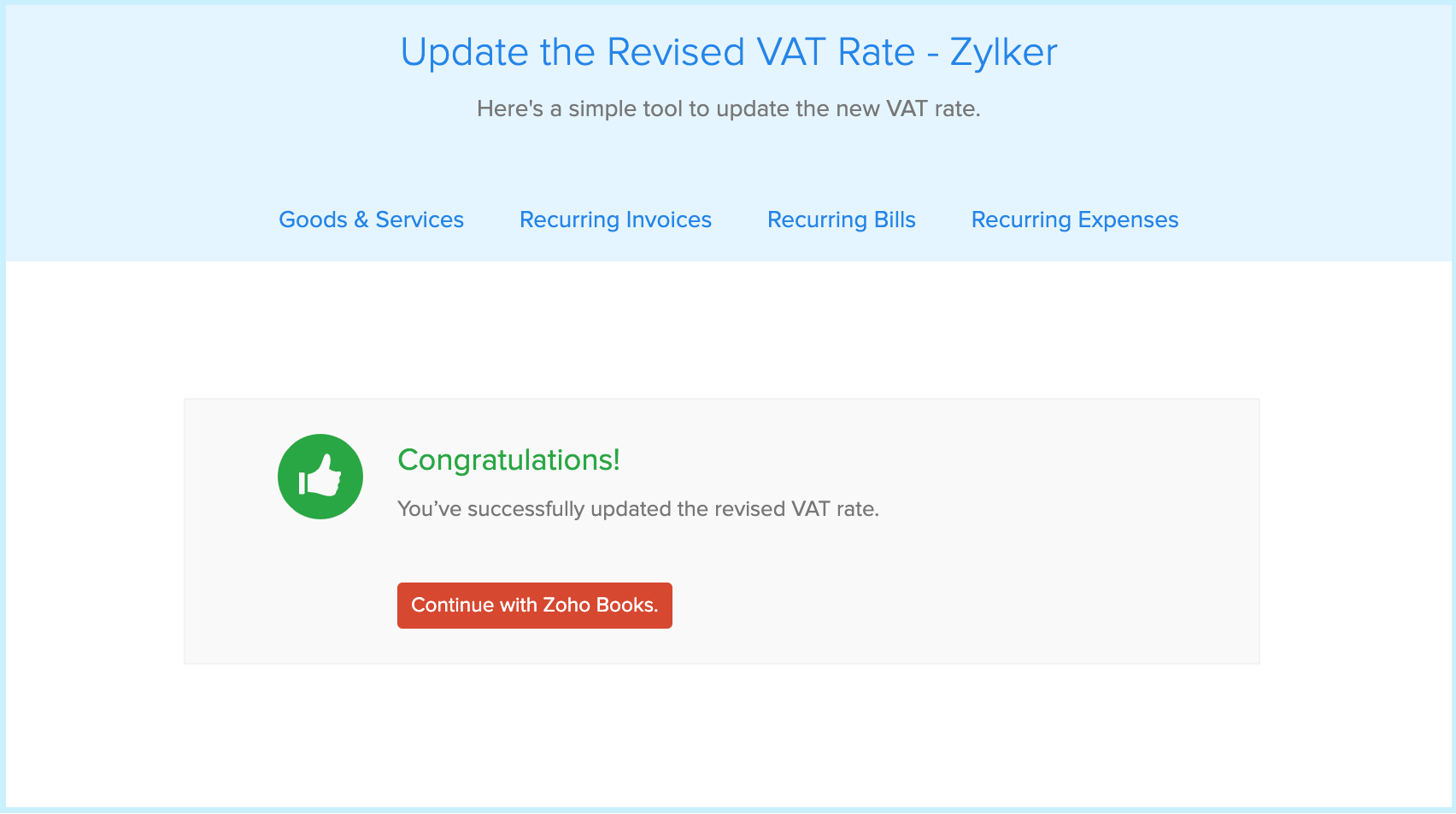
Once you have changed the VAT rates in the above sections, click Continue with Zoho Books/Zoho Invoice/Zoho Inventory.
You will be redirected to your organization with the updated VAT rates.
We have come up with this tool to simplify the process of updating the VAT rates in each item and transaction. If you have any questions, please feel free to reach out to us at [email protected]. We are happy to help!
The COVID-19 pandemic has introduced hardships in multiple areas of business, government, and everyday life. Small businesses in particular have been subjected to increased challenges as the way we do business has changed.
There are many types of small businesses: SMEs, MSMEs, local shops, and more.
We at Zoho know small businesses are a vital part of our communities across the world, so we’ve compiled some actionable tips for supporting small businesses during the COVID-19 pandemic, and beyond.
We’re also pleased to announce our new Digital Jumpstart Program to help small businesses adapt to the changing business landscape.
Let’s take a look at the ways small business in different parts of the world have been affected by this current crisis:
According to a survey done by the Madras Chamber of Commerce and Industry (MCCI), 50% of micro, small, and medium companies (MSMEs) in India are struggling to pay salaries and rent.
According to a University of California at Santa Cruz study, 41% of minority-owned small businesses in the US shuttered their company for good.
67% of African business owners said their business has been hit hard since the introduction of social distancing, lockdowns, and curfews on the continent – as per an African Management Institute (AMI) report.
Department of Education, Skills and Employment reported that nearly 30% of Australian businesses have reduced staff since the onset of the COVID-19 pandemic.
If we step up and support small businesses now, they will stand a better chance of surviving.
Small businesses offer a positive impact on their communities by creating more job opportunities and keeping money circulating in their local economies.
Small businesses can create a huge impact on a national economy as well. For example:Indian MSMEs contribute close to 30% of India’s GDP.
Small businesses preserve the unique character of our local communities and create a multiplier effect. Locally made products can attract customers and tourists to a community, adding to that area’s incoming revenue. For example: Some Indian MSMEs preserve India’s textile legacy, including world-famous silk sarees and fabric prints.
MSME Day is celebrated across the world on the 27th of June every year. Zoho applauds and thanks MSMEs for their contribution to the world.
Wondering how you can support small businesses now during the COVID-19 pandemic and economic downturn? Here’s some tips on ways to help beyond simply spending money:
Go local
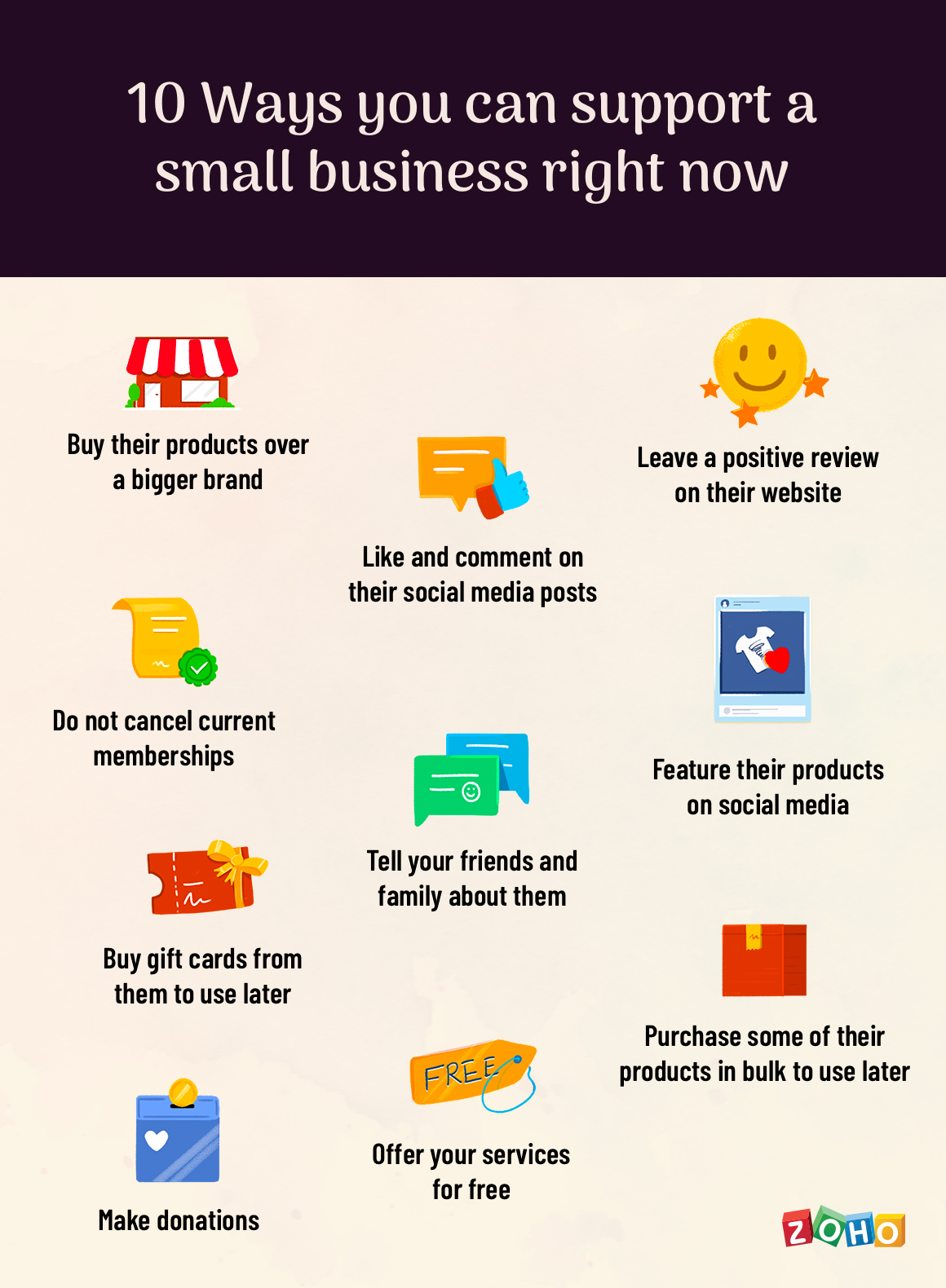
Buy locally made and sold products over those from a bigger brand. Need a household device or a new piece of clothing? Skip ordering from international brands and look at local shops first.
Show them some love
Find small businesses in your area or even online. Like and comment on their social media posts, or even re-share on your own account. Leave a positive review on their website or other business review sites. Tell your friends and family about them and encourage them to shop small as well.
Go the extra mile
If possible, don’t cancel current memberships during your area’s lockdown or limited-capacity periods. Buy gift cards from them to use later when business in your area is more stable. Purchase some of their products in bulk now to use over time to give the business revenue now when things are tough.
Uplift them
Offer your services for free. If you have free time at the moment and can offer needed services like web development, device repair, or even social media advice, consider volunteering your services to support local businesses. Some local organizations may even be able to accept monetary donations.
Small businesses are going digital
One of the positive responses the business world has seen during the COVID-19 pandemic is a growing digital transformation as many businesses of every size learn that digitization is essential to keep their business going. Small businesses owners are putting in extra effort to improve their digital literacy.
According to a report by Connected Commerce Council (3C), 76% of small businesses in the US are relying more on digital tools than before.
Small businesses especially must adapt to digitization faster to navigate this new normal of remote work and limited-capacity social distancing.
Zoho is proud to offer multiple apps that can help small businesses not only survive these hard times but thrive in our changing world.
Small businesses can use our apps to:
Work remotely and get things done from anywhere. This way, they will be able to adapt to new working conditions easily
Build their online store and start selling their products faster
File taxes, do accounting, generate invoices, manage inventory, collect payments, and more to improve their cash flow position
Increase their marketing efforts, expand their reach and, build customer pipelines
Manage their employees, measure their productivity, and find new talent
Build better customer relationships
Serve their customers better
Manage all aspects of their business
Zoho is passionate about empowering small businesses to succeed. This has been one of our driving motivations for the past 23 years.
Zoho’s contribution: MSME Digital Jumpstart Program
If you are a MSME business owner and looking at digital tech adoption, we at Zoho are happy to help you with our new Digital Jumpstart Program.
Through this program, Zoho will help launch the digital transformation journey for ten winning companies and provide any necessary support to help them succeed.
To submit your business into our drawing for a free Digital Jumpstart, please fill out this form before July 5, and choose your primary business goal.
Some of the goals available to choose are remote working, build an online store, manage finances, manage employees, improve online presence, support customers better, and handle all business aspects.
We will draw ten winners from all submissions. Submissions are limited to one per business. Please complete your business submission before July 5, 2020.
After the ten winners are drawn, Zoho will then set up digital solutions for their businesses based on the primary business goal they registered in the form.
A note to all small business owners:
Thank you for being the beating heart of our economy. We’re here to help you.
Get in touch with us if you need to talk to an expert about digital technology. You can start with a comment right now.
When you shop small businesses, you support someone’s big dream.
Stay strong. Stay compassionate. Stay safe.
Rithika Mahbubani
Rithika is a brand and marketing strategist who helps businesses grow their professional brands.
At Zoho, Rithika helps execute some product marketing, management and business development initiatives for the product Zoho One. She is also a part of the team that drives the Zoho Empower SMB initiative.
Rithika holds an honours degree in Management & IT from the University of Madras. She has also been trained by the London Business School on Entrepreneurship and Brand Management.
Rithika enjoys travelling, gardening and, is a budding pianist.
This is a guest blog post by Mary Hart, ConnectLeader.
No matter if you’re working out of your office surrounded by your sales team, or working from home and only see your sales reps in video meetings, your sales metrics don’t change. As a sales manager or a sales rep, you’re still tasked with delivering revenue, meeting and exceeding your sales quota, and connecting with potential customers in order to set up meetings.
So, how can you improve sales engagement and productivity? Read on to learn the top ways to have contextual conversations, send out emails that convert, and ultimately make more sales.
#1 Know your audience
You might wish that every person is a potential customer for your product, but that’s rarely the case. Work with your Ideal Customer Profile (ICP) and buyer personas to improve the chances of your marketing and sales efforts’ success, as you can tailor your efforts towards prospects who are more likely to convert.
#2 Look at your customers
Don’t have an ICP or buyer persona? Your customers have purchased from you, so figure out what they have in common (and this can be more than one thing). Do they all have the same title? Are they all in the same vertical? Are they located geographically close to each other? These similarities are the starting point for figuring out what kind of person is your Ideal Customer.
#3 Understand pain points
As you’re assessing your current customers and ideal customers, consider the challenges they face. What is keeping them from being their most productive? Technology? Budget? Processes?
#4 Create the right cadence
As you’re creating your sales cadence to contact prospective customers, make sure it includes seven to twelve touches total. These should be in the form of email, phone, texts, video, and social outreach.
#5 Personalization is key
Remember those pain points I mentioned above? You’re going to use them to create targeted, personalized messaging for each of the seven to twelve touches. No one wants to get a sales pitch that could be delivered to anyone passing by. Add personal aspects to it, including the pain points that person could be facing, the name of someone you know in common who referred you, or something that person posted on LinkedIn recently.
#6 Include success stories
Your happy customers are the best people to promote your products because they’ve already chosen them and are seeing the return on investment. Sending a potential customer who is in the consideration stage of the customer lifecycle, a case study or a customer quote that shows how it’s helped them increase revenue or productivity—or even better, both, can motivate them to buy.
#7 Use the right tools
This seems like a no-brainer, but it isn’t. Take a look at the crowded sales engagement market and narrow it down to exactly what your specific company needs to increase productivity and drive sales engagement.
Once you have the right sales engagement tools and have done your research to create personalized sales outreach messages (be that a cold call, cold email, text, or social message) you’ll have everything you need to boost your sales engagement and productivity.
Try Connectleader TruCadence Sales Cadence for Zoho CRM
Work smarter by adding new capabilities to Zoho CRM with business solutions from Zoho Marketplace.
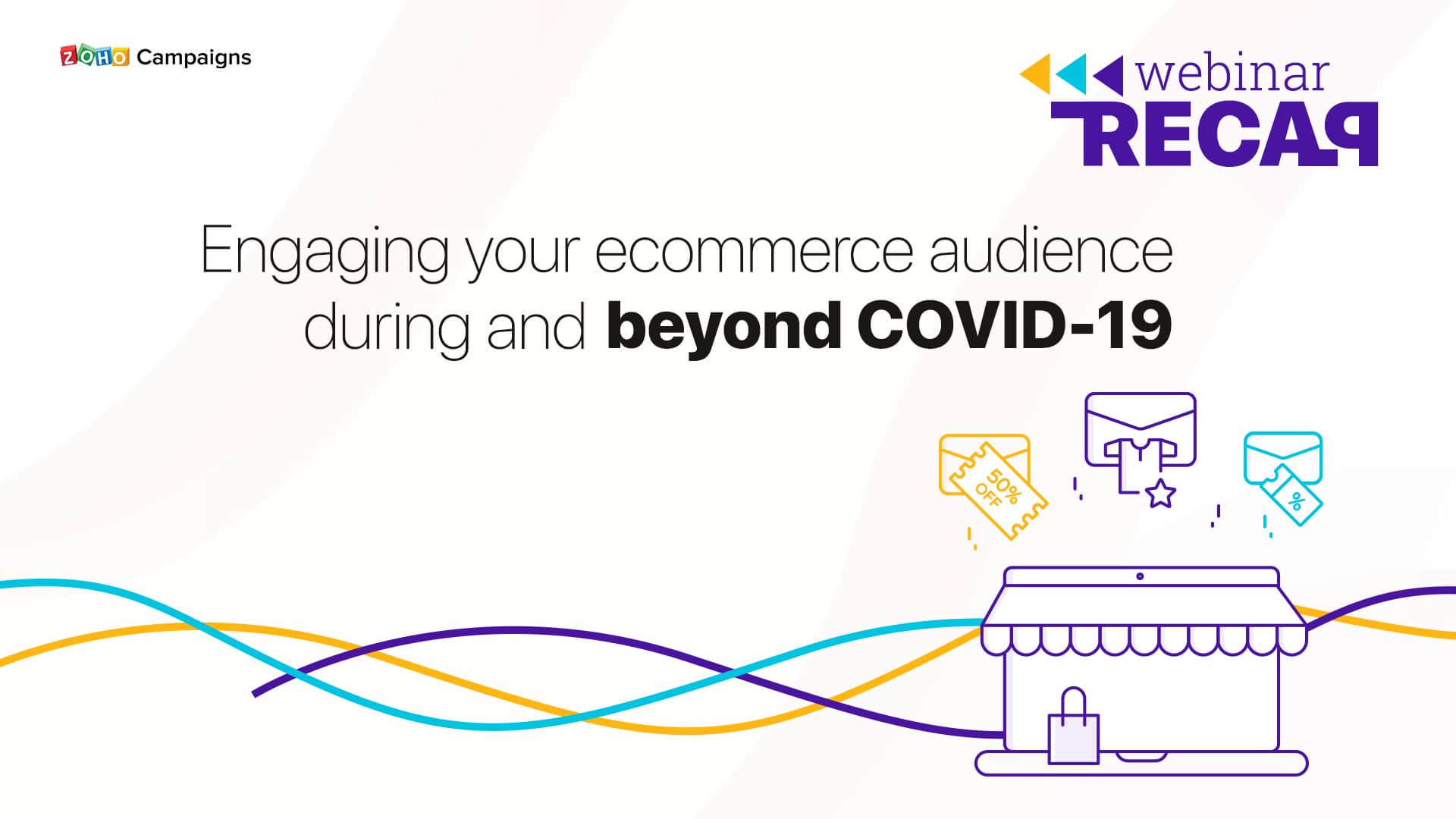
In our recent webinar, we discussed a question that’s currently on the lips of many ecommerce marketers: “How do I stay at the top of my customers’ minds while still being considerate of the global situation?” The key to this lies in the relevance of your communications.
You’re likely seeing the phrase “We’re here for you” everywhere in current marketing, but the better thing to communicate is actually how your service can make their lives better. That said, this has to be subtly connected with your customers’ shopping sensibilities and profile.
For example, if you have a fitness-based online store, you can send your customers tips and tricks for home workouts using the equipment they bought from you. This way, your content becomes both relevant and actionable.
To achieve this, you should obviously turn to your customers’ sales interactions and information collected from signup forms like region, country, gender, and more. Once you sample the available data, you can segment your users based on different criteria. This, in turn, indicates what content to create for whom. (This is why segmentation is touted as a technique for all times.)
Now comes a question: “Do you need an additional tool to meet your segmentation needs?” Not at all. Your email marketing software comes in with a built-in feature to achieve this purpose. We dissected the nuances of email segmentation in our webinar by joining hands with Zoho Commerce, our in-house ecommerce software.
In case you didn’t get a chance to attend, you’re just a click away from watching it now.
Here’s a rundown of the discussions we had during the webinar:
Q1. How do I add the link to my landing pages in an email?
You can do this by:
1. Superimposing your links on a certain portion of your text
2. Embedding your links as call-to-action (CTA) buttons on an email template
Note: The pre-designed newsletter templates have strategically-placed CTAs to help you save time. The template editor allows you to create CTAs on your own as well.
Quick tip: Make sure your CTAs are clearly visible and definitive.
Q2. How do I segment my users based on their sales interactions?
Ideally, your e-store has to be integrated with your email marketing software. With Zoho Campaigns, your store’s sales data gets automatically imported to the mailing list you define.
Furthermore, you have seven ecommerce-based segmentation options at your disposal:
Total number of orders made by a user
Items purchased
Items not purchased
Total amount spent
Average amount spent
Average amount spent per order
Date of last order
Note: You can create advanced segments by combining these options with the regular profile-information-based ones.
Q3. Can you explain the other (ecommerce) integration capabilities of Zoho Campaigns?
Zoho Campaigns integrates with as many as four ecommerce platforms: Shopify, WooCommerce, BigCommerce, and Zoho Commerce. The tighter integration between Campaigns and your store means you can track your store’s overall and email-based revenue within Campaigns.
Your store’s cart gets virtually connected with Campaigns, enabling you to leverage email automation for abandoned cart and purchase follow-ups. What’s more, there are ecommerce-based, ready-made email templates (at no cost) to help you send quick promotions. You can also swiftly pull your store-generated coupons and product images into your newsletter templates.
Read more about Campaigns’ ecommerce email marketing solution here.
Q4. How does Zoho Campaigns’ automation helps recover abandoned carts?
This aspect of your business is taken care of by the drag-and-drop workflows of Campaigns. These workflows function on “if this happens, do this” basis. [You predefine an email to launch at or some time after the occurrence of an event (trigger).]
The drag-and-drop interface is designed in a way to help you easily visualize your follow-up strategies. You configure a series of emails by having “cart abandonment” as the trigger and completely automate them. The best part is you can create follow-ups based on different responses to an email: opens, unopens, link clicks, multiple link clicks, and more. In order to make your reminders/follow-ups clickworthy, the image and details of the concerned product are automatically added.
We hope this helps you in framing your engagement strategy. We also have a webinar on “email designs” scheduled for Thursday, June 25. Save your spot by clicking here.
Note: This story is part of #ZohoInfluence, a program focused on sharing experiences and advice from our customers, and is written by Amanda Dolan-Riddle of Purolite. Click here to see more from Zoho Influence.
When it comes to dealing with the challenges presented by Covid-19, none are more apparent than those faced by essential services. Purolite supplies ion exchange resins to many industries including public drinking water supplies. This makes us an essential-to-life supplier and hence, we are fully operational during the pandemic.
As with many companies, Purolite is experiencing unique challenges due to the Covid-19 pandemic. While our sales offices and administrations are all working remotely, our production staff are all reporting to work. We are focused on the safety of our employees and their families.
We’ve had to introduce new systems in order to adapt to this remote work. Issues like collecting employee information, expenses, and HR became much harder when administrators weren’t available on site. We’ve adapted to these new challenges by making the processes as easy to learn and automated as possible, reducing the time needed for training and the number of people required for an individual task.
In order to keep track of employee health, we’ve begun collecting employee temperatures. We are now using Zoho Forms as a way for employees to log their temperature each day when reporting to work. The form is easily deployed on mobile phones so that employees can record their temperature and we can be sure our employees are safe and well.
We’ve also implemented new procedures to ensure a clean and safe work environment for our production staff. The need to purchase supplies related to PPE and disinfection for Covid-19 required that we add new categories to our accounting ledgers. Zoho Expense made it easy to add the new accounts and categories so that our employees can be reimbursed for these important supplies.
May and June are a busy time for our HR department. Open enrollment for our healthcare benefits plans usually involve one-on-one meetings with employees and group sessions to help employees learn about the various plan options. This year we are using Zoho Meeting for our benefits webinars. Our HR team has also set up two computer stations, monitored by Zoho Assist so that they can offer live assistance to our employees who are signing up for plans. HR has also started using Zoho Bookings to allow employees to sign-up for remote HR discussions using Zoho Meeting. This offers our employees a way to communicate with HR in a private, secure setting remotely.
While our manufacturing teams are reporting to work, our sales teams are all working remotely. I have encouraged them to use time at home to focus on cleaning up CRM data, something I always like to prioritize.
Employees also need new ways to stay connected to each other and to continue learning. To help our employees stay in touch, our marketing team has used Zoho Campaigns to distribute a daily newsletter called The Exchange. Each day they include a different topic, sometimes business related or Covid-19 related as well as an employee spotlight segment. It has been lovely to learn new details and see how my fellow employees are managing all the changes and challenges of working from home. They often share fun details about their home life and even delicious recipes. We have also begun using Zoho Showtime to launch an educational series.
The most important thing in the transition to remote work was smoothing out any roadblocks in the software so employees could just focus on their work. This required automating and centralizing processes and making it as easy as possible for employees to stay connected and up to date. The ease of customization, integration and deployment of Zoho apps has made the transition to remote operation as seamless as possible. And while, like so many others, we look forward to the reopening and recovery from this pandemic, we’re happy to feel supported by our people and processes in the mean time.
This website uses cookies to improve your experience. We'll assume you're ok with this, but you can opt-out if you wish. Cookie settingsACCEPT
Privacy & Cookies Policy
Privacy Overview
This website uses cookies to improve your experience while you navigate through the website. Out of these cookies, the cookies that are categorized as necessary are stored on your browser as they are essential for the working of basic functionalities of the website. We also use third-party cookies that help us analyze and understand how you use this website. These cookies will be stored in your browser only with your consent. You also have the option to opt-out of these cookies. But opting out of some of these cookies may have an effect on your browsing experience.
Necessary cookies are absolutely essential for the website to function properly. This category only includes cookies that ensures basic functionalities and security features of the website. These cookies do not store any personal information.
Any cookies that may not be particularly necessary for the website to function and is used specifically to collect user personal data via analytics, ads, other embedded contents are termed as non-necessary cookies. It is mandatory to procure user consent prior to running these cookies on your website.